ReText
ReText: A focused Linux editor for Markdown and four markup formats with local preview and export. Ranked #20 of 31 in Markdown Editors by our editors (6.8/10); pricing: Free plan; best for linux users editing multiple markup formats.
At a glance
- Editor score6.8 / 10
- PricingFree plan
- Best forLinux users editing multiple markup formats
- Free planYes
- Paid fromFree
- Facts checked20 Sep 2026
Where it wins
- Edits Markdown, reStructuredText, Textile, and AsciiDoc
- Previews documents and exports to PDF or HTML
- Combines file browsing, spell-checking, and table editing
Where it doesn't
- Official support is limited to Linux
- No publishing workflow is included
- Collaboration and integrations are not part of the offering
Our verdict on ReText
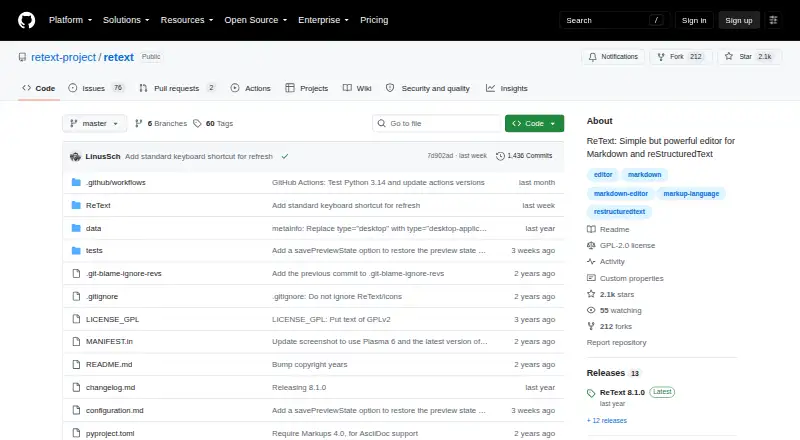
ReText is a free, open-source desktop editor for people who work with plain-text markup files on Linux. It supports Markdown, reStructuredText, Textile, and AsciiDoc, giving users one application for several markup formats rather than a Markdown-only workflow. The interface includes a directory tree for browsing local files, syntax highlighting for Markdown and reStructuredText, spell-checking through pyenchant, and a table editing mode. It is a practical fit for individual writers, documentation authors, and developers who prefer local files and desktop editing.
Its strongest distinction is breadth within markup editing. ReText combines HTML preview with an optional Qt WebEngine previewer, plus PDF and HTML export, so users can inspect and produce rendered documents without leaving the editor. Custom export extensions add flexibility for users who need to adapt the export process. The published feature set is centered on editing, previewing, and exporting rather than team workflows, making it better suited to personal documentation and local content production than collaborative publishing.
The main constraint is platform scope: Linux is officially supported, while Windows and macOS are documented as unofficial platforms. ReText is distributed under the GNU GPL and has a free, open-source model, which suits users who want a desktop tool without a paid plan. It does not include a publishing workflow, and collaboration or integrations are not part of its stated offering. Choose ReText for Linux-based, multi-format markup work with local files and export options; choose another editor if official support on Windows or macOS, connected services, or built-in collaboration is central to the workflow.
Your product? Our editors can test ReText in depth and publish a review, labelled as paid · from $149/mo →
ReText pricing
ReText fact sheet
| Free plan | Yes |
|---|---|
| Paid from | Free |
| Supported platforms | linux |
| Export formats | PDF, HTML |
| Publishing workflow | None |
| Real-time collaboration | Not verified |
| Markdown flavor | Not verified |
| Cloud sync | Not verified |
| Local file support | Yes |
| Deployment | Desktop |
| Platforms | Linux |
| Support | Docs |
| Pricing | Free plan |
| Website | github.com |
| Facts checked | 20 Sep 2026 |
Alternatives to ReText
- StackEditA broad free editor for Markdown writing, collaboration, cloud sync, and CMS publishing.9.2
- HackMDA capable collaborative Markdown workspace with strong GitHub and publishing workflows.9.1
- HedgeDocA self-hosted Markdown workspace for teams that need live collaboration and control.8.9



Used ReText? Be the first to review it
The editor score above is our own research. What this page doesn't have yet is a reader's view — what you used ReText for, what worked and what didn't. No stars are seeded and no review is paid for; an editor reads every one before it appears.
Write a reviewTwo minutes · verified accounts only · read by an editor before it appears
Featured on iTechGuides

ReText is listed in our Markdown Editors directory. Add the badge to your site — it links back to this page.
<a href="https://www.itechguides.com/products/retext/"><img src="https://www.itechguides.com/best/badge/retext.svg" alt="Featured on iTechGuides" width="230" height="46"></a>
Reviewed by iTechGuides Editors · Editorial team · Updated Oct 2026
Advertiser disclosure: iTechGuides is reader-supported. Vendors can pay for top positions in our rankings and for a place on other products' pages, and we may earn a commission when you click some links. Bought places stand at the number bought; this page and our disclosure say so. Paying vendors may get a fuller, more detailed review from our editors, and that review can change their score. How we rank.
Last updated · How we research and update