
Remark Office OMR
Remark Office OMR: A specialized Windows tool for turning paper course evaluations into analyzed, exportable data. Ranked #20 of 21 in Course Evaluation Software by our editors (7.1/10); pricing: Paid; best for organizations processing paper evaluation forms.
At a glance
- Editor score7.1 / 10
- PricingPaid
- Best forOrganizations processing paper evaluation forms
- Free planNo
- Paid from$1,295/device one-time
- Founded1991 · Malvern, Pennsylvania, USA
- Facts checked20 Sep 2026
Where it wins
- Recognizes optical marks, barcodes, OCR text, and handwritten responses
- Creates statistical reports with filtering and comparison of data subsets
- Exports evaluation data to more than 35 formats
Where it doesn't
- Windows-only deployment limits platform flexibility
- The license costs $1,295 as a one-time purchase
- Training is optional and selected separately from the license
Our verdict on Remark Office OMR
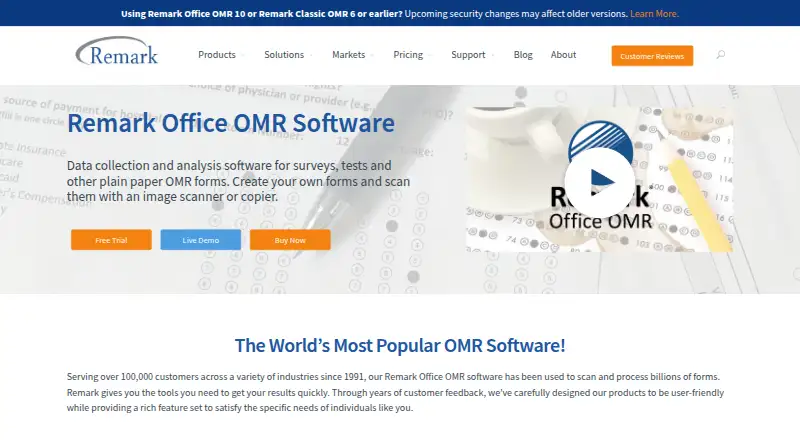
Remark Office OMR is Windows desktop software for organizations that collect course evaluations, surveys, tests, assessments, ballots, safety forms, and other paper-based responses. Schools, universities, businesses, and other organizations can create custom forms with word processors or design tools, scan them through TWAIN-compatible scanners or image files, and convert responses into analyzable data. Its course-evaluation workflow supports instructor, course, speaker, and session filtering, along with detailed reports and comparison of data subsets.
Pricing is straightforward but requires a substantial upfront purchase: the Remark Office OMR plan costs $1,295 one time. The Windows PC license includes one year of software maintenance and technical support during that maintenance period. Optional online training and additional license options are selected separately. For organizations processing paper evaluations over an extended period, the one-time model may suit a defined desktop workflow; teams seeking a free plan or a recurring low-cost entry point should look elsewhere.
The product’s main strength is breadth within paper data capture. It combines optical mark, barcode, and OCR text recognition with handwritten response capture and optional ICR. Automatic form, page, and respondent identification, data validation and transformation, fillable PDF creation, survey analysis, and statistical reports extend the workflow beyond scanning alone. Data can be exported to more than 35 formats, with integrations listed for Microsoft Computer Vision, Dropbox, and Google Drive. Choose Remark Office OMR when paper forms, advanced reporting, and flexible exports are central requirements. It is less suitable for organizations that need a browser-based or non-Windows evaluation system.
Your product? Our editors can test Remark Office OMR in depth and publish a review, labelled as paid · from $149/mo →
Remark Office OMR pricing
All 1 Remark Office OMR plans and prices →
Remark Office OMR fact sheet
| Free plan | No |
|---|---|
| Paid from | $1,295/device one-time |
| Anonymous feedback | Not verified |
| Instructor evaluations | Yes |
| LMS integrations | Not verified |
| Benchmarking | Yes |
| Response limit | Not verified |
| Reporting depth | Advanced |
| Data export | Yes |
| Deployment | Desktop |
| Platforms | Windows |
| Support | Email, Phone |
| Built for | Small business, Mid-market, Enterprise (editorial estimate) |
| Integrations | 3 integrations: Microsoft Computer Vision, Dropbox, Google Drive |
| Pricing | Paid (source) |
| Website | remarksoftware.com |
| Facts checked | 20 Sep 2026 |
Remark Office OMR integrations
Remark Office OMR lists 3 integrations on its own site.
- Microsoft Computer Vision
- Dropbox
- Google Drive
Alternatives to Remark Office OMR
- evasysA mature evaluation suite for institutions managing online, paper, and hybrid feedback.9.4
- SmartEvalsA higher-education evaluation platform with automation, integrations, and benchmarking.9.3
- Watermark Course Evaluations & SurveysA reporting-focused evaluation platform for institutions that need comparative and longitudinal insight.9.2



See all Remark Office OMR alternatives →
Also Ranked In
Remark Office OMR is ranked in 2 of our directories.
Used Remark Office OMR? Be the first to review it
The editor score above is our own research. What this page doesn't have yet is a reader's view — what you used Remark Office OMR for, what worked and what didn't. No stars are seeded and no review is paid for; an editor reads every one before it appears.
Write a reviewTwo minutes · verified accounts only · read by an editor before it appears
Featured on iTechGuides

Remark Office OMR is listed in our Course Evaluation Software directory. Add the badge to your site — it links back to this page.
<a href="https://www.itechguides.com/products/remark-office-omr/"><img src="https://www.itechguides.com/best/badge/remark-office-omr.svg" alt="Featured on iTechGuides" width="230" height="46"></a>
Reviewed by iTechGuides Editors · Editorial team · Updated Oct 2026
Advertiser disclosure: iTechGuides is reader-supported. Vendors can pay for top positions in our rankings and for a place on other products' pages, and we may earn a commission when you click some links. Bought places stand at the number bought; this page and our disclosure say so. Paying vendors may get a fuller, more detailed review from our editors, and that review can change their score. How we rank.
Last updated · How we research and update