REAL Video Enhancer
REAL Video Enhancer: A capable free option for local batch enhancement across Windows, macOS, and Linux. Ranked #19 of 40 in Video Upscaling Software by our editors (6.9/10); pricing: Free plan; best for free users needing batch and multi-backend processing.
At a glance
- Editor score6.9 / 10
- PricingFree plan
- Best forFree users needing batch and multi-backend processing
- Free planYes
- Paid fromFree
- Facts checked20 Sep 2026
Where it wins
- Free and open source across Windows, macOS, and Linux
- Supports upscaling, interpolation, denoising, and HDR controls
- Batch processing with TensorRT, PyTorch, and NCNN backends
Where it doesn't
- Requires compatible desktop hardware for local processing
- Desktop-first workflow may not suit browser-based users
- Multiple models and backends can add configuration complexity
Our verdict on REAL Video Enhancer
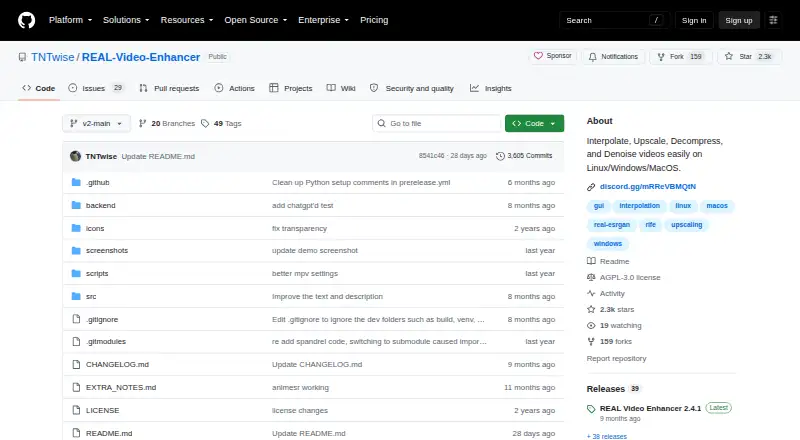
REAL Video Enhancer is an open-source desktop application for users who want to process video locally on Windows, macOS, or Linux. Its focus is broader than simple enlargement: it combines neural video upscaling with frame interpolation, scene-change detection, denoising, video decompression, preview rendering, and HDR and encoding controls. The software supports models including RIFE, GMFSS, IFRNet, SPAN, OpenProteus, and AnimeSR, making it relevant to users handling different video enhancement tasks rather than a single fixed workflow.
Pricing is straightforward. The published Free plan provides the desktop video enhancement application, and the product is open source. There are no paid tiers described in the available plan information. The free offering includes the core capabilities: multiple neural enhancement models, frame interpolation, batch input processing, scene detection, previewing of the latest rendered frame, and several inference backends. A Google Colab notebook is also linked for a cloud-based workflow, while the main application remains local desktop software.
The strongest fit is for free users who need batch processing and flexibility across TensorRT, PyTorch, and NCNN backends. The combination of upscaling, interpolation, denoising, decompression, and HDR controls gives it useful breadth for local video work. It is less suitable for someone who wants a browser-first product or a narrowly guided workflow, since processing is centered on desktop builds and compatible hardware. Choose REAL Video Enhancer for open-source local enhancement across three desktop platforms; consider an alternative if cloud-first access or a simpler setup matters more than model and backend choice.
Questions about REAL Video Enhancer
Does REAL Video Enhancer have a free plan? Yes, there is a free plan.
What does REAL Video Enhancer run on? Windows, macOS and Linux. It runs as a desktop app.
Who is REAL Video Enhancer built for? Solo users and small businesses (our editorial estimate).
Your product? Our editors can test REAL Video Enhancer in depth and publish a review, labelled as paid · from $149/mo →
REAL Video Enhancer pricing
All 1 REAL Video Enhancer plans and prices →
REAL Video Enhancer fact sheet
| Free plan | Yes |
|---|---|
| Paid from | Free |
| Max output resolution | Not verified |
| Max upscale factor | Not verified |
| AI enhancement | Yes |
| Frame interpolation | Yes |
| Batch processing | Yes |
| Processing mode | Both |
| Supported platforms | Windows, Linux, macOS |
| Deployment | Desktop |
| Platforms | Windows, macOS, Linux |
| Support | Community, Docs |
| Built for | Solo, Small business (editorial estimate) |
| Pricing | Free plan (source) |
| Website | github.com |
| Facts checked | 20 Sep 2026 |
Alternatives to REAL Video Enhancer
- Topaz VideoA broad AI toolkit for editors working with low-quality, legacy, or demanding video.8.9
- HitPaw VikPeaA broad AI video toolkit with 8K output and a free preview, but a high monthly entry price.8.8
- AVCLabs Video Enhancer AIA capable local video restoration suite for Windows and macOS, without a free plan.8.6


See all REAL Video Enhancer alternatives →
Also Ranked In
REAL Video Enhancer is ranked in 3 of our directories.
Used REAL Video Enhancer? Be the first to review it
The editor score above is our own research. What this page doesn't have yet is a reader's view — what you used REAL Video Enhancer for, what worked and what didn't. No stars are seeded and no review is paid for; an editor reads every one before it appears.
Write a reviewTwo minutes · verified accounts only · read by an editor before it appears
Featured on iTechGuides

REAL Video Enhancer is listed in our Video Upscaling Software directory. Add the badge to your site — it links back to this page.
<a href="https://www.itechguides.com/products/real-video-enhancer/"><img src="https://www.itechguides.com/best/badge/real-video-enhancer.svg" alt="Featured on iTechGuides" width="230" height="46"></a>
Reviewed by iTechGuides Editors · Editorial team · Updated Nov 2026
Advertiser disclosure: iTechGuides is reader-supported. Vendors can pay for top positions in our rankings and for a place on other products' pages, and we may earn a commission when you click some links. Bought places stand at the number bought; this page and our disclosure say so. Paying vendors may get a fuller, more detailed review from our editors, and that review can change their score. How we rank.
Last updated · How we research and update