Quiver
Quiver: Quiver brings curriculum-linked AR activities to young learners on mobile devices. Ranked #22 of 25 in Augmented Reality Learning Apps by our editors (5.5/10); pricing: Free plan · 7-day trial; best for young learners using curriculum-linked AR activities.
At a glance
- Editor score5.5 / 10
- PricingFree plan · 7-day trial
- Best forYoung learners using curriculum-linked AR activities
- Free planYes
- AR modeMarker-based
- Facts checked21 Sep 2026
Where it wins
- Free tier includes 10 AR coloring sheets with no subscription required
- Curriculum-aligned activity plans cover science, mathematics, language, and social studies
- Seat plans add teacher logins, Google and Microsoft sign-in, and classroom management
Where it doesn't
- Free access is limited to 10 AR coloring sheets
- Marker-based AR requires users to print, color, and scan pages
- Its learning scope is narrower than full authoring platforms
Our verdict on Quiver
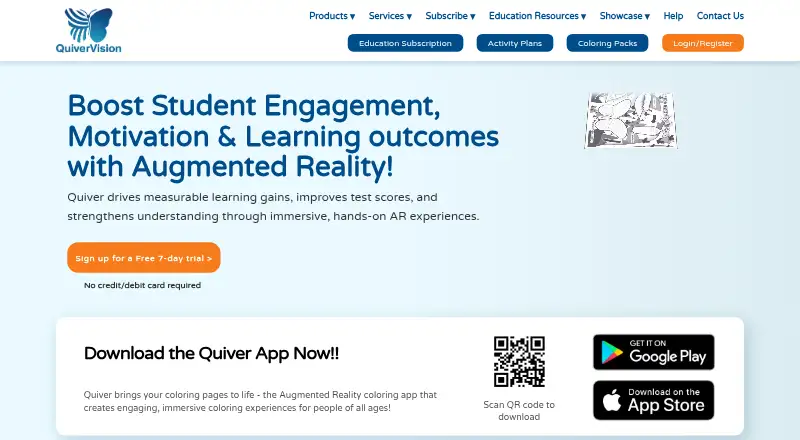
Quiver is a marker-based augmented-reality learning app for children, families, educators, libraries, and schools. Learners print coloring pages, color them, and scan them on an iOS or Android device to see animated 3D content and interactive educational experiences. The approach suits young learners who benefit from a physical activity connected to digital content, particularly in curriculum-linked classroom or home settings.
Quiver uses a freemium model. The Free Tier includes 10 AR coloring sheets and requires no subscription. Education plans use seat licensing and include 350+ AR sheets, 120+ activity plans, one teacher login on the 10- and 30-seat plans, and Google and Microsoft sign-in. The 75-seat plan includes three teacher logins, while the 150-seat plan includes six teacher logins and Classroom Management. Education subscriptions are managed through the Education Dashboard, and the published offer includes a seven-day free trial.
The product’s focus is guided AR content rather than broad creation tools. Its educational coloring packs and curriculum-aligned activity plans support subjects including science, mathematics, language, and social studies, while eligible education plans add classroom management. That makes Quiver a fit for schools, educators, libraries, and families seeking ready-made coloring-led AR activities. It is less suitable for teams looking for expansive authoring capabilities or a wider learning platform. The print, color, and scan workflow is central to the experience, so buyers should choose Quiver when that physical-digital format matches their teaching approach.
Your product? Our editors can test Quiver in depth and publish a review, labelled as paid · from $149/mo →
Quiver pricing
All 7 Quiver plans and prices →
Quiver fact sheet
| Free plan | Yes |
|---|---|
| Paid from | Not verified |
| AR mode | Marker-based |
| Supported platforms | ios, android |
| Lesson authoring | Yes |
| Classroom management | Yes |
| Student limit | 10 students |
| Wearable support | Not verified |
| Free trial | 7 days · no card needed |
| Deployment | Cloud, Mobile |
| Platforms | iOS, Android |
| Support | Email, Docs |
| Built for | Solo, Small business, Mid-market, Enterprise (editorial estimate) |
| Integrations | 2 integrations: Google, Microsoft |
| Pricing | Free plan · 7-day trial (source) |
| Website | quivervision.com |
| Facts checked | 21 Sep 2026 |
Quiver integrations
Quiver lists 2 integrations on its own site.
- Microsoft
Alternatives to Quiver
- Reveal MathA full K–12 math curriculum with strong assessment and teacher workflow tools.7.9
- ClassVRA managed headset learning platform with strong classroom controls and a $219 monthly starting price.7.9
- JigSpaceA flexible AR presentation tool for teams turning 3D models into guided learning content.7.9


Used Quiver? Be the first to review it
The editor score above is our own research. What this page doesn't have yet is a reader's view — what you used Quiver for, what worked and what didn't. No stars are seeded and no review is paid for; an editor reads every one before it appears.
Write a reviewTwo minutes · verified accounts only · read by an editor before it appears
Featured on iTechGuides

Quiver is listed in our Augmented Reality Learning Apps directory. Add the badge to your site — it links back to this page.
<a href="https://www.itechguides.com/products/quiver/"><img src="https://www.itechguides.com/best/badge/quiver.svg" alt="Featured on iTechGuides" width="230" height="46"></a>
Reviewed by iTechGuides Editors · Editorial team · Updated Oct 2026
Advertiser disclosure: iTechGuides is reader-supported. Vendors can pay for top positions in our rankings and for a place on other products' pages, and we may earn a commission when you click some links. Bought places stand at the number bought; this page and our disclosure say so. Paying vendors may get a fuller, more detailed review from our editors, and that review can change their score. How we rank.
Last updated · How we research and update