QuickMail
QuickMail: A capable free, open-source Windows client with unified inboxes and offline email. Ranked #62 of 142 in Email Clients by our editors (3.6/10); pricing: Free plan; best for free Windows users wanting a capable open client.
At a glance
- Editor score3.6 / 10
- PricingFree plan
- Best forFree Windows users wanting a capable open client
- Free planYes
- Paid fromFree
- App coverageDesktop
- Facts checked20 Sep 2026
Where it wins
- Unified inbox for multiple IMAP/SMTP accounts
- Offline reading, queued sending, rules, and saved views
- Keyboard navigation and screen-reader support
Where it doesn't
- Windows-only platform support
- Desktop-focused rather than mobile or cross-platform
- Calendar and email features depend on supported providers and protocols
Our verdict on QuickMail
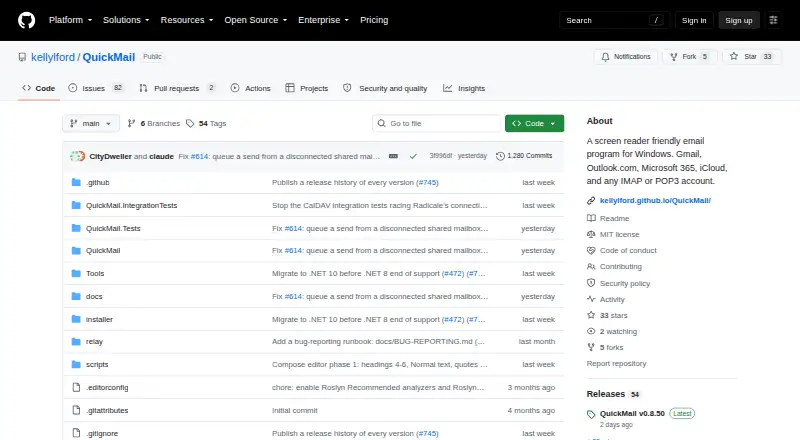
QuickMail is a free, open-source desktop email client for Windows users managing Gmail, Microsoft 365, Outlook.com, iCloud, or standard IMAP, SMTP, and POP3 accounts. It brings multiple accounts into a unified inbox, supports conversation threading, and combines email with address books, contact management, and an integrated calendar. Its keyboard-first design, screen-reader support, and secure reading pane make it a practical fit for users who want an accessible Windows mail application rather than a web-only workflow.
Its strongest area is day-to-day email control. Cached messages support offline reading, while queued sending helps keep work moving when connectivity is interrupted. Mail rules, filtering, search folders, saved views, and conversation threading provide useful organization for busy inboxes. HTML email rendering is paired with a secure reading pane, and credentials are stored through Windows Credential Manager. Connections cover common consumer and business services, including Gmail, Microsoft 365, Outlook.com, iCloud, Microsoft Graph, and standard mail protocols.
QuickMail is most suitable for Windows users who value an open-source client, local access, keyboard navigation, and a unified view across accounts. Its scope is narrower for people who need email across several operating systems or on mobile devices, since the application is Windows desktop software. The integrated calendar and online calendar synchronization add useful coverage, but the product remains centered on email management rather than a broader collaboration suite. Choose QuickMail for a focused, accessible Windows client with offline capabilities; consider another option if cross-platform access is a core requirement.
Your product? Our editors can test QuickMail in depth and publish a review, labelled as paid · from $149/mo →
QuickMail pricing
QuickMail fact sheet
| Free plan | Yes |
|---|---|
| Paid from | Free |
| App coverage | Desktop |
| Account limit | Not verified |
| Unified inbox | Yes |
| Offline access | Yes |
| Scheduled sending | Not verified |
| Calendar tools | Yes |
| Deployment | Desktop |
| Platforms | Windows |
| Support | Docs |
| Built for | Solo, Small business (editorial estimate) |
| Integrations | 8 integrations: Gmail, Microsoft 365, Outlook.com, iCloud, IMAP, SMTP … |
| Pricing | Free plan |
| Website | github.com |
| Facts checked | 20 Sep 2026 |
QuickMail integrations
QuickMail lists 8 integrations on its own site.
- Gmail
- Microsoft 365
- Outlook.com
- iCloud
- IMAP
- SMTP
- POP3
- Microsoft Graph
Alternatives to QuickMail
- Mozilla ThunderbirdA capable free client for multi-account email, offline access, and desktop productivity tools.9.4
- Zoho MailA flexible hosted email service with free access, migration tools, and Zoho collaboration options.9.2
- Apple MailA capable Apple-focused email client with unified inboxes, scheduling, privacy controls, and AI assistance.9.1



See all QuickMail alternatives →
Used QuickMail? Be the first to review it
The editor score above is our own research. What this page doesn't have yet is a reader's view — what you used QuickMail for, what worked and what didn't. No stars are seeded and no review is paid for; an editor reads every one before it appears.
Write a reviewTwo minutes · verified accounts only · read by an editor before it appears
Featured on iTechGuides

QuickMail is listed in our Email Clients directory. Add the badge to your site — it links back to this page.
<a href="https://www.itechguides.com/products/quickmail-email-client/"><img src="https://www.itechguides.com/best/badge/quickmail-email-client.svg" alt="Featured on iTechGuides" width="230" height="46"></a>
Reviewed by iTechGuides Editors · Editorial team · Updated Oct 2026
Advertiser disclosure: iTechGuides is reader-supported. Vendors can pay for top positions in our rankings and for a place on other products' pages, and we may earn a commission when you click some links. Bought places stand at the number bought; this page and our disclosure say so. Paying vendors may get a fuller, more detailed review from our editors, and that review can change their score. How we rank.
Last updated · How we research and update