
pyVideoTrans
pyVideoTrans: A free, technical toolkit for end-to-end video localization with local and online models. Ranked #7 of 23 in Video Localization Software by our editors (8.7/10); pricing: Free plan; best for technical users wanting free local localization.
At a glance
- Editor score8.7 / 10
- PricingFree plan
- Best forTechnical users wanting free local localization
- Free planYes
- Paid fromFree
- Subtitle translationYes
- Facts checked20 Sep 2026
Where it wins
- Covers transcription, translation, dubbing, synchronization, and composition
- Supports voice cloning, multi-speaker roles, proofreading, and re-dubbing
- Offers desktop, WebUI, CLI, and local API access
Where it doesn't
- Third-party translation, TTS, and recognition services may charge separately
- Language coverage varies by the selected model or online service
- The broad model and interface choices may require technical decisions
Our verdict on pyVideoTrans
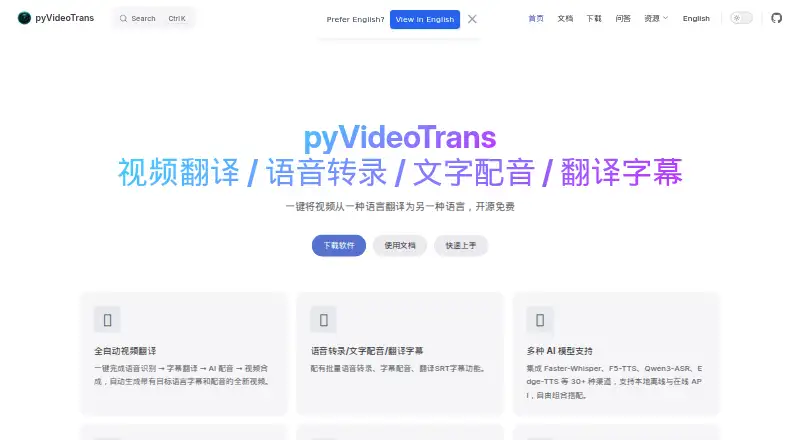
pyVideoTrans is open-source software for translating videos between languages, with a workflow that runs from speech recognition and subtitle creation through translation, dubbing, synchronization, and video composition. It is aimed at technical users who want local control over video localization, while still allowing online services for recognition, translation, and voice generation. The software also supports standalone transcription, subtitle translation, and subtitle dubbing.
Its platform and model flexibility are central to the product. Users can work through a desktop application, browser-based WebUI, command-line tools, or a local API on Windows, macOS, and Linux. The published integrations include Faster-Whisper, F5-TTS, Qwen3-ASR, Edge-TTS, Google Translate, Microsoft Translator, DeepL, OpenAI TTS, and ElevenLabs. That selection supports different approaches to speech recognition, translation, and voice generation, including local models, online services, voice cloning from reference audio, and separate voice roles for multi-speaker dubbing.
The software itself is free and open source. Its workflow includes batch timestamped SRT transcription, monolingual or bilingual subtitle translation, subtitle editing, translation proofreading, preview, re-dubbing, audio-visual alignment, dubbing speed adjustment, and subtitle embedding. The trade-off is that third-party services may introduce separate charges, while language coverage depends on the selected model or service. Choose pyVideoTrans if you want broad access methods and control over localization components; choose another option if you prefer a narrower workflow with fewer technical choices.
Your product? Our editors can test pyVideoTrans in depth and publish a review, labelled as paid · from $149/mo →
pyVideoTrans pricing
pyVideoTrans fact sheet
| Free plan | Yes |
|---|---|
| Paid from | Free |
| Subtitle translation | Yes |
| AI dubbing | Yes |
| Voice cloning | Yes |
| Lip sync | Not verified |
| Supported languages | Not verified |
| Review workflow | Yes |
| API access | Yes |
| Deployment | Cloud, Self-hosted, Desktop |
| Platforms | Web, Windows, macOS, Linux |
| Support | Docs, Community |
| Built for | Solo, Small business, Mid-market, Enterprise (editorial estimate) |
| Integrations | 9 integrations: Faster-Whisper, F5-TTS, Qwen3-ASR, Edge-TTS, Google Translate, Microsoft Translator … |
| Pricing | Free plan |
| Website | pyvideotrans.com |
| Facts checked | 20 Sep 2026 |
pyVideoTrans integrations
pyVideoTrans lists 9 integrations on its own site.
- Faster-Whisper
- F5-TTS
- Qwen3-ASR
- Edge-TTS
- Google Translate
- Microsoft Translator
- DeepL
- OpenAI TTS
- ElevenLabs
Alternatives to pyVideoTrans
- CaptionHubEnterprise localization workflows with subtitles, dubbing, voice cloning, and deployment options.9.4
- CAMB.AIA broad AI localization toolkit with unusually low-cost entry plans and API access.9.3
- Perso DubbingA broad dubbing workflow for creators who need affordable localization tools.9.2



See all pyVideoTrans alternatives →
pyVideoTrans vs the competition
- pyVideoTrans vs CaptionHub
- pyVideoTrans vs CAMB.AI
- pyVideoTrans vs Perso Dubbing
- pyVideoTrans vs Dubverse
- pyVideoTrans vs Rask AI
- pyVideoTrans vs Ollang



Compare pyVideoTrans with any tool side by side →
Also Ranked In
pyVideoTrans is ranked in 2 of our directories.
Used pyVideoTrans? Be the first to review it
The editor score above is our own research. What this page doesn't have yet is a reader's view — what you used pyVideoTrans for, what worked and what didn't. No stars are seeded and no review is paid for; an editor reads every one before it appears.
Write a reviewTwo minutes · verified accounts only · read by an editor before it appears
Featured on iTechGuides

pyVideoTrans is listed in our Video Localization Software directory. Add the badge to your site — it links back to this page.
<a href="https://www.itechguides.com/products/pyvideotrans/"><img src="https://www.itechguides.com/best/badge/pyvideotrans.svg" alt="Featured on iTechGuides" width="230" height="46"></a>
Reviewed by iTechGuides Editors · Editorial team · Updated Oct 2026
Advertiser disclosure: iTechGuides is reader-supported. Vendors can pay for top positions in our rankings and for a place on other products' pages, and we may earn a commission when you click some links. Bought places stand at the number bought; this page and our disclosure say so. Paying vendors may get a fuller, more detailed review from our editors, and that review can change their score. How we rank.
Last updated · How we research and update