
PunchFlow
PunchFlow: A capable kiosk time clock with payroll exports, but no mobile clock-in. Ranked #17 of 28 in Time Clock Software by our editors (7.4/10); pricing: Free plan; best for kiosk-based teams wanting a free starting plan.
At a glance
- Editor score7.4 / 10
- PricingFree plan
- Best forKiosk-based teams wanting a free starting plan
- Free planYes
- Paid fromA$10/mo
- Mobile clock-inNo
- Facts checked22 Sep 2026
Where it wins
- Free plan includes core clocking for up to 2 employees
- Automatic hours, breaks, corrections, audit logs, and payroll exports
- Integrates with Xero, MYOB, QuickBooks, and Zapier webhooks
Where it doesn't
- No dedicated employee mobile app or mobile clock-in
- Free plan is limited to 2 employees and 1 kiosk
- Kiosk clocking depends on PINs and shared devices
Our verdict on PunchFlow
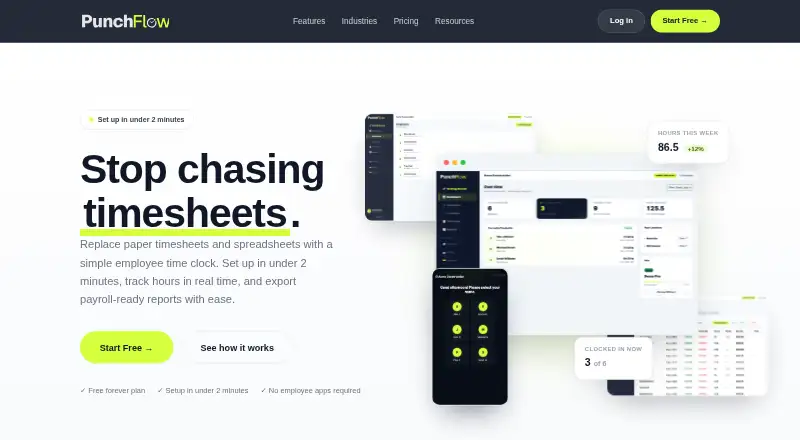
PunchFlow is a web-based employee time clock and kiosk management platform for small businesses and shift-based teams. Employees clock in and out from a shared kiosk using personal PINs, with no app installation or individual accounts required. It fits cafes, retail stores, construction companies, warehouses, offices, and other organizations managing hourly workers. The real-time dashboard shows currently clocked-in staff, while automatic calculations cover overnight and split shifts.
Pricing is structured as a freemium monthly plan in Australian dollars. Free supports up to 2 employees, 1 kiosk, core time clock functions, basic reports, and CSV export. Basic costs AUD 10 per month for up to 6 employees and 3 kiosks, adding email notifications, clock-out and break reminders, break tracking, PDF exports, and pay slips. Pro costs AUD 25 per month for up to 15 employees and 10 kiosks, adding GPS and IP restrictions, an employee portal, and a full audit log. Unlimited costs AUD 99 per month and adds unlimited employees, unlimited kiosks, everything in Pro, and priority support.
PunchFlow’s strongest fit is a kiosk-led attendance workflow with practical payroll administration. Teams can filter time logs by employee, date range, or pay period; export CSV or PDF payroll files; maintain raw punch logs and audit trails; and route employee correction requests through manager approval. Integrations include Xero, MYOB, QuickBooks, and Zapier through webhooks. Browser-based kiosks work on phones, tablets, laptops, and desktops, across web, Windows, macOS, iOS, and Android platforms. However, there is no dedicated employee mobile app or mobile clock-in, so organizations needing flexible clocking away from shared kiosks should choose another tool. PunchFlow suits small and growing teams that prioritize controlled kiosk access, while mobile-first workforces may find its clock-in model restrictive.
Your product? Our editors can test PunchFlow in depth and publish a review, labelled as paid · from $149/mo →
PunchFlow pricing
All 4 PunchFlow plans and prices →
PunchFlow fact sheet
| Free plan | Yes |
|---|---|
| Paid from | A$10/mo |
| Mobile clock-in | No |
| Geofencing | Yes |
| Break tracking | Yes |
| Attendance reports | Yes |
| Timesheet approvals | Yes |
| Clock-in methods | PIN kiosk |
| Deployment | Cloud |
| Platforms | Web, Windows, macOS, iOS, Android |
| Support | Email, Phone, Docs |
| Built for | Small business (editorial estimate) |
| Integrations | 5 integrations: Xero, MYOB, QuickBooks, Gusto, Zapier |
| Pricing | Free plan (source) |
| Website | punchflowapp.com |
| Facts checked | 22 Sep 2026 |
PunchFlow integrations
PunchFlow lists 5 integrations on its own site.
- Xero
- MYOB
- QuickBooks
- Gusto
- Zapier
Alternatives to PunchFlow
- QuickBooks TimeA QuickBooks-centered time clock for jobs, projects, approvals, and payroll workflows.9.2
- JibbleA broad time clock platform with a permanent free plan and strong workforce controls.8.9
- SynerionA mature, low-cost attendance platform with broad clocking and payroll options.8.8


See all PunchFlow alternatives →
Used PunchFlow? Be the first to review it
The editor score above is our own research. What this page doesn't have yet is a reader's view — what you used PunchFlow for, what worked and what didn't. No stars are seeded and no review is paid for; an editor reads every one before it appears.
Write a reviewTwo minutes · verified accounts only · read by an editor before it appears
Featured on iTechGuides

PunchFlow is listed in our Time Clock Software directory. Add the badge to your site — it links back to this page.
<a href="https://www.itechguides.com/products/punchflow/"><img src="https://www.itechguides.com/best/badge/punchflow.svg" alt="Featured on iTechGuides" width="230" height="46"></a>
Reviewed by iTechGuides Editors · Editorial team · Updated Oct 2026
Advertiser disclosure: iTechGuides is reader-supported. Vendors can pay for top positions in our rankings and for a place on other products' pages, and we may earn a commission when you click some links. Bought places stand at the number bought; this page and our disclosure say so. Paying vendors may get a fuller, more detailed review from our editors, and that review can change their score. How we rank.
Last updated · How we research and update