Power Tab Editor
Power Tab Editor: A free desktop tab editor with MIDI tools, Guitar Pro import, and 8-string support. Ranked #19 of 32 in Guitar Tab Software by our editors (6.4/10); pricing: Free plan; best for free legacy-style Power Tab editing.
At a glance
- Editor score6.4 / 10
- PricingFree plan
- Best forFree legacy-style Power Tab editing
- Free planYes
- Paid fromFree
- Tab playbackYes
- Facts checked20 Sep 2026
Where it wins
- Free, open-source editor for guitar tablature
- Imports Guitar Pro tabs and exports tablature to MIDI
- MIDI playback includes mixer controls and speed adjustment
Where it doesn't
- Desktop platforms only; no mobile app
- Feature set is narrower than broader guitar notation suites
- Notation-mode capability is not established here
Our verdict on Power Tab Editor
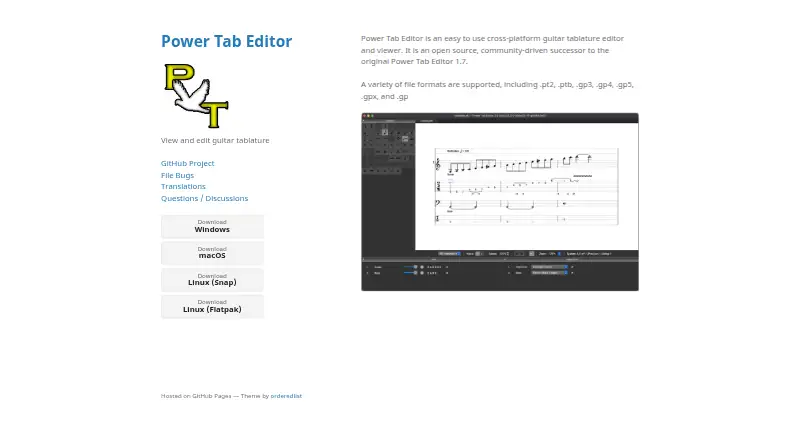
Power Tab Editor is a free, open-source desktop application for creating, viewing, and editing guitar tablature. It is aimed at guitarists, tab authors, and musicians who want a legacy-style workflow across Windows, macOS, or Linux. The editor can open Power Tab files and several Guitar Pro formats, including PT2, PTB, GP3, GP4, GP5, GPX, and GP. Multiple files can stay open in a tabbed layout, which suits users who compare or organize several tabs in one session.
The main value is the combination of editing, playback, and file compatibility without a paid plan. MIDI playback includes mixer volume controls, while playback speed can be adjusted for practice. Users can import Guitar Pro tabs and export tablature to MIDI, giving the application a practical path between tab files and MIDI workflows. Customizable keyboard shortcuts support a more personal editing setup, and 8-string guitar support extends the instrument range beyond standard guitar use. The feature set remains focused on tablature rather than a broader music-production environment.
Power Tab Editor fits musicians who want a free desktop tool for maintaining, editing, and playing back guitar tabs, especially those working with Power Tab or Guitar Pro files. Its Windows, macOS, and Linux coverage is useful for desktop users, but it does not extend to mobile platforms. Choose it when open-source access, MIDI playback, speed control, and file import matter more than a wider ecosystem or a broader notation feature set. Users seeking mobile access or a more expansive guitar notation workflow should consider an alternative.
Your product? Our editors can test Power Tab Editor in depth and publish a review, labelled as paid · from $149/mo →
Power Tab Editor pricing
Power Tab Editor fact sheet
| Free plan | Yes |
|---|---|
| Paid from | Free |
| Supported platforms | Windows, macOS, Linux |
| Notation modes | Not verified |
| Tab playback | Yes |
| MIDI support | Yes |
| Audio recording | Not verified |
| Sharing or publishing | Not verified |
| Deployment | Desktop |
| Platforms | Windows, macOS, Linux |
| Support | Community, Docs |
| Built for | Solo, Small business (editorial estimate) |
| Pricing | Free plan |
| Website | powertab.github.io |
| Facts checked | 20 Sep 2026 |
Alternatives to Power Tab Editor
- Guitar ProA mature, deep tab editor for musicians who need notation, playback, and broad exports.9.3
- TuxGuitarA broad free tab editor with strong format support, playback, and four-platform coverage.9.0
- Guitar2TabsA flexible audio-to-tab tool with editing, playback, sharing, and broad export support.8.5



See all Power Tab Editor alternatives →
Also Ranked In
Power Tab Editor is ranked in 2 of our directories.
Used Power Tab Editor? Be the first to review it
The editor score above is our own research. What this page doesn't have yet is a reader's view — what you used Power Tab Editor for, what worked and what didn't. No stars are seeded and no review is paid for; an editor reads every one before it appears.
Write a reviewTwo minutes · verified accounts only · read by an editor before it appears
Featured on iTechGuides

Power Tab Editor is listed in our Guitar Tab Software directory. Add the badge to your site — it links back to this page.
<a href="https://www.itechguides.com/products/power-tab-editor/"><img src="https://www.itechguides.com/best/badge/power-tab-editor.svg" alt="Featured on iTechGuides" width="230" height="46"></a>
Reviewed by iTechGuides Editors · Editorial team · Updated Oct 2026
Advertiser disclosure: iTechGuides is reader-supported. Vendors can pay for top positions in our rankings and for a place on other products' pages, and we may earn a commission when you click some links. Bought places stand at the number bought; this page and our disclosure say so. Paying vendors may get a fuller, more detailed review from our editors, and that review can change their score. How we rank.
Last updated · How we research and update