
Polyga FlexScan3D
Polyga FlexScan3D: A free Windows toolkit for structured-light scanning, mesh processing, and inspection. Ranked #17 of 29 in 3D Scanning Software by our editors (7.4/10); pricing: Free plan; best for free Polyga structured-light scanning.
At a glance
- Editor score7.4 / 10
- PricingFree plan
- Best forFree Polyga structured-light scanning
- Free planYes
- Paid fromFree
- Supported inputsPolyga 3D scanners; Basler and FLIR monochrome global-shutter machine-vision cameras; color machine-vision cameras; standard DLP projectors via HDMI
- Founded2016 · Vancouver, Canada
- Facts checked20 Sep 2026
Where it wins
- Covers capture, alignment, merging, cleanup, measurement, and inspection
- Supports point-cloud and mesh workflows with several export formats
- Includes scripting, command-line access, and hardware integrations
Where it doesn't
- Windows 10 64-bit is the supported operating system
- Hardware support centers on Polyga and specified vision components
- Polyga currently classifies the software as legacy
Our verdict on Polyga FlexScan3D
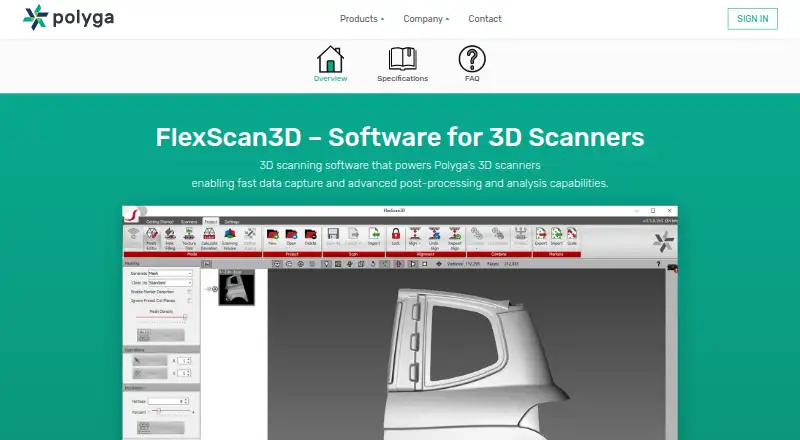
Polyga FlexScan3D is Windows software for capturing 3D scans with Polyga scanners or compatible machine-vision hardware, then processing the resulting point clouds and meshes. It is aimed at engineers, manufacturers, researchers, and 3D professionals, as well as users developing custom structured-light scanners. The published product information describes a free tool covering capture, calibration, alignment, merging, mesh editing, measurement, deviation analysis, coordinate transforms, and export.
Its workflow scope is a central strength. FlexScan3D supports point-cloud or mesh capture, camera live view, scanner calibration, geometry, select, fine, and marker alignment, plus smooth or precise scan merging. Processing tools include cleanup, decimation, smoothing, erosion, interactive hole filling, 3D measurement, mesh-to-mesh deviation analysis, coordinate transformation, and cut-plane processing. Exports include PLY, OBJ, STL, ASC, and FBX. Command-line access and scripting add options for repeatable processing, while C++ and C# applications can connect through the SB SDK.
Hardware and platform fit deserve close attention before selection. Supported inputs include Polyga 3D scanners, Basler and FLIR monochrome global-shutter machine-vision cameras, color machine-vision cameras, and standard DLP projectors through HDMI. The product supports Polyga’s automatic rotary table and is documented for Windows 10 64-bit. Polyga currently labels FlexScan3D as legacy software while stating that it remains freely available. It suits buyers who need a no-cost Polyga-centered scanning and inspection workflow with broad processing tools. Teams requiring a current product direction, another operating system, or hardware outside the documented ecosystem should consider alternatives.
Your product? Our editors can test Polyga FlexScan3D in depth and publish a review, labelled as paid · from $149/mo →
Polyga FlexScan3D pricing
Polyga FlexScan3D fact sheet
| Free plan | Yes |
|---|---|
| Paid from | Free |
| Supported inputs | Polyga 3D scanners; Basler and FLIR monochrome global-shutter machine-vision cameras; color machine-vision cameras; standard DLP projectors via HDMI |
| Supported platforms | Windows 10 64-bit |
| Point-cloud tools | Yes |
| Mesh reconstruction | Yes |
| Real-time capture | Yes |
| Export formats | PLY, OBJ, STL, ASC, FBX |
| API access | Yes |
| Deployment | Desktop |
| Platforms | Windows |
| Support | Email, Docs |
| Built for | Small business, Mid-market, Enterprise (editorial estimate) |
| Integrations | 6 integrations: Polyga 3D scanners, Polyga automatic rotary table, Basler machine-vision cameras, FLIR machine-vision cameras, DLP projectors via HDMI, C++ and C# applications through SB SDK |
| Pricing | Free plan |
| Website | polyga.com |
| Facts checked | 20 Sep 2026 |
Polyga FlexScan3D integrations
Polyga FlexScan3D lists 6 integrations on its own site.
- Polyga 3D scanners
- Polyga automatic rotary table
- Basler machine-vision cameras
- FLIR machine-vision cameras
- DLP projectors via HDMI
- C++ and C# applications through SB SDK
Alternatives to Polyga FlexScan3D
- Artec StudioA Windows workflow for scanner capture, photogrammetry, CAD work, and inspection.9.2
- Creaform.OSA focused acquisition and inspection environment for Creaform hardware workflows.8.6
- Autodesk ReCap ProA broad reality-capture suite for teams working across scanning, BIM, and Autodesk tools.8.2



See all Polyga FlexScan3D alternatives →
Used Polyga FlexScan3D? Be the first to review it
The editor score above is our own research. What this page doesn't have yet is a reader's view — what you used Polyga FlexScan3D for, what worked and what didn't. No stars are seeded and no review is paid for; an editor reads every one before it appears.
Write a reviewTwo minutes · verified accounts only · read by an editor before it appears
Featured on iTechGuides

Polyga FlexScan3D is listed in our 3D Scanning Software directory. Add the badge to your site — it links back to this page.
<a href="https://www.itechguides.com/products/polyga-flexscan3d/"><img src="https://www.itechguides.com/best/badge/polyga-flexscan3d.svg" alt="Featured on iTechGuides" width="230" height="46"></a>
Reviewed by iTechGuides Editors · Editorial team · Updated Oct 2026
Advertiser disclosure: iTechGuides is reader-supported. Vendors can pay for top positions in our rankings and for a place on other products' pages, and we may earn a commission when you click some links. Bought places stand at the number bought; this page and our disclosure say so. Paying vendors may get a fuller, more detailed review from our editors, and that review can change their score. How we rank.
Last updated · How we research and update