
PollQR
PollQR: A QR-first polling tool with broad formats, moderation and presentation integrations. Ranked #13 of 32 in Polling Software by our editors (8.0/10); pricing: Free plan · 14-day trial; best for QR-first event polling.
At a glance
- Editor score8.0 / 10
- PricingFree plan · 14-day trial
- Best forQR-first event polling
- Free planYes
- Paid from$19/mo
- Audience limit500 participants
- Founded2024
- Facts checked21 Sep 2026
Where it wins
- QR polls support real-time results and anonymous responses
- Seven question types plus moderated, upvoted audience Q&A
- Works with PowerPoint, Google Slides, Zoom and Teams
Where it doesn't
- Free access is limited to one live poll
- Audience capacity is limited to 500 people
- Founded in 2024, it has a shorter maturity track record
Our verdict on PollQR
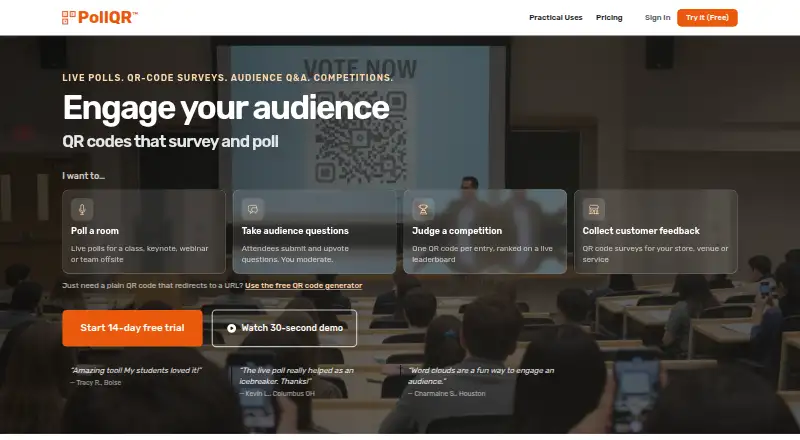
PollQR is a browser-based audience engagement platform for presenters, educators, event organizers and businesses. Its core workflow uses QR codes to bring participants into live polls, surveys, feedback activities and competition voting. Question formats include multiple-choice, rating, ranking, limited-choice, word-cloud and text questions, while real-time results support presentations and live sessions. The platform also includes anonymous responses, response storage, CSV and JSON exports, and a stated audience limit of 500 people.
For event and presentation workflows, PollQR covers more than basic polling. Audience Q&A includes upvoting and pre-moderation controls for approving, rejecting and marking questions as answered. PowerPoint and Google Slides workflows connect polling with presentations, while Zoom and Microsoft Teams workflows extend it to online sessions. AI features are included, and QR-code surveys give businesses a way to collect feedback beyond a single live question. This breadth suits organizers who want polling, Q&A and surveys in one browser-based product, though buyers needing a larger audience than 500 people should look elsewhere.
The pricing structure supports occasional and recurring use. The Free plan includes one live poll. Pay-As-You-Go costs $2.99 per poll and adds real-time results, all 7 question types and CSV response downloads. Pro costs $19 per month and adds surveys and feedback, live polling, and audience Q&A with upvoting. Enterprise Starter costs $299 per month for a multi-location business plan. A 14-day Pro trial is available. PollQR is a strong fit for QR-led events, classes and presentations that need varied interactions without a recurring commitment; teams seeking a longer-established platform or higher audience capacity should consider alternatives.
Your product? Our editors can test PollQR in depth and publish a review, labelled as paid · from $149/mo →
PollQR pricing
All 4 PollQR plans and prices →
PollQR fact sheet
| Free plan | Yes |
|---|---|
| Paid from | $19/mo |
| Audience limit | 500 participants |
| Presenter seats | Not verified |
| Quiz mode | Not verified |
| Word clouds | Yes |
| Anonymous responses | Yes |
| Moderation tools | Yes |
| Slide integration | Yes |
| Free trial | 14 days · card required |
| Money-back guarantee | 14 days |
| Deployment | Cloud |
| Platforms | Web, Windows, macOS |
| Support | Email, Docs |
| Built for | Solo, Small business, Mid-market, Enterprise (editorial estimate) |
| Integrations | 4 integrations: Microsoft PowerPoint, Google Slides, Zoom, Microsoft Teams |
| Pricing | Free plan · 14-day trial (source) |
| Website | pollqr.com |
| Facts checked | 21 Sep 2026 |
PollQR integrations
PollQR lists 4 integrations on its own site.
- Microsoft PowerPoint
- Google Slides
- Zoom
- Microsoft Teams
Alternatives to PollQR
- Poll EverywhereA versatile polling suite for presentations, events, training, and audience Q&A.9.4
- WooclapA broad audience-response toolkit for large classrooms and live sessions.9.2
- Pigeonhole LiveDeep live Q&A and polling for presentations, meetings, and events.9.1



Also Ranked In
PollQR is ranked in 2 of our directories.
Used PollQR? Be the first to review it
The editor score above is our own research. What this page doesn't have yet is a reader's view — what you used PollQR for, what worked and what didn't. No stars are seeded and no review is paid for; an editor reads every one before it appears.
Write a reviewTwo minutes · verified accounts only · read by an editor before it appears
Featured on iTechGuides

PollQR is listed in our Polling Software directory. Add the badge to your site — it links back to this page.
<a href="https://www.itechguides.com/products/pollqr/"><img src="https://www.itechguides.com/best/badge/pollqr.svg" alt="Featured on iTechGuides" width="230" height="46"></a>
Reviewed by iTechGuides Editors · Editorial team · Updated Oct 2026
Advertiser disclosure: iTechGuides is reader-supported. Vendors can pay for top positions in our rankings and for a place on other products' pages, and we may earn a commission when you click some links. Bought places stand at the number bought; this page and our disclosure say so. Paying vendors may get a fuller, more detailed review from our editors, and that review can change their score. How we rank.
Last updated · How we research and update