
Pixen
Pixen: A focused pixel-art editor with animation, export, and Mac–iOS synchronization. Ranked #21 of 70 in Pixel Art Software by our editors (7.1/10); pricing: Free plan; best for mac and iOS pixel-art workflows.
At a glance
- Editor score7.1 / 10
- PricingFree plan
- Best forMac and iOS pixel-art workflows
- Free planYes
- Animation timelineYes
- Facts checked20 Sep 2026
Where it wins
- Animation tools include onion skinning, filmstrip view, and broad exports
- Layers, palettes, grids, patterns, and pixel-perfect drawing support detailed work
- iCloud synchronization connects projects across macOS and iOS
Where it doesn't
- Designed for macOS and iOS rather than broader platform coverage
- The Pro plan is required to unlock all features and file types
- It does not include AI features
Our verdict on Pixen
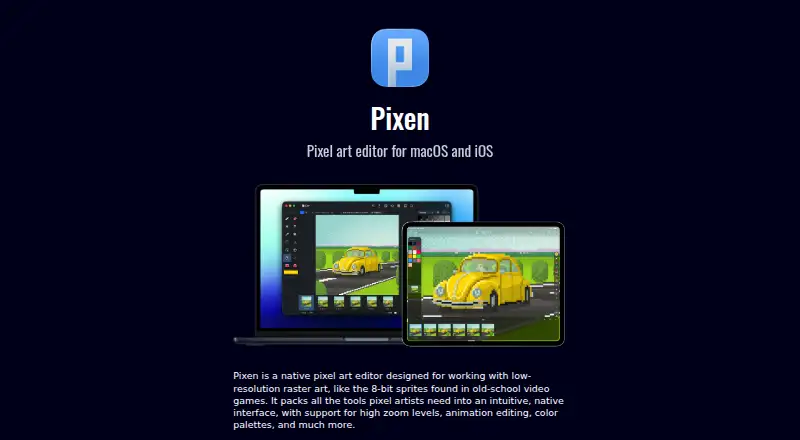
Pixen is a native pixel-art and animation editor for macOS and iOS. It is aimed at artists creating low-resolution raster artwork, game sprites, animated frames, palettes, and spritesheets. Its toolset covers drawing and selection, layers, filters, grids, custom patterns, pixel-perfect drawing, previews, and format conversion. The iPad version also supports Apple Pencil and Files integration, giving Apple-device users a focused workflow for creating and managing pixel artwork.
Animation is a central strength. Pixen provides frame-based editing with a filmstrip view, onion-skin overlay for the previous frame, sprite-sheet import and export, and animation output to GIF, APNG, movies, and image sequences. Its export coverage also includes PNG, JPEG, ICO, BMP, TIFF, SVG, PSD, MP4, MOV, and sprite sheets. Palette creation, editing, import, and export support controlled color workflows, while layers include opacity and blend-mode controls. These features make Pixen a strong fit for sprite work and animated pixel assets rather than a general-purpose illustration application.
Platform fit is especially clear for users working across a Mac, iPhone, and iPad. iCloud synchronization connects the macOS and iOS versions, while the iPad adds Apple Pencil and Files support. The free access includes animation, onion skinning, palettes, spritesheets, layers, and broad animation export formats. Pixen is therefore a good choice for Apple-focused pixel-art workflows that need animation and file-format flexibility. It is less suitable for teams requiring broader platform coverage, users seeking AI-assisted features, or anyone who needs every feature and file type without moving to the Pro plan.
Questions about Pixen
What does Pixen run on? macOS and iOS. It runs as a desktop app and as a mobile app.
What does Pixen integrate with? 1 integration: iCloud.
Who is Pixen built for? Solo users and small businesses (our editorial estimate).
Your product? Our editors can test Pixen in depth and publish a review, labelled as paid · from $149/mo →
Pixen pricing
All 1 Pixen plans and prices →
Pixen fact sheet
| Free plan | Yes |
|---|---|
| Paid from | Not verified |
| Animation timeline | Yes |
| Indexed color tools | Yes |
| Sprite-sheet export | Yes |
| Onion skinning | Yes |
| Tilemap tools | Not verified |
| Supported platforms | macOS, iOS |
| Export formats | PNG, JPEG, GIF, ICO, BMP, TIFF, SVG, PSD, APNG, MP4, MOV, sprite sheets |
| Deployment | Desktop, Mobile |
| Platforms | macOS, iOS |
| Support | Docs |
| Built for | Solo, Small business (editorial estimate) |
| Integrations | 1 integrations: iCloud |
| Pricing | Free plan (source) |
| Website | pixenapp.com |
| Facts checked | 20 Sep 2026 |
Pixen integrations
Pixen lists 1 integrations on its own site.
- iCloud
Alternatives to Pixen
- PixeloramaA capable free pixel art editor with broad platform support and automation tools.9.4
- PixelWallA capable free pixel-art editor with broad platform support and $15 Pro exports.9.3
- Pix2DA capable free pixel art editor for artists working across web, desktop, and Android.9.1



Also Ranked In
Pixen is ranked in 2 of our directories.
Used Pixen? Be the first to review it
The editor score above is our own research. What this page doesn't have yet is a reader's view — what you used Pixen for, what worked and what didn't. No stars are seeded and no review is paid for; an editor reads every one before it appears.
Write a reviewTwo minutes · verified accounts only · read by an editor before it appears
Featured on iTechGuides

Pixen is listed in our Pixel Art Software directory. Add the badge to your site — it links back to this page.
<a href="https://www.itechguides.com/products/pixen/"><img src="https://www.itechguides.com/best/badge/pixen.svg" alt="Featured on iTechGuides" width="230" height="46"></a>
Reviewed by iTechGuides Editors · Editorial team · Updated Nov 2026
Advertiser disclosure: iTechGuides is reader-supported. Vendors can pay for top positions in our rankings and for a place on other products' pages, and we may earn a commission when you click some links. Bought places stand at the number bought; this page and our disclosure say so. Paying vendors may get a fuller, more detailed review from our editors, and that review can change their score. How we rank.
Last updated · How we research and update