
Pixel Nova Studio
Pixel Nova Studio: A free web suite for pixel conversion, recoloring, palettes, editing, and export. Ranked #53 of 70 in Pixel Art Software by our editors (5.5/10); pricing: Free plan; best for quick web pixel-art conversion and recoloring.
At a glance
- Editor score5.5 / 10
- PricingFree plan
- Best forQuick web pixel-art conversion and recoloring
- Free planYes
- Paid fromFree
- Facts checked22 Sep 2026
Where it wins
- Converts images with configurable resolution and palette size
- Includes recoloring, palette generation, and layered editing
- Exports PNG, ZIP, and spritesheets at no cost
Where it doesn't
- Public alpha status may not suit production-critical workflows
- Web-only deployment requires browser access
- Not positioned around animation timelines or onion skinning
Our verdict on Pixel Nova Studio
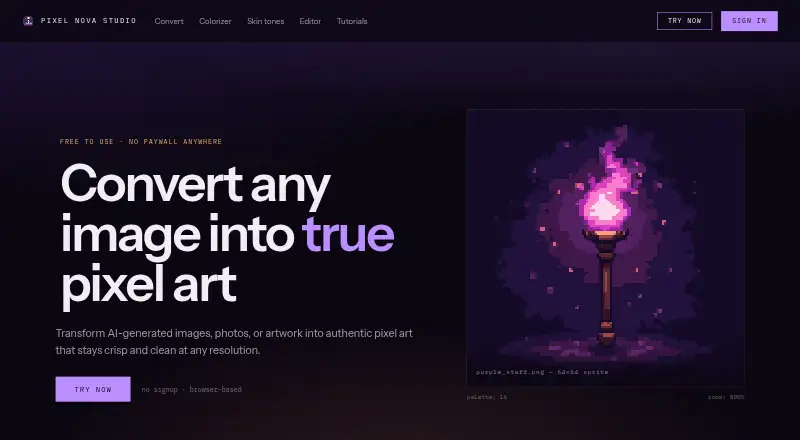
Pixel Nova Studio is a browser-based pixel art suite for artists, game developers, and newcomers. It converts photos, drawings, renders, and AI-generated images into grid-aligned pixel art, while also supporting sprite recoloring, skin-tone palette generation, and layered editing. The product is aimed at solo creators and small teams that want a focused web tool without an account or paid tier.
Its strongest area is image preparation and color work. Users can configure conversion resolution and palette size, generate harmonized recoloring palettes, and create skin-tone palettes and ramps. The layered editor adds pixel-level tools including pencil, line, rectangle, ellipse, eraser, bucket fill, eyedropper, selection, and pan. Undo history, zoom, and pan support iterative editing, while indexed color and spritesheet export fit common pixel-art workflows.
Pixel Nova Studio is free, with no paid tier, and exports PNG, ZIP, and spritesheets. That makes it a practical choice for quick conversion, recoloring, palette exploration, and lightweight sprite editing in a browser. The editor is labeled a public alpha, and the product is not positioned around animation timelines, onion skinning, or tilemap tools. Creators focused on still images, palettes, and export should find the feature mix well aligned; teams seeking a broader sprite-production environment should consider a tool with deeper animation and game-production features.
Your product? Our editors can test Pixel Nova Studio in depth and publish a review, labelled as paid · from $149/mo →
Pixel Nova Studio pricing
Pixel Nova Studio fact sheet
| Free plan | Yes |
|---|---|
| Paid from | Free |
| Animation timeline | Not verified |
| Indexed color tools | Yes |
| Sprite-sheet export | Yes |
| Onion skinning | Not verified |
| Tilemap tools | Not verified |
| Supported platforms | web |
| Export formats | PNG, ZIP, spritesheet |
| Deployment | Cloud |
| Platforms | Web |
| Support | |
| Built for | Solo, Small business (editorial estimate) |
| Pricing | Free plan |
| Website | pixelnovastudio.app |
| Facts checked | 22 Sep 2026 |
Alternatives to Pixel Nova Studio
- PixeloramaA capable free pixel art editor with broad platform support and automation tools.9.4
- PixelWallA capable free pixel-art editor with broad platform support and $15 Pro exports.9.3
- Pix2DA capable free pixel art editor for artists working across web, desktop, and Android.9.1



See all Pixel Nova Studio alternatives →
Used Pixel Nova Studio? Be the first to review it
The editor score above is our own research. What this page doesn't have yet is a reader's view — what you used Pixel Nova Studio for, what worked and what didn't. No stars are seeded and no review is paid for; an editor reads every one before it appears.
Write a reviewTwo minutes · verified accounts only · read by an editor before it appears
Featured on iTechGuides

Pixel Nova Studio is listed in our Pixel Art Software directory. Add the badge to your site — it links back to this page.
<a href="https://www.itechguides.com/products/pixel-nova-studio/"><img src="https://www.itechguides.com/best/badge/pixel-nova-studio.svg" alt="Featured on iTechGuides" width="230" height="46"></a>
Reviewed by iTechGuides Editors · Editorial team · Updated Oct 2026
Advertiser disclosure: iTechGuides is reader-supported. Vendors can pay for top positions in our rankings and for a place on other products' pages, and we may earn a commission when you click some links. Bought places stand at the number bought; this page and our disclosure say so. Paying vendors may get a fuller, more detailed review from our editors, and that review can change their score. How we rank.
Last updated · How we research and update