PikoPixel
PikoPixel: A focused desktop editor for straightforward pixel-art drawing and editing. Ranked #65 of 70 in Pixel Art Software by our editors (5.5/10); pricing: Free plan; best for simple open-source pixel drawing.
At a glance
- Editor score5.5 / 10
- PricingFree plan
- Best forSimple open-source pixel drawing
- Free planYes
- Paid fromFree
- Facts checked22 Sep 2026
Where it wins
- Free and open source under the GNU Affero General Public License
- Multiple layers, unlimited undo, and customizable canvas backgrounds
- Runs on Mac OS X, Linux, and BSD with upscaled image export
Where it doesn't
- The published feature set is focused on drawing rather than animation
- A narrower fit for indexed-color and spritesheet workflows
- Export-format breadth and tilemap tooling are not part of its positioning
Our verdict on PikoPixel
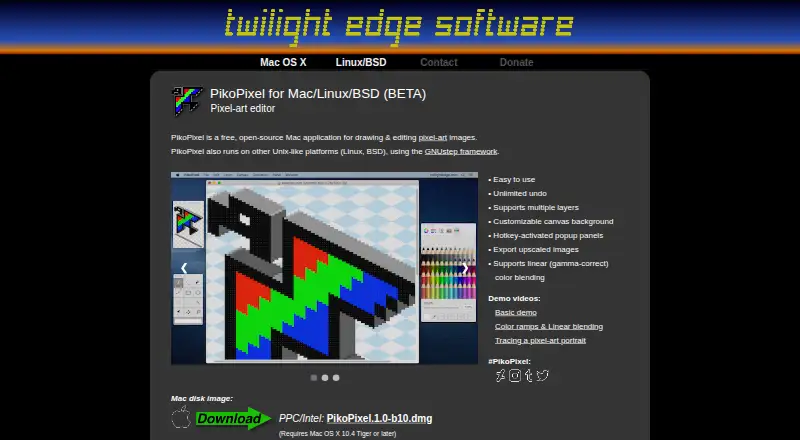
PikoPixel is a free, open-source desktop application for drawing and editing pixel-art images. It is primarily available for Mac OS X and also runs on Linux and BSD through GNUstep, making it a practical fit for solo creators and small teams seeking a focused pixel-drawing tool. Its core workspace includes multiple layers, unlimited undo, customizable canvas backgrounds, hotkey-activated popup panels, linear gamma-correct color blending, and upscaled image export. The free pricing model and GNU Affero General Public License also make it suitable for users who want an open-source editor rather than a paid application.
The strongest case for PikoPixel is its concentrated drawing workflow. Layers and unlimited undo support iterative image work, while customizable backgrounds and popup panels provide control over the editing workspace. Upscaled export is useful when the final image needs enlargement without changing the basic pixel-art purpose. The application is distributed as a Mac disk image, Linux AppImages, Linux/BSD packages and installation scripts, along with source code. That platform coverage gives it a clear desktop and open-source orientation, though it is not presented as a broad production suite.
PikoPixel is better suited to simple pixel-art creation than to pipelines centered on animation, indexed color, spritesheets, tilemaps, or extensive export-format support. The official site labels it BETA; the version history lists BETA10c for Linux/BSD dated March 31, 2026, while the Mac download remains BETA10b. Choose it for free, focused pixel drawing on Mac OS X, Linux, or BSD. Consider another tool when those specialized workflow requirements are central to the project.
Your product? Our editors can test PikoPixel in depth and publish a review, labelled as paid · from $149/mo →
PikoPixel pricing
PikoPixel fact sheet
| Free plan | Yes |
|---|---|
| Paid from | Free |
| Animation timeline | Not verified |
| Indexed color tools | Not verified |
| Sprite-sheet export | Not verified |
| Onion skinning | Not verified |
| Tilemap tools | Not verified |
| Supported platforms | Mac OS X, Linux, BSD |
| Export formats | Not verified |
| Deployment | Desktop |
| Platforms | macOS, Linux |
| Built for | Solo, Small business (editorial estimate) |
| Pricing | Free plan |
| Website | twilightedge.com |
| Facts checked | 22 Sep 2026 |
Alternatives to PikoPixel
- PixeloramaA capable free pixel art editor with broad platform support and automation tools.9.4
- PixelWallA capable free pixel-art editor with broad platform support and $15 Pro exports.9.3
- Pix2DA capable free pixel art editor for artists working across web, desktop, and Android.9.1



See all PikoPixel alternatives →
Used PikoPixel? Be the first to review it
The editor score above is our own research. What this page doesn't have yet is a reader's view — what you used PikoPixel for, what worked and what didn't. No stars are seeded and no review is paid for; an editor reads every one before it appears.
Write a reviewTwo minutes · verified accounts only · read by an editor before it appears
Featured on iTechGuides

PikoPixel is listed in our Pixel Art Software directory. Add the badge to your site — it links back to this page.
<a href="https://www.itechguides.com/products/pikopixel/"><img src="https://www.itechguides.com/best/badge/pikopixel.svg" alt="Featured on iTechGuides" width="230" height="46"></a>
Reviewed by iTechGuides Editors · Editorial team · Updated Oct 2026
Advertiser disclosure: iTechGuides is reader-supported. Vendors can pay for top positions in our rankings and for a place on other products' pages, and we may earn a commission when you click some links. Bought places stand at the number bought; this page and our disclosure say so. Paying vendors may get a fuller, more detailed review from our editors, and that review can change their score. How we rank.
Last updated · How we research and update