
PicsFit
PicsFit: A free browser tool for local batch compression, format conversion and resizing. Ranked #47 of 85 in Image Compression Software by our editors (4.7/10); pricing: Free plan; best for individuals batch-compressing images locally in a browser.
At a glance
- Editor score4.7 / 10
- PricingFree plan
- Best forIndividuals batch-compressing images locally in a browser
- Free planYes
- Paid fromFree
- Compression modesBoth
- Facts checked24 Sep 2026
Where it wins
- Compresses JPG, PNG, WebP and AVIF files locally in the browser
- Batch processing supports ZIP downloads and folder preservation
- Offers target-size compression, resizing and metadata controls
Where it doesn't
- Requires web access; there is no listed desktop platform
- Support is limited to email
- Does not include AI features
Our verdict on PicsFit
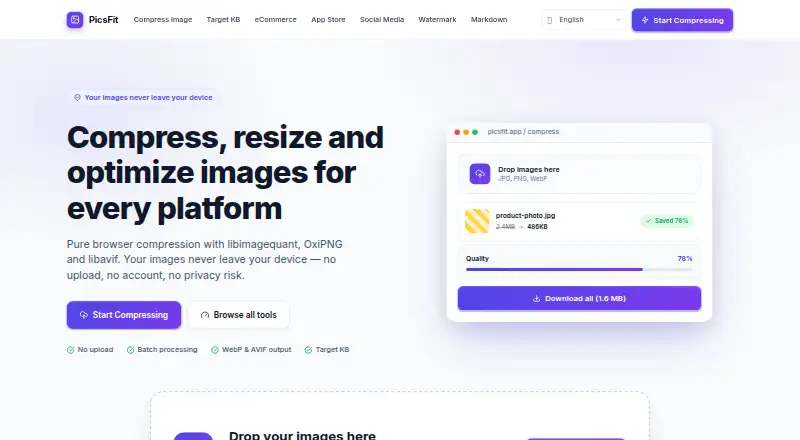
PicsFit is a free, browser-based tool for compressing and resizing images, suited to individuals and small teams handling general-purpose image workflows. It processes images locally in the browser using JavaScript and WebAssembly, with no account or payment required. Its focus is practical file preparation: users can convert among JPG, PNG, WebP and AVIF, adjust quality, resize or crop images, and choose whether to strip or preserve EXIF metadata. This makes it a fit for people who want file handling without routing image data through an upload workflow, rather than teams seeking a broader image-management system.
Batch work is a notable strength. PicsFit supports ZIP downloads and folder preservation, which can help keep a batch organized after compression. PNG users can choose between lossless OxiPNG and lossy libimagequant modes, while quality presets and custom target file-size compression offer different ways to manage output. Platform presets cover eCommerce product photos, app-store screenshots and social-media images. These controls give it useful range for routine optimization, although its feature set remains centered on compression and resizing rather than a larger creative or asset-management workflow.
The free offering includes local compression and requires neither an account nor payment. The available access is web-based, so people looking specifically for a desktop application should look elsewhere. Email is the listed support channel, and there are no AI features. PicsFit is a sensible pick for individuals who value local browser processing and batch file handling; it is less suited to buyers who need a desktop platform, AI capabilities or a broader team-oriented toolset.
Your product? Our editors can test PicsFit in depth and publish a review, labelled as paid · from $149/mo →
PicsFit pricing
All 1 PicsFit plans and prices →
PicsFit fact sheet
| Free plan | Yes |
|---|---|
| Paid from | Free |
| Compression modes | Both |
| Batch processing | Yes |
| API access | Not verified |
| Max upload size | Not verified |
| Image resizing | Yes |
| Supported formats | JPG, PNG, WebP, AVIF |
| Metadata controls | Yes |
| Deployment | Cloud |
| Platforms | Web |
| Support | |
| Built for | Solo, Small business (editorial estimate) |
| Pricing | Free plan (source) |
| Website | picsfit.com |
| Facts checked | 24 Sep 2026 |
Alternatives to PicsFit
- TinyPNGA flexible compressor for web workflows, batch processing, and automated image pipelines.9.3
- OptimoleA strong WordPress-focused optimizer for responsive images, modern formats, and CDN delivery.9.2
- ThumborA self-hosted image service with URL transformations, smart cropping, and format selection.9.1


See all PicsFit alternatives →
Used PicsFit? Be the first to review it
The editor score above is our own research. What this page doesn't have yet is a reader's view — what you used PicsFit for, what worked and what didn't. No stars are seeded and no review is paid for; an editor reads every one before it appears.
Write a reviewTwo minutes · verified accounts only · read by an editor before it appears
Featured on iTechGuides

PicsFit is listed in our Image Compression Software directory. Add the badge to your site — it links back to this page.
<a href="https://www.itechguides.com/products/picsfit/"><img src="https://www.itechguides.com/best/badge/picsfit.svg" alt="Featured on iTechGuides" width="230" height="46"></a>
Reviewed by iTechGuides Editors · Editorial team · Updated Oct 2026
Advertiser disclosure: iTechGuides is reader-supported. Vendors can pay for top positions in our rankings and for a place on other products' pages, and we may earn a commission when you click some links. Bought places stand at the number bought; this page and our disclosure say so. Paying vendors may get a fuller, more detailed review from our editors, and that review can change their score. How we rank.
Last updated · How we research and update