PicoToolkit Banner Editor
PicoToolkit Banner Editor: A free web editor for creating and exporting simple HTML5 and image banners. Ranked #20 of 25 in Banner Design Software by our editors (6.9/10); pricing: Free plan; best for free users needing simple HTML5 banners.
At a glance
- Editor score6.9 / 10
- PricingFree plan
- Best forFree users needing simple HTML5 banners
- Free planYes
- Paid fromFree
- Founded2022 · Warsaw, Poland
- Facts checked21 Sep 2026
Where it wins
- Exports banners as PNG, JPG, WebP, or HTML5
- Offers templates, custom dimensions, layers, and element controls
- Includes AI editing, history, and local browser project storage
Where it doesn't
- Projects are stored locally in the browser
- No desktop or mobile platform is listed
- Advanced automation and collaboration workflows are not a focus
Our verdict on PicoToolkit Banner Editor
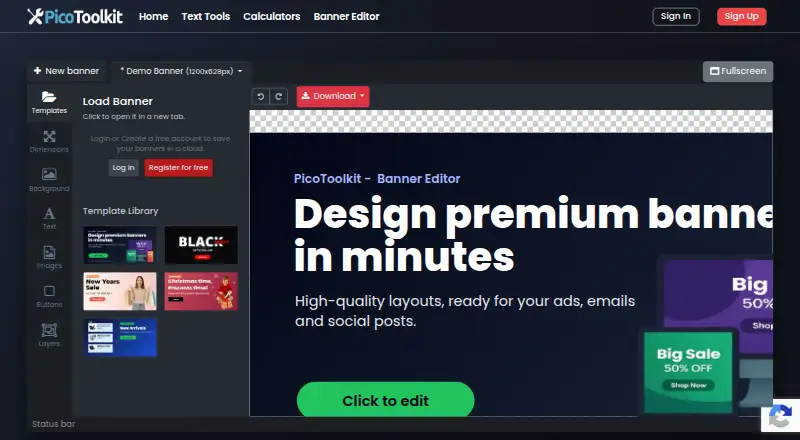
PicoToolkit Banner Editor is a free web-based tool for creating promotional graphics for shops, advertising campaigns, newsletters, and other online placements. It supports both template-based and blank-canvas workflows, with custom banner dimensions and preset sizes for different placements. Users can add text, images, icons, shapes, and buttons, then refine layouts through layer management and duplication. The editor requires no account or credit card, making it a practical choice for individuals and small teams that need straightforward banner production in a browser.
Its strongest fit is the combination of basic design control and export flexibility. Text effects include shadows, glow, borders, echo, and blur, while AI-assisted editing provides an additional way to adjust banner work. Undo, redo, and change history support iterative editing, and projects are stored locally in the browser. Export options cover PNG, JPG, WebP, and HTML5, so the tool can serve both static promotional graphics and web placements that require HTML5 output. These capabilities make it more capable than a template-only generator while keeping the workflow focused on individual banner creation.
The main trade-off is scope. Local browser storage can suit lightweight, browser-centered work, but it makes project handling a consideration for teams that need shared access or centralized management. PicoToolkit is a good choice for free users who want custom-sized banners, layered editing, visual effects, AI assistance, and HTML5 export without account setup. It is less suitable for organizations seeking a broader production system centered on collaboration, bulk creation, resizing automation, or other advanced campaign workflows.
Your product? Our editors can test PicoToolkit Banner Editor in depth and publish a review, labelled as paid · from $149/mo →
PicoToolkit Banner Editor pricing
PicoToolkit Banner Editor fact sheet
| Free plan | Yes |
|---|---|
| Paid from | Free |
| Animated banners | Not verified |
| HTML5 export | Yes |
| Bulk banner creation | Not verified |
| Automated resizing | Not verified |
| Display ad templates | Not verified |
| Brand kit | Not verified |
| Team collaboration | Not verified |
| Deployment | Cloud |
| Platforms | Web |
| Compliance & security | GDPR |
| Support | Tickets |
| Built for | Solo, Small business (editorial estimate) |
| Pricing | Free plan |
| Website | picotoolkit.com |
| Facts checked | 21 Sep 2026 |
Alternatives to PicoToolkit Banner Editor
- BannersnackA broad banner production platform with animation, automation, collaboration, and API access.9.4
- BannerBooA web-based banner editor with AI, resizing, animation, and ad-network exports.9.2
- BannerNowA deep display-ad platform for teams managing complex creative and campaign workflows.9.0



See all PicoToolkit Banner Editor alternatives →
Used PicoToolkit Banner Editor? Be the first to review it
The editor score above is our own research. What this page doesn't have yet is a reader's view — what you used PicoToolkit Banner Editor for, what worked and what didn't. No stars are seeded and no review is paid for; an editor reads every one before it appears.
Write a reviewTwo minutes · verified accounts only · read by an editor before it appears
Featured on iTechGuides

PicoToolkit Banner Editor is listed in our Banner Design Software directory. Add the badge to your site — it links back to this page.
<a href="https://www.itechguides.com/products/picotoolkit-banner-editor/"><img src="https://www.itechguides.com/best/badge/picotoolkit-banner-editor.svg" alt="Featured on iTechGuides" width="230" height="46"></a>
Reviewed by iTechGuides Editors · Editorial team · Updated Oct 2026
Advertiser disclosure: iTechGuides is reader-supported. Vendors can pay for top positions in our rankings and for a place on other products' pages, and we may earn a commission when you click some links. Bought places stand at the number bought; this page and our disclosure say so. Paying vendors may get a fuller, more detailed review from our editors, and that review can change their score. How we rank.
Last updated · How we research and update