
Picotap
Picotap: A focused static pixel editor for touch-first drawing and lightweight asset creation. Ranked #56 of 70 in Pixel Art Software by our editors (5.5/10); pricing: Free plan; best for touch-first static pixel drawing.
At a glance
- Editor score5.5 / 10
- PricingFree plan
- Best forTouch-first static pixel drawing
- Free planYes
- Facts checked20 Sep 2026
Where it wins
- Touch controls, swipe cursor movement, and magnification support precise drawing.
- 60 palettes, palette synchronization, tracing, patterns, and selection tools.
- Free access across iOS, Android, macOS, and the web with recovery features.
Where it doesn't
- Its stated focus is static pixel drawing rather than animation workflows.
- The freemium model includes in-app purchases and optional rewarded ads.
- Export is centered on PNG and editable files rather than broader formats.
Our verdict on Picotap
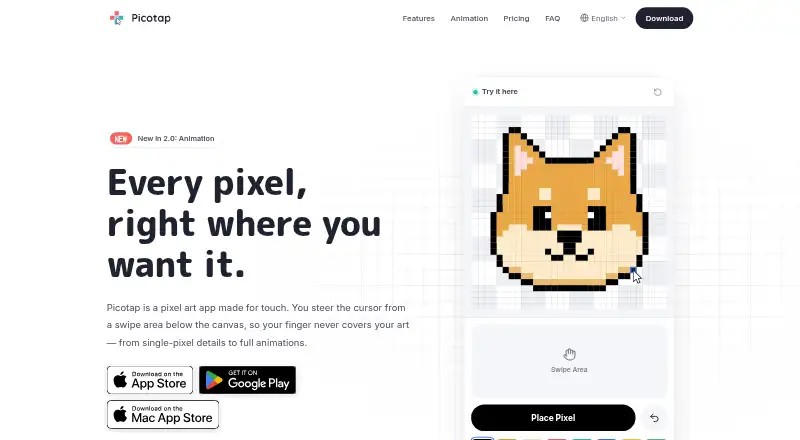
Picotap is a pixel art editor for phones, tablets, Mac computers, and the web. Its strongest fit is touch-first static drawing: beginners, casual creators, icon makers, and artists who want to work with one hand or alongside PC tools. The interface centers on touch-optimized pixel placement, swipe-to-move cursor controls, and a long-press magnifier for precise work. Drawing tools include brush patterns, fill, selection, copy, flip, rotate, and paste, while reference-image import supports tracing. PNG and editable-file export cover common static asset workflows.
The free-access model makes Picotap approachable across iOS, Android, macOS, and web. Its published product details describe a freemium structure with in-app purchases, plus optional rewarded ads that unlock some features. Rather than separating the product into a range of named plans, Picotap emphasizes broad platform availability and a common feature set. The 60 color palettes and palette synchronization are useful for creators who want consistent colors across devices. Autosave, backup, restore, and trash recovery also give the workflow practical protection against losing artwork.
Picotap is a good choice for static pixel illustrations, icons, traced references, and small assets where touch interaction matters. Its documented emphasis is narrower than a full animation or game-art production suite: animation, onion skinning, spritesheet export, and tilemaps are outside the stated focus. Creators who prioritize palette work, precise touch placement, selection editing, and straightforward PNG or editable-file export should find the feature mix well aligned. Those choosing primarily for animation-oriented workflows or tilemap production should look for a tool centered on those tasks instead.
Your product? Our editors can test Picotap in depth and publish a review, labelled as paid · from $99/mo →
Picotap pricing
Picotap fact sheet
| Free plan | Yes |
|---|---|
| Paid from | Not verified |
| Animation timeline | Not verified |
| Indexed color tools | Yes |
| Sprite-sheet export | Not verified |
| Onion skinning | Not verified |
| Tilemap tools | Not verified |
| Supported platforms | iOS, Android, macOS, Web |
| Export formats | PNG; editable files |
| Deployment | Cloud, Desktop, Mobile |
| Platforms | Web, macOS, iOS, Android |
| Support | |
| Built for | Solo, Small business (editorial estimate) |
| Pricing | Free plan |
| Website | picotap.app |
| Facts checked | 20 Sep 2026 |
Alternatives to Picotap
- PixeloramaA capable free pixel art editor with broad platform support and automation tools.9.4
- PixelWallA capable free pixel-art editor with broad platform support and $15 Pro exports.9.3
- Pix2DA capable free pixel art editor for artists working across web, desktop, and Android.9.1



See all Picotap alternatives →
Used Picotap? Be the first to review it
The editor score above is our own research. What this page doesn't have yet is a reader's view — what you used Picotap for, what worked and what didn't. No stars are seeded and no review is paid for; an editor reads every one before it appears.
Write a reviewTwo minutes · verified accounts only · read by an editor before it appears
Featured on iTechGuides

Picotap is listed in our Pixel Art Software directory. Add the badge to your site — it links back to this page.
<a href="https://www.itechguides.com/products/picotap/"><img src="https://www.itechguides.com/best/badge/picotap.svg" alt="Featured on iTechGuides" width="230" height="46"></a>
Guides on pixel art software
- 12 Best Free and Open-Source Pixel Art EditorsAug 2026
- 5 Best AI Pixel Art Generators in 2026Aug 2026
Reviewed by iTechGuides Editors · Editorial team · Updated Oct 2026
Advertiser disclosure: iTechGuides is reader-supported. Vendors can pay for top positions in our rankings and for a place on other products' pages, and we may earn a commission when you click some links. How we rank.
Last updated · How we research and update