
Pibooth
Pibooth: A flexible local photo booth foundation for builders comfortable with custom hardware. Ranked #21 of 26 in Photo Booth Software by our editors (7.2/10); pricing: Free plan; best for raspberry Pi photo-booth builders.
At a glance
- Editor score7.2 / 10
- PricingFree plan
- Best forRaspberry Pi photo-booth builders
- Free planYes
- Paid fromFree
- Offline captureYes
- Facts checked20 Sep 2026
Where it wins
- Free and open source under the MIT License
- Supports Raspberry Pi, gPhoto2, and OpenCV-compatible cameras
- Offers local storage, CUPS printing, layouts, effects, and plugins
Where it doesn't
- Capture is limited to photos rather than broader event media
- Platform support is limited to Linux and macOS
- Custom hardware setups may require technical configuration
Our verdict on Pibooth
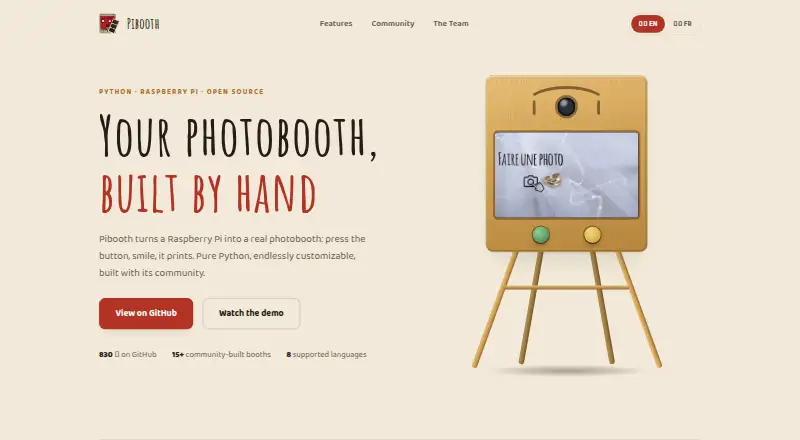
Pibooth is an open-source photo booth application written in Python for Raspberry Pi and compatible cameras. It is intended for individuals and small teams building locally hosted photo booths with custom hardware. The application captures one to four photos, combines them into a final picture, stores final pictures and individual captures locally, and supports printing through a CUPS server. Controls can come from physical buttons, Raspberry Pi GPIO, a keyboard, a mouse, or a touchscreen.
Its strongest fit is a builder-oriented setup that needs control over the booth experience and hardware. Pibooth supports Raspberry Pi cameras, gPhoto2-compatible cameras, and OpenCV-compatible cameras, while configurable capture layouts, text, fonts, colors, backgrounds, overlays, and image effects provide room for customization. Plugins extend that customization further. Local storage also suits offline capture, and integrations with CUPS, gPhoto2, OpenCV, and Raspberry Pi cameras connect the application to the main parts of a self-hosted booth.
Pibooth is free and open source under the MIT License, making it a practical choice where software cost and local operation matter. Its focus is narrower than a feature-rich event platform: the published capabilities center on photo capture, local files, printing, layouts, effects, and hardware control. Support is strongest on Linux and macOS, so teams seeking wider platform coverage or capabilities beyond photo booths should consider an alternative. Choose Pibooth when you want to assemble and customize a Raspberry Pi-based booth; avoid it when you need a broader, less technical event system.
Your product? Our editors can test Pibooth in depth and publish a review, labelled as paid · from $149/mo →
Pibooth pricing
Pibooth fact sheet
| Free plan | Yes |
|---|---|
| Paid from | Free |
| Offline capture | Yes |
| Printing support | Yes |
| Lead capture | Not verified |
| Capture modes | photos |
| Live event gallery | Not verified |
| Supported platforms | Linux, macOS |
| Booth limit | Not verified |
| Deployment | Self-hosted |
| Platforms | Linux, macOS |
| Support | Community, Docs |
| Built for | Solo, Small business (editorial estimate) |
| Integrations | 4 integrations: CUPS, gPhoto2, OpenCV, Raspberry Pi cameras |
| Pricing | Free plan |
| Website | pibooth.org |
| Facts checked | 20 Sep 2026 |
Pibooth integrations
Pibooth lists 4 integrations on its own site.
- CUPS
- gPhoto2
- OpenCV
- Raspberry Pi cameras
Alternatives to Pibooth
- LumaBoothA broad, affordable choice for operators working across multiple booth platforms.9.4
- Booth.EventsA broad photo booth toolkit for operators who need offline capture and event automation.9.2
- Curator LiveA broad photo booth toolkit with a free starting point and paid event licensing.9.0



See all Pibooth alternatives →
Used Pibooth? Be the first to review it
The editor score above is our own research. What this page doesn't have yet is a reader's view — what you used Pibooth for, what worked and what didn't. No stars are seeded and no review is paid for; an editor reads every one before it appears.
Write a reviewTwo minutes · verified accounts only · read by an editor before it appears
Featured on iTechGuides

Pibooth is listed in our Photo Booth Software directory. Add the badge to your site — it links back to this page.
<a href="https://www.itechguides.com/products/pibooth/"><img src="https://www.itechguides.com/best/badge/pibooth.svg" alt="Featured on iTechGuides" width="230" height="46"></a>
Reviewed by iTechGuides Editors · Editorial team · Updated Oct 2026
Advertiser disclosure: iTechGuides is reader-supported. Vendors can pay for top positions in our rankings and for a place on other products' pages, and we may earn a commission when you click some links. Bought places stand at the number bought; this page and our disclosure say so. Paying vendors may get a fuller, more detailed review from our editors, and that review can change their score. How we rank.
Last updated · How we research and update