PhotoRestore Pro
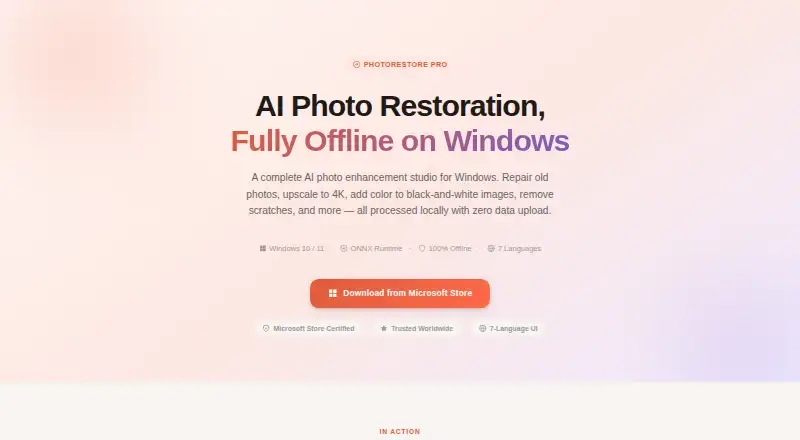
PhotoRestore Pro: A Windows-focused restoration tool with AI repair, colorization, upscaling and batch utilities. Ranked #20 of 25 in Photo Restoration Software by our editors (7.1/10); pricing: Paid; best for windows users needing batch AI restoration.
At a glance
- Editor score7.1 / 10
- PricingPaid
- Best forWindows users needing batch AI restoration
- Free planNo
- Scratch repairYes
- Facts checked20 Sep 2026
Where it wins
- AI restoration combines denoising, color enhancement, sharpening and 4× upscaling
- Repairs scratches and creases with morphological analysis and inpainting
- Batch watermarking and resizing support up to 50 photos
Where it doesn't
- Runs only on Windows 10 and Windows 11
- The free trial limits AI processing per session
- A paid full license is required for unlimited AI processing
Our verdict on PhotoRestore Pro
PhotoRestore Pro is a paid Windows desktop application for restoring aging, faded and damaged photographs. It is aimed at family historians, photographers, e-commerce owners, archivists and museums that need local processing rather than cloud uploads or an account. The software supports Windows 10 and Windows 11, with PNG, JPEG, WebP, BMP and TIFF file support. Its focus is practical restoration, from lightly aged images to photographs with fading, scratches, creases or missing color.
Its strongest area is the breadth of restoration tools in one desktop application. AI restoration combines denoising, color enhancement, sharpening and 4× upscaling, while a separate 4× AI upscaling feature addresses enlargement. Black-and-white photographs can be colorized, and scratch and crease repair uses morphological analysis and inpainting. For routine image preparation, PhotoRestore Pro also includes cropping and format conversion. Batch watermarking and batch resizing handle up to 50 photos, giving the product a useful role in small archival, catalog or family-photo workflows.
The plan structure is straightforward: the Free Trial provides full feature access, limited AI processing per session, and requires neither a credit card nor an account. The Full License adds unlimited AI processing, batch operations and future updates within the version. Because the application is Windows-only, it is not a fit for users who need macOS or another platform. Buyers who want cloud-based access, broader platform support or a workflow centered on online collaboration should choose a different tool. PhotoRestore Pro is better suited to Windows users who value local processing and a concentrated set of restoration, colorization, repair and batch functions.
Your product? Our editors can test PhotoRestore Pro in depth and publish a review, labelled as paid · from $149/mo →
PhotoRestore Pro pricing
All 2 PhotoRestore Pro plans and prices →
PhotoRestore Pro fact sheet
| Free plan | No |
|---|---|
| Paid from | Not verified |
| Scratch repair | Yes |
| Photo colorization | Yes |
| Face enhancement | Not verified |
| Batch processing | Yes |
| Platform | Desktop |
| Max export resolution | Not verified |
| Supported file formats | PNG, JPEG, WebP, BMP, TIFF |
| Deployment | Desktop |
| Platforms | Windows |
| Support | Email, Docs |
| Built for | Solo, Small business, Mid-market (editorial estimate) |
| Pricing | Paid (source) |
| Website | hummingbirdlabs.github.io |
| Facts checked | 20 Sep 2026 |
Alternatives to PhotoRestore Pro
- ImageColorizerA broad AI restoration toolkit with flexible device support and a useful free tier.9.4
- Restore.PhotoA broad web restoration tool with free access, batch processing, and Business API support.9.1
- 1001 Photo RestoreA low-cost browser service for batch restoration, colorization, and enhancement.8.9



See all PhotoRestore Pro alternatives →
Used PhotoRestore Pro? Be the first to review it
The editor score above is our own research. What this page doesn't have yet is a reader's view — what you used PhotoRestore Pro for, what worked and what didn't. No stars are seeded and no review is paid for; an editor reads every one before it appears.
Write a reviewTwo minutes · verified accounts only · read by an editor before it appears
Featured on iTechGuides

PhotoRestore Pro is listed in our Photo Restoration Software directory. Add the badge to your site — it links back to this page.
<a href="https://www.itechguides.com/products/photorestore-pro/"><img src="https://www.itechguides.com/best/badge/photorestore-pro.svg" alt="Featured on iTechGuides" width="230" height="46"></a>
Reviewed by iTechGuides Editors · Editorial team · Updated Oct 2026
Advertiser disclosure: iTechGuides is reader-supported. Vendors can pay for top positions in our rankings and for a place on other products' pages, and we may earn a commission when you click some links. Bought places stand at the number bought; this page and our disclosure say so. Paying vendors may get a fuller, more detailed review from our editors, and that review can change their score. How we rank.
Last updated · How we research and update