
Photopus
Photopus: A capable Windows batch converter with a free edition and low-cost Pro upgrade. Ranked #18 of 36 in Image Converter Software by our editors (7.0/10); pricing: Free plan; best for affordable Windows batch editing and conversion.
At a glance
- Editor score7.0 / 10
- PricingFree plan
- Best forAffordable Windows batch editing and conversion
- Free planYes
- Batch conversionYes
- Facts checked21 Sep 2026
Where it wins
- Batch processing with resizing, effects, watermarks and renaming
- Pro supports more than 90 formats, including RAW and PDF
- Preserves metadata and creates multi-page PDF or TIFF files
Where it doesn't
- Windows-only desktop software
- Advanced format support requires the Pro edition
- No AI features or web app option
Our verdict on Photopus
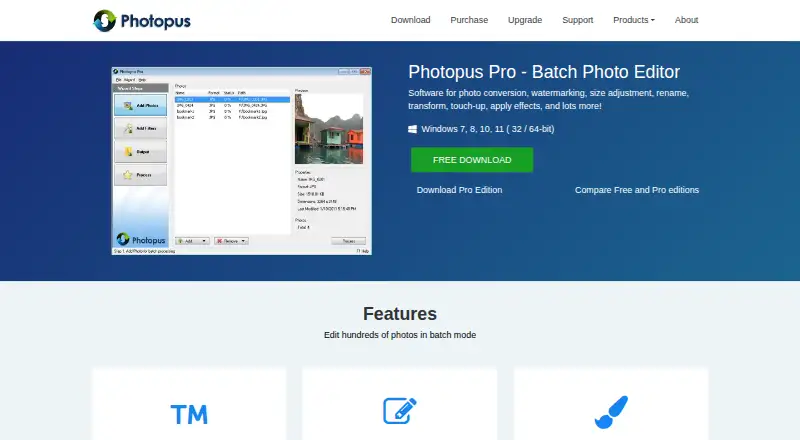
Photopus is a Windows desktop application for converting and editing batches of photos. It is aimed at users who need to process many images in one operation rather than edit files individually. The free Standard edition covers automatic resizing, batch processing and common photo formats. Photopus Pro expands the format range and adds support for RAW camera images, PDF and multi-page PDF files. The software supports Windows 7, 8, 10 and 11.
Its strongest area is batch workflow control. Users can set custom dimensions or choose resizing presets, then rotate, flip, crop and adjust brightness, contrast, color balance, gamma or hue and saturation. Effects include grayscale, sepia, blur, sharpen and borders. Batch watermarking supports text, images, dates and comments, while automatic renaming helps organize converted files. Metadata preservation after processing is also included. Photopus can create multi-page PDF or TIFF files from multi-page images, which gives it a practical role in document and image collection workflows.
The pricing structure is straightforward. Standard is free and focuses on common formats and core batch resizing and processing. Pro costs $19.95 as a one-time purchase and adds batch conversion across more than 90 image formats, RAW support, PDF and multi-page PDF support, free upgrades for one year and a 30-day money-back guarantee. Photopus suits Windows users who want affordable offline batch conversion with editing tools in the same application. It is less suitable for users who need a web app, an API, AI-assisted editing or support beyond Windows.
Your product? Our editors can test Photopus in depth and publish a review, labelled as paid · from $149/mo →
Photopus pricing
All 2 Photopus plans and prices →
Photopus fact sheet
| Free plan | Yes |
|---|---|
| Paid from | Not verified |
| Batch conversion | Yes |
| Image resizing | Yes |
| Color mode conversion | Not verified |
| API access | Not verified |
| Desktop application | Yes |
| Web application | Not verified |
| Supported formats | 90 formats |
| Money-back guarantee | 30 days |
| Deployment | Desktop |
| Platforms | Windows |
| Support | Email, Docs |
| Built for | Solo, Small business (editorial estimate) |
| Pricing | Free plan (source) |
| Website | photopus.net |
| Facts checked | 21 Sep 2026 |
Alternatives to Photopus
- XnConvertA broad local converter for automated batch workflows, with free noncommercial use.9.4
- ImageMagickA highly capable command-line converter for developers building automated image pipelines.9.2
- GraphicsMagickA capable free converter for scripted, multi-file image workflows.8.9


See all Photopus alternatives →
Used Photopus? Be the first to review it
The editor score above is our own research. What this page doesn't have yet is a reader's view — what you used Photopus for, what worked and what didn't. No stars are seeded and no review is paid for; an editor reads every one before it appears.
Write a reviewTwo minutes · verified accounts only · read by an editor before it appears
Featured on iTechGuides

Photopus is listed in our Image Converter Software directory. Add the badge to your site — it links back to this page.
<a href="https://www.itechguides.com/products/photopus/"><img src="https://www.itechguides.com/best/badge/photopus.svg" alt="Featured on iTechGuides" width="230" height="46"></a>
Reviewed by iTechGuides Editors · Editorial team · Updated Oct 2026
Advertiser disclosure: iTechGuides is reader-supported. Vendors can pay for top positions in our rankings and for a place on other products' pages, and we may earn a commission when you click some links. Bought places stand at the number bought; this page and our disclosure say so. Paying vendors may get a fuller, more detailed review from our editors, and that review can change their score. How we rank.
Last updated · How we research and update