
PhotoME
PhotoME: A free Windows metadata editor with broad format, GPS, RAW, and inspection support. Ranked #18 of 31 in Photo Metadata Editors by our editors (7.4/10); pricing: Free plan; best for windows users needing broad inspection and editing.
At a glance
- Editor score7.4 / 10
- PricingFree plan
- Best forWindows users needing broad inspection and editing
- Free planYes
- Paid fromFree
- Batch editingNo
- Facts checked22 Sep 2026
Where it wins
- Supports Exif, IPTC-NAA, ICC profiles, maker notes, and GPS data
- Handles JPEG, TIFF, GIF, PNG, DNG, and camera RAW files
- Includes mapping, metadata import/export, thumbnails, and RAW previews
Where it doesn't
- Batch processing is unavailable
- IPTC writing is disabled in the listed beta version
- Supported operating-system target is Windows only
Our verdict on PhotoME
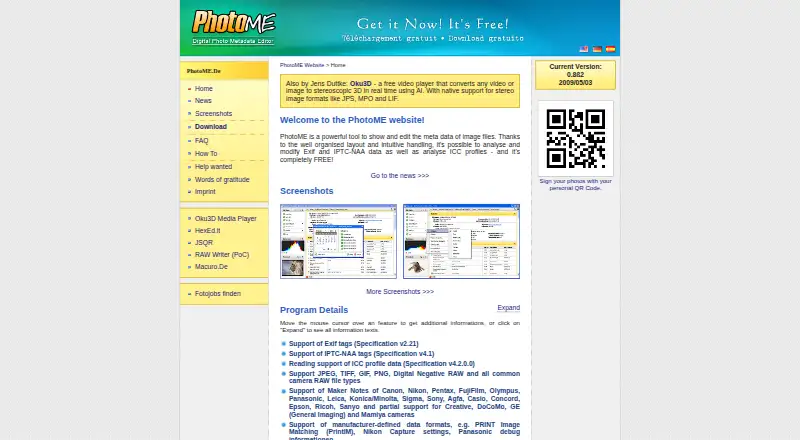
PhotoME is free Windows desktop software for inspecting and editing metadata in digital images. It is aimed at photographers, archivists, and other Windows users who need detailed access to Exif, IPTC-NAA, ICC color profiles, camera maker notes, autofocus points, and embedded GPS information. File support covers JPEG, TIFF, GIF, PNG, DNG, and numerous camera RAW formats, giving it a broad remit across common image and camera-file types.
Its strongest area is metadata inspection. PhotoME can display and locate GPS coordinates through mapping services, browse files with thumbnails, import and export Exif and IPTC-NAA metadata, and export metadata as text or BBCode. Selected RAW files can also receive generated previews. Its listed integrations extend into Google Maps, Google Earth, Mozilla Firefox, Microsoft Internet Explorer, Thunderbird, SeaMonkey, and Opera, which suits workflows that connect image metadata with mapping or browser-based viewing. These capabilities make the product more than a basic tag viewer, particularly for users who need to inspect camera-specific information.
The main constraint is workflow scale and version status. Batch processing is explicitly unavailable, so users managing many images or applying the same changes repeatedly should consider a tool with verified batch editing. The listed version is 0.8ß2, dated 2009-05-03, and IPTC writing is disabled in that beta version; that limits its usefulness when editing IPTC data is a core requirement. PhotoME is a sensible choice for free, detailed Windows inspection across varied image formats, but less suitable for batch-oriented catalog maintenance or dependable IPTC authoring.
Questions about PhotoME
What does PhotoME run on? Windows. It runs as a desktop app.
What does PhotoME integrate with? 7 integrations, including Google Maps, Google Earth, Mozilla Firefox, Microsoft Internet Explorer and Thunderbird.
Who is PhotoME built for? Solo users and small businesses (our editorial estimate).
Your product? Our editors can test PhotoME in depth and publish a review, labelled as paid · from $149/mo →
PhotoME pricing
PhotoME fact sheet
| Free plan | Yes |
|---|---|
| Paid from | Free |
| Metadata scope | Broader |
| Batch editing | No |
| RAW file support | Yes |
| Platform | Desktop |
| GPS metadata tools | Yes |
| Metadata templates | Yes |
| Documented file formats | Not verified |
| Deployment | Desktop |
| Platforms | Windows |
| Support | Email, Docs |
| Built for | Solo, Small business (editorial estimate) |
| Integrations | 7 integrations: Google Maps, Google Earth, Mozilla Firefox, Microsoft Internet Explorer, Thunderbird, SeaMonkey … |
| Pricing | Free plan |
| Website | photome.de |
| Facts checked | 22 Sep 2026 |
PhotoME integrations
PhotoME lists 7 integrations on its own site.
- Google Maps
- Google Earth
- Mozilla Firefox
- Microsoft Internet Explorer
- Thunderbird
- SeaMonkey
- Opera
Alternatives to PhotoME
- ExifToolA free, open-source metadata toolkit for deep, cross-platform batch control.9.4
- PhotiniA complete open-source metadata editor with batch tools, geotagging, and RAW support.9.2
- GeoSetterA focused, free Windows tool for detailed metadata editing and GPS-based photo organization.9.0


See all PhotoME alternatives →
Used PhotoME? Be the first to review it
The editor score above is our own research. What this page doesn't have yet is a reader's view — what you used PhotoME for, what worked and what didn't. No stars are seeded and no review is paid for; an editor reads every one before it appears.
Write a reviewTwo minutes · verified accounts only · read by an editor before it appears
Featured on iTechGuides

PhotoME is listed in our Photo Metadata Editors directory. Add the badge to your site — it links back to this page.
<a href="https://www.itechguides.com/products/photome/"><img src="https://www.itechguides.com/best/badge/photome.svg" alt="Featured on iTechGuides" width="230" height="46"></a>
Reviewed by iTechGuides Editors · Editorial team · Updated Nov 2026
Advertiser disclosure: iTechGuides is reader-supported. Vendors can pay for top positions in our rankings and for a place on other products' pages, and we may earn a commission when you click some links. Bought places stand at the number bought; this page and our disclosure say so. Paying vendors may get a fuller, more detailed review from our editors, and that review can change their score. How we rank.
Last updated · How we research and update