
PhotoGlory
PhotoGlory: A Windows-focused restoration tool with batch processing and creative controls. Ranked #9 of 25 in Photo Restoration Software by our editors (8.2/10); pricing: Paid; best for windows batch restoration with creative controls.
At a glance
- Editor score8.2 / 10
- PricingPaid
- Best forWindows batch restoration with creative controls
- Free planNo
- Paid from$27.50 one-time
- Scratch repairYes
- Facts checked20 Sep 2026
Where it wins
- Repairs scratches, creases, stains, tears, and damaged edges
- Supports automatic and manual colorization plus batch processing
- Includes scanning, geometry correction, red-eye removal, and 100 effects
Where it doesn't
- Available only for Windows desktop
- Standard does not include manual coloring or major-defect repair
- Advanced effects and 3D LUTs require the PRO plan
Our verdict on PhotoGlory
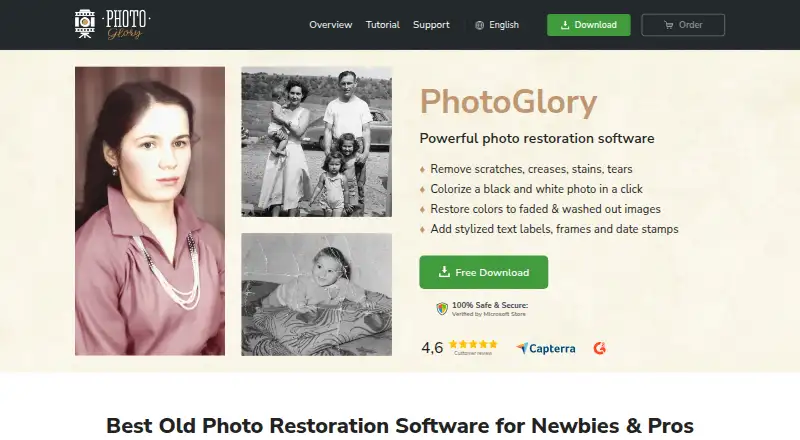
PhotoGlory is Windows desktop software for restoring damaged, faded, and monochrome photographs. It is aimed at beginners, professionals, family archives, and photo-restoration work that benefits from both automated corrections and manual creative control. Its core tools address scratches, creases, stains, tears, damaged edges, faded colors, and red-eye. It also supports black-and-white colorization, photo scanning, geometry correction, captions, date stamps, frames, vintage stickers, and offline work.
The pricing structure is straightforward, with one-time license prices across three plans. Standard costs $27.50 and covers automatic colorization, repair of torn corners, cracks, and tears, and correction of faded or washed-out colors. Deluxe costs $42 and adds manual coloring plus tools to fix major defects and recreate missing parts. PRO costs $56 and adds automatic restoration, manual coloring, major-defect repair, and 100+ filter effects or 3D LUTs. The published plans show the main restoration capabilities at the entry tier, while higher tiers focus on creative control and more extensive repair and effects.
PhotoGlory’s strongest fit is a Windows-based workflow involving multiple photographs or family albums. Batch restoration and colorization can reduce repetitive work, while scanning within the program keeps image capture in the same desktop workflow. Geometry correction and damaged-edge cropping add practical cleanup options, and the built-in effects support a more stylized finish. The trade-off is platform coverage: Windows is the only listed platform, so it is not a fit for users seeking software for other desktop operating systems. Choose PhotoGlory for Windows restoration with batch tools and creative adjustments; consider an alternative if cross-platform access is essential.
Your product? Our editors can test PhotoGlory in depth and publish a review, labelled as paid · from $149/mo →
PhotoGlory pricing
All 3 PhotoGlory plans and prices →
PhotoGlory fact sheet
| Free plan | No |
|---|---|
| Paid from | $27.50 one-time |
| Scratch repair | Yes |
| Photo colorization | Yes |
| Face enhancement | Not verified |
| Batch processing | Yes |
| Platform | Desktop |
| Max export resolution | Not verified |
| Supported file formats | Not verified |
| Deployment | Desktop |
| Platforms | Windows |
| Support | Docs |
| Built for | Solo, Small business (editorial estimate) |
| Pricing | Paid (source) |
| Website | photoglory.net |
| Facts checked | 20 Sep 2026 |
Alternatives to PhotoGlory
- ImageColorizerA broad AI restoration toolkit with flexible device support and a useful free tier.9.4
- Restore.PhotoA broad web restoration tool with free access, batch processing, and Business API support.9.1
- 1001 Photo RestoreA low-cost browser service for batch restoration, colorization, and enhancement.8.9



See all PhotoGlory alternatives →
Also Ranked In
PhotoGlory is ranked in 2 of our directories.
Used PhotoGlory? Be the first to review it
The editor score above is our own research. What this page doesn't have yet is a reader's view — what you used PhotoGlory for, what worked and what didn't. No stars are seeded and no review is paid for; an editor reads every one before it appears.
Write a reviewTwo minutes · verified accounts only · read by an editor before it appears
Featured on iTechGuides

PhotoGlory is listed in our Photo Restoration Software directory. Add the badge to your site — it links back to this page.
<a href="https://www.itechguides.com/products/photoglory/"><img src="https://www.itechguides.com/best/badge/photoglory.svg" alt="Featured on iTechGuides" width="230" height="46"></a>
Reviewed by iTechGuides Editors · Editorial team · Updated Oct 2026
Advertiser disclosure: iTechGuides is reader-supported. Vendors can pay for top positions in our rankings and for a place on other products' pages, and we may earn a commission when you click some links. Bought places stand at the number bought; this page and our disclosure say so. Paying vendors may get a fuller, more detailed review from our editors, and that review can change their score. How we rank.
Last updated · How we research and update