Photo Ninja
Photo Ninja: A focused desktop RAW converter with strong rendering tools and limited output options. Ranked #34 of 37 in Batch Photo Processing Software by our editors (5.9/10); pricing: 14-day trial; best for users prioritizing high-quality RAW rendering.
At a glance
- Editor score5.9 / 10
- Pricing14-day trial
- Best forUsers prioritizing high-quality RAW rendering
- Free planNo
- Paid from$119 one-time
- RAW processingYes
- Founded2003 · Austin, Texas, United States
- Facts checked20 Sep 2026
Where it wins
- RAW conversion with advanced demosaicing and highlight recovery
- Batch rendering with saved, copied, and default settings
- Noise reduction, adaptive lighting, and correction tools
Where it doesn't
- JPEG and TIFF are the listed export formats
- The license costs $119 upfront
- Compatibility documentation may be dated
Our verdict on Photo Ninja
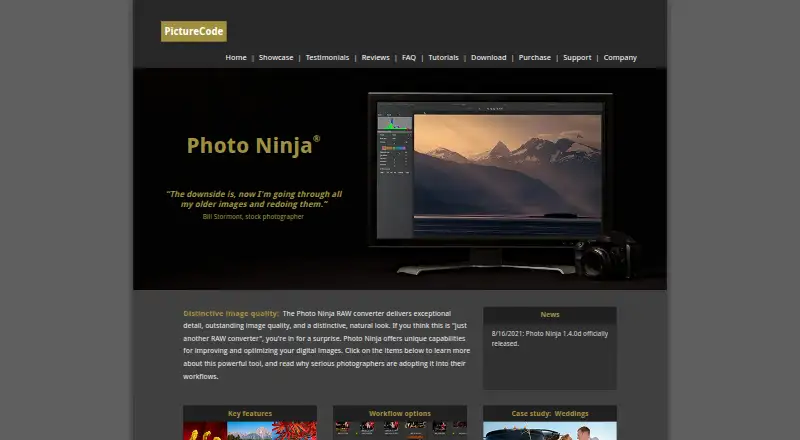
Photo Ninja is a desktop RAW converter and image-enhancement application from PictureCode LLC for professional and serious amateur photographers. It processes RAW, JPEG, and TIFF files, with tools for demosaicing, noise reduction, adaptive lighting, detail enhancement, highlight recovery, color correction, and distortion correction. An integrated folder-based browser supports image organization, while batch rendering applies settings across multiple images.
Pricing is centered on a one-time license. The Photo Ninja license key costs $119, activates all features, provides a perpetual license, and includes one year of upgrades. The Photo Ninja upgrade key costs $49 one-time and renews a license key for another year of software upgrades. Users with a legacy Noise Ninja license can move to Photo Ninja through the $69 one-time upgrade key. There is no free plan, while a 14-day free trial is available. This structure suits photographers who prefer perpetual desktop licensing, but the upfront cost is significant for a tool with two listed export formats.
The strongest fit is a RAW-focused workflow that values image rendering, repeatable presets, and batch processing over broad delivery options. Saved and global presets support consistent processing, and XMP-based editing settings help retain adjustments. Photo Ninja also integrates with Photo Mechanic and Adobe Lightroom, and runs on Windows and macOS. Choose it when RAW conversion quality and correction controls are the priority; look elsewhere if you need a wider range of output formats, broader platform coverage, or a lower upfront cost.
Your product? Our editors can test Photo Ninja in depth and publish a review, labelled as paid · from $149/mo →
Photo Ninja pricing
All 3 Photo Ninja plans and prices →
Photo Ninja fact sheet
| Free plan | No |
|---|---|
| Paid from | $119 one-time |
| RAW processing | Yes |
| Bulk renaming | Not verified |
| Bulk resizing | Not verified |
| Output formats | JPEG, TIFF |
| Supported platforms | Windows, macOS |
| Watched folders | Not verified |
| Batch automation level | Preset-based |
| Free trial | 14 days |
| Deployment | Desktop |
| Platforms | Windows, macOS |
| Support | Email, Docs |
| Built for | Solo, Small business (editorial estimate) |
| Integrations | 2 integrations: Photo Mechanic, Adobe Lightroom |
| Pricing | 14-day trial (source) |
| Website | picturecode.com |
| Facts checked | 20 Sep 2026 |
Photo Ninja integrations
Photo Ninja lists 2 integrations on its own site.
- Photo Mechanic
- Adobe Lightroom
Alternatives to Photo Ninja
- XnConvertA low-cost desktop tool for automated, multi-format batch image processing.9.4
- ImageMagickA capable command-line toolkit for developers building automated image pipelines.9.2
- BatchPhotoA capable desktop batch processor for high-volume conversion and repeatable image workflows.9.0


See all Photo Ninja alternatives →
Also Ranked In
Photo Ninja is ranked in 3 of our directories.
Used Photo Ninja? Be the first to review it
The editor score above is our own research. What this page doesn't have yet is a reader's view — what you used Photo Ninja for, what worked and what didn't. No stars are seeded and no review is paid for; an editor reads every one before it appears.
Write a reviewTwo minutes · verified accounts only · read by an editor before it appears
Featured on iTechGuides

Photo Ninja is listed in our Batch Photo Processing Software directory. Add the badge to your site — it links back to this page.
<a href="https://www.itechguides.com/products/photo-ninja/"><img src="https://www.itechguides.com/best/badge/photo-ninja.svg" alt="Featured on iTechGuides" width="230" height="46"></a>
Reviewed by iTechGuides Editors · Editorial team · Updated Oct 2026
Advertiser disclosure: iTechGuides is reader-supported. Vendors can pay for top positions in our rankings and for a place on other products' pages, and we may earn a commission when you click some links. Bought places stand at the number bought; this page and our disclosure say so. Paying vendors may get a fuller, more detailed review from our editors, and that review can change their score. How we rank.
Last updated · How we research and update