Pencil Code
Pencil Code: A free, open-source path from visual coding to text-based creative projects. Ranked #26 of 42 in Coding Learning Software by our editors (6.9/10); pricing: Free plan; best for beginners learning blocks alongside text.
At a glance
- Editor score6.9 / 10
- PricingFree plan
- Best forBeginners learning blocks alongside text
- Free planYes
- Paid fromFree
- Feedback modeAutomated
- Facts checked23 Sep 2026
Where it wins
- Dual-mode editing connects blocks with CoffeeScript and other web languages
- Supports art, music, games, stories, webpages, simulations, and algorithms
- Includes online guides, classroom activities, and teacher materials
Where it doesn't
- Access is limited to the web
- CoffeeScript is the main programming language
- Public sharing may not suit projects requiring private distribution
Our verdict on Pencil Code
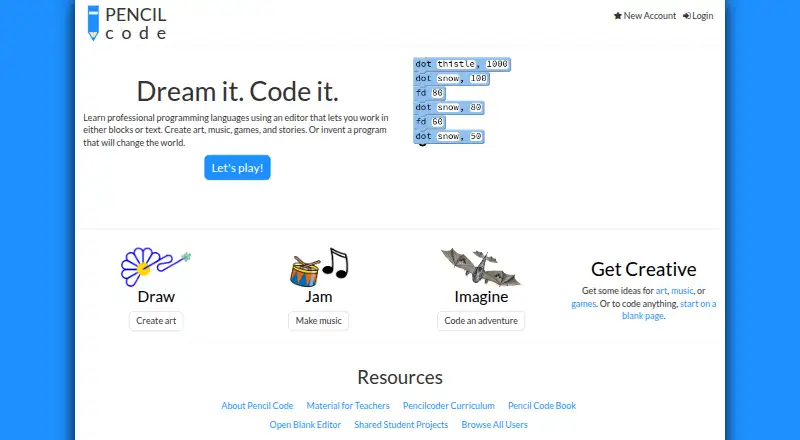
Pencil Code is a free, open-source, browser-based programming environment for learners who want to move between blocks and text. Its dual-mode editor supports CoffeeScript alongside JavaScript, HTML, and CSS, making it suitable for beginners who are ready to connect visual programming concepts with written code. The project-based format covers creative work such as art, music, games, stories, webpages, simulations, and algorithms. Turtle graphics, online saving, and public sharing give learners several ways to turn lessons into visible projects.
Its strongest fit is educational use built around guided activities and experimentation. Pencil Code provides online guides, classroom activities, a teacher manual, and an illustrated programming book, while the programming environment gives learners a broad set of project directions. The combination of blocks, text, and web technologies can support a gradual transition from introductory exercises to more expressive creations. Teachers and learners should expect a browser-based experience rather than a native application, since web is the listed platform.
Pencil Code’s open-source model and free access make it straightforward to consider for classrooms, self-directed learners, and educators looking for reusable teaching materials without paid tiers. It is less suitable for buyers seeking a polished commercial learning suite, a broad integration ecosystem, or a primary language other than CoffeeScript. Learners who value public project sharing and creative programming should find the format aligned with its focus; those who need private distribution or mobile access should choose another option.
Your product? Our editors can test Pencil Code in depth and publish a review, labelled as paid · from $149/mo →
Pencil Code pricing
Pencil Code fact sheet
| Free plan | Yes |
|---|---|
| Paid from | Free |
| Feedback mode | Automated |
| Learning format | Mixed |
| Programming languages | CoffeeScript, JavaScript, HTML, CSS |
| Project-based learning | Yes |
| Mobile apps | Not verified |
| Computer science topics | Yes |
| Deployment | Cloud |
| Platforms | Web |
| Support | Community, Docs |
| Built for | Solo, Small business (editorial estimate) |
| Pricing | Free plan |
| Website | pencilcode.net |
| Facts checked | 23 Sep 2026 |
Alternatives to Pencil Code
- CodeAI (formerly Code.org)A free, structured web curriculum with classroom tools, labs, and educator support.9.4
- freeCodeCampA completely free, open-source path from coding challenges to full-stack certifications.9.3
- CodecademyA broad coding curriculum with free entry and structured paid paths.9.2



See all Pencil Code alternatives →
Used Pencil Code? Be the first to review it
The editor score above is our own research. What this page doesn't have yet is a reader's view — what you used Pencil Code for, what worked and what didn't. No stars are seeded and no review is paid for; an editor reads every one before it appears.
Write a reviewTwo minutes · verified accounts only · read by an editor before it appears
Featured on iTechGuides

Pencil Code is listed in our Coding Learning Software directory. Add the badge to your site — it links back to this page.
<a href="https://www.itechguides.com/products/pencil-code/"><img src="https://www.itechguides.com/best/badge/pencil-code.svg" alt="Featured on iTechGuides" width="230" height="46"></a>
Reviewed by iTechGuides Editors · Editorial team · Updated Oct 2026
Advertiser disclosure: iTechGuides is reader-supported. Vendors can pay for top positions in our rankings and for a place on other products' pages, and we may earn a commission when you click some links. Bought places stand at the number bought; this page and our disclosure say so. Paying vendors may get a fuller, more detailed review from our editors, and that review can change their score. How we rank.
Last updated · How we research and update