
Pelton
Pelton: A privacy-focused desktop client for offline mail, encryption, and keyboard-driven workflows. Ranked #63 of 142 in Email Clients by our editors (3.5/10); pricing: Free plan; best for open-source desktop users needing secure offline mail.
At a glance
- Editor score3.5 / 10
- PricingFree plan
- Best forOpen-source desktop users needing secure offline mail
- Free planYes
- Paid fromFree
- App coverageDesktop
- Facts checked23 Sep 2026
Where it wins
- Local SQLite storage with offline search, caching, and pinned messages
- PGP and S/MIME signing, encryption, decryption, and verification
- Scheduled sending, snoozing, shortcuts, previews, and desktop notifications
Where it doesn't
- Desktop-only, with no mobile version
- Provider connectivity centers on IMAP, SMTP, and CardDAV
- No unified inbox or calendar tools are described
Our verdict on Pelton
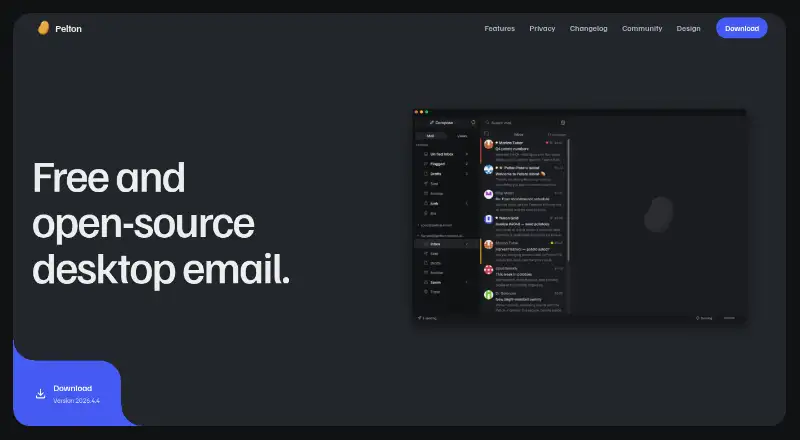
Pelton is a free, open-source desktop email client for macOS, Windows, and Linux. It connects to standard IMAP and SMTP mail providers, stores messages in a local SQLite database, and supports offline reading and full-text mailbox search. Its audience is desktop users who want local control over mail data, offline access, and a client that supports encryption workflows. Pelton is distributed under the GPL-3.0 license and does not route mail through servers operated by the project.
Its strongest area is the offline and privacy-oriented desktop experience. Local message storage, offline caching, pinned messages, and full-text search support work away from an active connection. PGP and S/MIME features cover signing, encryption, decryption, and verification. Scheduled sending and snoozing add message-management controls, while native notifications, PDF, image, and text previews, a command palette, and customizable keyboard shortcuts support daily desktop use. The MCP server also provides local agent access. These capabilities make Pelton a focused choice for users who value local mail handling and configurable workflows.
Pelton fits accounts and address books through IMAP, SMTP, and CardDAV, but its stated platform coverage is desktop-only and no mobile version is available. The published feature set does not describe a unified inbox or calendar tools, so users seeking a broader communications workspace may prefer a client with those capabilities. Choose Pelton for open-source desktop email, offline search, local storage, and built-in PGP or S/MIME support. Choose an alternative if mobile access, calendar functionality, or wider provider-specific integrations are central to your workflow.
Your product? Our editors can test Pelton in depth and publish a review, labelled as paid · from $149/mo →
Pelton pricing
Pelton fact sheet
| Free plan | Yes |
|---|---|
| Paid from | Free |
| App coverage | Desktop |
| Account limit | Not verified |
| Unified inbox | Not verified |
| Offline access | Yes |
| Scheduled sending | Yes |
| Calendar tools | Not verified |
| Deployment | Desktop |
| Platforms | macOS, Windows, Linux |
| Support | Email, Community |
| Built for | Solo, Small business (editorial estimate) |
| Pricing | Free plan |
| Website | pelton.app |
| Facts checked | 23 Sep 2026 |
Alternatives to Pelton
- Mozilla ThunderbirdA capable free client for multi-account email, offline access, and desktop productivity tools.9.4
- Zoho MailA flexible hosted email service with free access, migration tools, and Zoho collaboration options.9.2
- Apple MailA capable Apple-focused email client with unified inboxes, scheduling, privacy controls, and AI assistance.9.1



Used Pelton? Be the first to review it
The editor score above is our own research. What this page doesn't have yet is a reader's view — what you used Pelton for, what worked and what didn't. No stars are seeded and no review is paid for; an editor reads every one before it appears.
Write a reviewTwo minutes · verified accounts only · read by an editor before it appears
Featured on iTechGuides

Pelton is listed in our Email Clients directory. Add the badge to your site — it links back to this page.
<a href="https://www.itechguides.com/products/pelton/"><img src="https://www.itechguides.com/best/badge/pelton.svg" alt="Featured on iTechGuides" width="230" height="46"></a>
Reviewed by iTechGuides Editors · Editorial team · Updated Oct 2026
Advertiser disclosure: iTechGuides is reader-supported. Vendors can pay for top positions in our rankings and for a place on other products' pages, and we may earn a commission when you click some links. Bought places stand at the number bought; this page and our disclosure say so. Paying vendors may get a fuller, more detailed review from our editors, and that review can change their score. How we rank.
Last updated · How we research and update