
Paperforge
Paperforge: A free, open-source desktop toolkit for merging, organizing, converting, and comparing PDFs locally. Ranked #11 of 36 in PDF Merger Software by our editors (8.3/10); pricing: Free plan; best for open-source desktop PDF organization.
At a glance
- Editor score8.3 / 10
- PricingFree plan
- Best forOpen-source desktop PDF organization
- Free planYes
- Paid fromFree
- Facts checked20 Sep 2026
Where it wins
- Free and open-source on Windows, macOS, and Linux
- Visual page thumbnails support reordering and deletion
- Local processing handles PDF jobs without uploads or an account
Where it doesn't
- Desktop-focused rather than a browser-based workflow
- No AI-assisted features
- Best suited to routine PDF operations, not broader document management
Our verdict on Paperforge
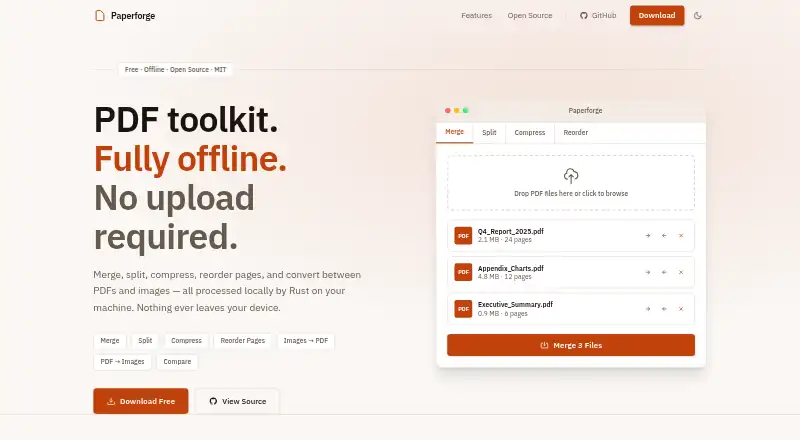
Paperforge is a free, open-source desktop PDF toolkit for individuals and teams handling routine document work. It supports merging multiple PDFs, splitting documents by page range or into individual pages, compressing files with selectable quality levels, and removing or reordering pages through visual thumbnails. It also converts JPG, PNG, and WebP images to PDF, exports PDF pages as PNG or JPG images, and compares two PDF versions side by side. Official installers are available for Windows, macOS, and Linux.
Local processing is one of Paperforge’s clearest advantages. PDF jobs run on the device through a Rust-based backend, so the workflow does not require uploads, an account, a subscription, or an internet connection. That makes the product a practical fit for users who want a straightforward desktop utility for document organization and routine file conversion. Its feature set is broader than merging alone, while remaining centered on PDF and image operations rather than a wider document-management system.
Paperforge is a strong choice for people who prefer open-source software and need a free desktop application across the major desktop platforms. The visual page controls are useful when a merge requires more than simply joining files, and the comparison feature adds value for reviewing two PDF versions. Users seeking AI-assisted workflows, browser-based access, or a broader document-management environment should look at alternatives designed around those needs instead. For local, no-subscription PDF organization, Paperforge keeps the scope focused and practical.
Your product? Our editors can test Paperforge in depth and publish a review, labelled as paid · from $149/mo →
Paperforge pricing
Paperforge fact sheet
| Free plan | Yes |
|---|---|
| Paid from | Free |
| Batch merging | Not verified |
| Page selection | Yes |
| Files per merge | Not verified |
| Maximum file size | Not verified |
| Primary platform | Desktop |
| Cloud storage support | Not verified |
| Deployment | Desktop |
| Platforms | Windows, macOS, Linux |
| Support | Community |
| Built for | Solo, Small business, Mid-market, Enterprise (editorial estimate) |
| Pricing | Free plan |
| Website | paperforge.asyncat.com |
| Facts checked | 20 Sep 2026 |
Alternatives to Paperforge
- PDFsam BasicA free, open-source PDF toolkit with detailed merging controls and offline processing.9.4
- PDF24 CreatorA mature free PDF toolkit that goes far beyond merging, but works only on Windows.9.3
- PDFtkA precise PDF toolkit for users who need page-level control and command-line processing.9.1


See all Paperforge alternatives →
Used Paperforge? Be the first to review it
The editor score above is our own research. What this page doesn't have yet is a reader's view — what you used Paperforge for, what worked and what didn't. No stars are seeded and no review is paid for; an editor reads every one before it appears.
Write a reviewTwo minutes · verified accounts only · read by an editor before it appears
Featured on iTechGuides

Paperforge is listed in our PDF Merger Software directory. Add the badge to your site — it links back to this page.
<a href="https://www.itechguides.com/products/paperforge/"><img src="https://www.itechguides.com/best/badge/paperforge.svg" alt="Featured on iTechGuides" width="230" height="46"></a>
Reviewed by iTechGuides Editors · Editorial team · Updated Oct 2026
Advertiser disclosure: iTechGuides is reader-supported. Vendors can pay for top positions in our rankings and for a place on other products' pages, and we may earn a commission when you click some links. Bought places stand at the number bought; this page and our disclosure say so. Paying vendors may get a fuller, more detailed review from our editors, and that review can change their score. How we rank.
Last updated · How we research and update