
OwlCAD
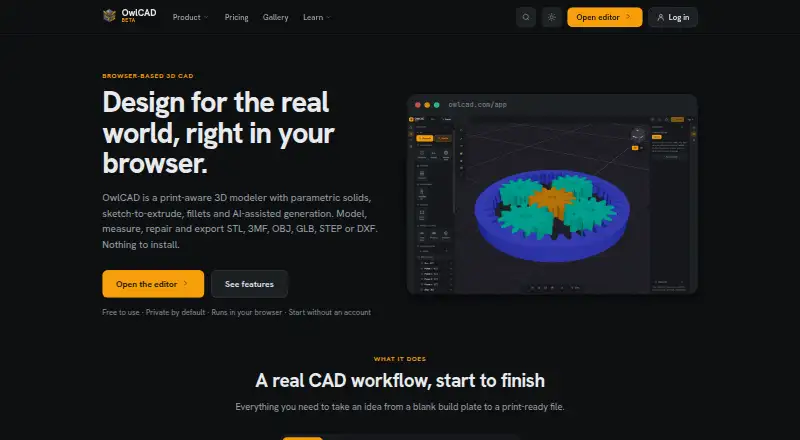
OwlCAD: A free browser CAD editor with print-aware tools and optional AI-assisted modeling. Ranked #32 of 80 in 3D CAD Software by our editors (6.2/10); pricing: Free plan; best for free browser-accessible CAD with AI-assisted modeling.
At a glance
- Editor score6.2 / 10
- PricingFree plan
- Best forFree browser-accessible CAD with AI-assisted modeling
- Free planYes
- Assembly designYes
- Facts checked19 Sep 2026
Where it wins
- Free parametric editor with editable dimensions and model history
- Assembly tools include motion checking, exploded views and bills of materials
- Print-aware checks, mesh repair and printer profiles support print preparation
Where it doesn't
- Pro plan adds AI features, but its subscription price is not shown here
- No-code customizer and browser sharing may not suit every engineering workflow
- Dedicated sheet-metal and surface-modeling tools are not described
Our verdict on OwlCAD
OwlCAD is a browser-based 3D CAD application for designing print-ready parts. It is aimed at people who want parametric modeling, print preparation and cloud project sharing without installing the free editor or creating an account. Its tools include sketches, extrusions, revolves, sweeps, lofts and Boolean operations, along with editable dimensions and modeling history. The application is also available on Windows, macOS and Linux, and supports import and export for STL, 3MF, OBJ, GLB, STEP, SVG and DXF; OpenSCAD .scad and .csg files are listed for import.
The free plan covers substantial core work: model customization, cloud projects, sharing and version history, plus assembly tools and bills of materials. Assembly workflows also include mates, motion checking and exploded views. For print-focused work, OwlCAD lists printability checks, mesh repair, printer profiles, measurements and print cost estimates. Cloud autosave, share links and comments support collaborative review. This makes the free tier a useful starting point for individuals and teams who need accessible part design and print preparation, though buyers should check whether its listed workflows match their engineering requirements.
Pro is the route to AI-assisted work: its listed additions include AI model generation, modifying and customizing with AI, monthly AI credits, MCP server access and credit top-up packs. Integrations include Claude Code, Claude Desktop, Cursor and MCP. The published plan details do not provide a numeric Pro subscription price, so compare the cost directly before depending on its AI tools. Choose OwlCAD if a browser-first parametric editor, print-aware features and sharing fit the job; consider another CAD tool if dedicated sheet-metal or surface-modeling functions are central to the workflow.
Your product? Our editors can test OwlCAD in depth and publish a review, labelled as paid · from $149/mo →
OwlCAD pricing
All 2 OwlCAD plans and prices →
OwlCAD fact sheet
| Free plan | Yes |
|---|---|
| Paid from | Not verified |
| Modeling method | Parametric |
| Assembly design | Yes |
| Sheet-metal tools | Not verified |
| Surface modeling | Not verified |
| Cloud collaboration | Yes |
| Supported platforms | Web browser; Windows, macOS and Linux |
| File import and export | Import/export: STL, 3MF, OBJ, GLB, STEP, SVG and DXF; OpenSCAD .scad and .csg import |
| Deployment | Cloud, Desktop |
| Platforms | Web, Windows, macOS, Linux |
| Integrations | 4 integrations: Claude Code, Claude Desktop, Cursor, MCP |
| Pricing | Free plan (source) |
| Website | owlcad.com |
| Facts checked | 19 Sep 2026 |
OwlCAD integrations
OwlCAD lists 4 integrations on its own site.
- Claude Code
- Claude Desktop
- Cursor
- MCP
Alternatives to OwlCAD
- Siemens NXDeep hybrid CAD with Teamcenter integration for large engineering organizations.9.4
- CATIAA deep engineering suite for complex products, with enterprise pricing to match.9.3
- SOLIDWORKSFull mechanical CAD with broad design, manufacturing, simulation, and collaboration tools.9.2


Used OwlCAD? Be the first to review it
The editor score above is our own research. What this page doesn't have yet is a reader's view — what you used OwlCAD for, what worked and what didn't. No stars are seeded and no review is paid for; an editor reads every one before it appears.
Write a reviewTwo minutes · verified accounts only · read by an editor before it appears
Featured on iTechGuides

OwlCAD is listed in our 3D CAD Software directory. Add the badge to your site — it links back to this page.
<a href="https://www.itechguides.com/products/owlcad/"><img src="https://www.itechguides.com/best/badge/owlcad.svg" alt="Featured on iTechGuides" width="230" height="46"></a>
Reviewed by iTechGuides Editors · Editorial team · Updated Oct 2026
Advertiser disclosure: iTechGuides is reader-supported. Vendors can pay for top positions in our rankings and for a place on other products' pages, and we may earn a commission when you click some links. Bought places stand at the number bought; this page and our disclosure say so. Paying vendors may get a fuller, more detailed review from our editors, and that review can change their score. How we rank.
Last updated · How we research and update