OpenPDF
OpenPDF: A capable free Java PDF library for creation, editing, rendering, and extraction. Ranked #26 of 31 in PDF SDKs by our editors (6.5/10); pricing: Free plan; best for free Java PDF creation and editing.
At a glance
- Editor score6.5 / 10
- PricingFree plan
- Best forFree Java PDF creation and editing
- Free planYes
- Paid fromFree
- Facts checked20 Sep 2026
Where it wins
- Creates, edits, renders, and extracts content from PDF documents
- Generates PDFs from HTML/CSS and supports graphics, images, and tables
- Supports encryption, compression, page layout, Android, and Kotlin
Where it doesn't
- Primarily targets Java/JVM and Android development
- Its feature set is narrower than leading general-purpose PDF SDKs
- Licensing varies between LGPL/MPL and LGPL-only modules
Our verdict on OpenPDF
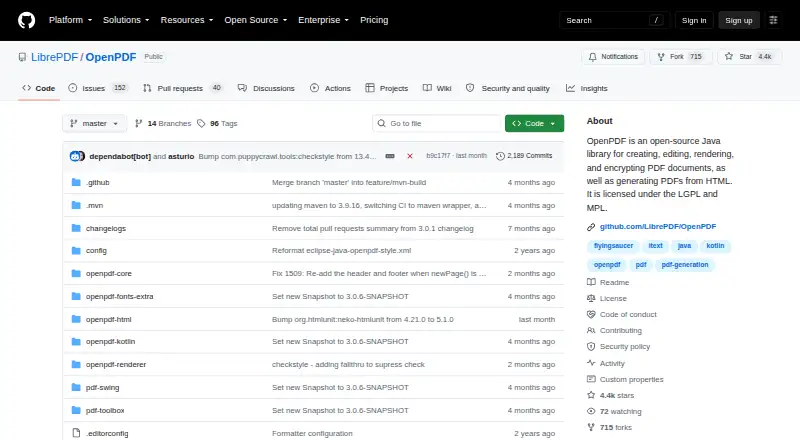
OpenPDF is an open-source Java library for creating, editing, rendering, encrypting, and reading PDF documents. It is designed for developers working in Java or Kotlin environments, including Android applications. Core capabilities cover new PDF creation, existing-document edits such as adding or removing pages and modifying text, text extraction, multiple fonts and styles, graphics, images, tables, and control over page size, orientation, and layout. Annotation tools are also included in its published category specifications.
Its strongest fit is a development team that wants broad PDF generation and manipulation without a paid plan. The openpdf-html module generates PDFs from HTML/CSS, while openpdf-renderer can render PDF pages as images. The library also supports PDF 2.0 and can read and write Brotli-compressed PDF streams. Android support extends its reach beyond standard JVM applications, while documented native binaries support Brotli-related work on Linux, macOS, and Windows. These features make OpenPDF suitable for document-generation workflows that need formatting, extraction, rendering, or encryption in one Java-oriented library.
The main trade-off is focus. OpenPDF covers substantial PDF fundamentals, but its verified feature set is narrower than leading general-purpose SDKs, so teams needing a wider range of specialized PDF capabilities should compare alternatives. It also has no AI features, and its licensing requires attention because the project uses dual LGPL 2.1 and Mozilla Public License 2.0 licensing, with some modules under LGPL 2.1 only. Choose OpenPDF for free, open-source Java or Kotlin PDF work; look elsewhere when broader SDK coverage or a different development stack is the priority.
Your product? Our editors can test OpenPDF in depth and publish a review, labelled as paid · from $149/mo →
OpenPDF pricing
OpenPDF fact sheet
| Free plan | Yes |
|---|---|
| Paid from | Free |
| PDF operations | PDF creation, editing, rendering, HTML-to-PDF generation, text extraction, encryption, and compression |
| Supported platforms | Java/JVM, Android; Linux, macOS, and Windows native binaries are documented for Brotli support |
| Language coverage | Java and Kotlin |
| Deployment model | Not verified |
| Annotation tools | Yes |
| Commercial license | Not verified |
| Deployment | Self-hosted |
| Platforms | Windows, macOS, Linux, Android |
| Support | Docs |
| Pricing | Free plan |
| Website | github.com |
| Facts checked | 20 Sep 2026 |
Alternatives to OpenPDF
- Foxit PDF SDKA broad commercial PDF SDK for teams building document-heavy applications across major platforms.9.3
- Nutrient SDKA broad cross-platform PDF SDK with a useful free viewer tier and quote-based commercial licensing.8.9
- Adobe PDF Library SDKA native PDF SDK for enterprise applications that need broad document processing capabilities.8.8


See all OpenPDF alternatives →
Used OpenPDF? Be the first to review it
The editor score above is our own research. What this page doesn't have yet is a reader's view — what you used OpenPDF for, what worked and what didn't. No stars are seeded and no review is paid for; an editor reads every one before it appears.
Write a reviewTwo minutes · verified accounts only · read by an editor before it appears
Featured on iTechGuides

OpenPDF is listed in our PDF SDKs directory. Add the badge to your site — it links back to this page.
<a href="https://www.itechguides.com/products/openpdf/"><img src="https://www.itechguides.com/best/badge/openpdf.svg" alt="Featured on iTechGuides" width="230" height="46"></a>
Reviewed by iTechGuides Editors · Editorial team · Updated Oct 2026
Advertiser disclosure: iTechGuides is reader-supported. Vendors can pay for top positions in our rankings and for a place on other products' pages, and we may earn a commission when you click some links. Bought places stand at the number bought; this page and our disclosure say so. Paying vendors may get a fuller, more detailed review from our editors, and that review can change their score. How we rank.
Last updated · How we research and update