OpenLock
OpenLock: A free, open Linux option with broad lockdown controls, but not exam-ready yet. Ranked #16 of 22 in Lockdown Browser Software by our editors (6.8/10); pricing: Free plan; best for linux institutions wanting a free open option.
At a glance
- Editor score6.8 / 10
- PricingFree plan
- Best forLinux institutions wanting a free open option
- Free planYes
- Paid fromFree
- Blocks app switchingYes
- Facts checked21 Sep 2026
Where it wins
- Free and open-source with Linux-native kiosk support
- Controls processes, shortcuts, clipboard, navigation, and browser features
- Adapters for Moodle, Canvas, and Blackboard
Where it doesn't
- Limited to Linux
- SEB key derivation is not yet byte-exact
- Not exam-ready; live LMS validation is incomplete
Our verdict on OpenLock
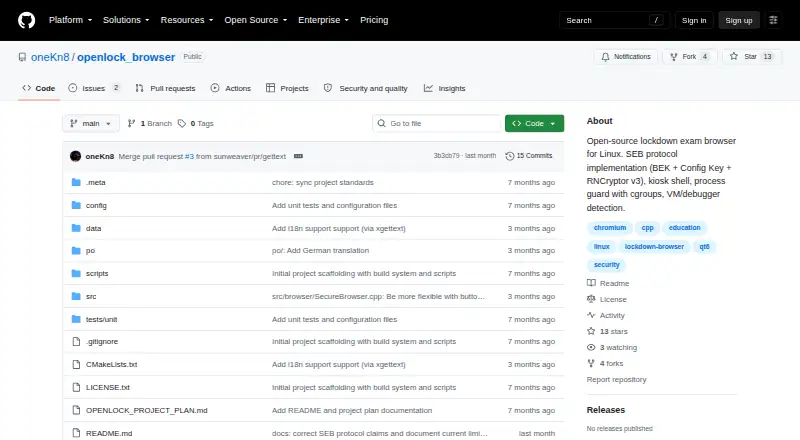
OpenLock is an open-source, Linux-native kiosk browser for secured online assessments. It is aimed at educational institutions and students who need a lockdown browser on Linux, with support for the Safe Exam Browser protocol and .seb configuration parsing. Its assessment controls cover fullscreen kiosk operation through X11 or Wayland/Cage, prohibited-application monitoring and termination, keyboard shortcuts, clipboard use, downloads, right-click access, and browser developer tools. System-integrity checks also address virtual machines, debuggers, and hypervisors.
Its main strength is the breadth of controls available in a free, open-source package. OpenLock can apply URL allowlists and blocklists, enforce navigation policies, and includes category adapters for Moodle, Canvas, and Blackboard. The published category specifications also include app-switching, copy and print, and screen-capture blocking. That combination makes it relevant for Linux institutions that need control over both the browser session and the surrounding desktop environment.
Readiness is the key qualification. OpenLock is not exam-ready because its SEB key derivation is not yet byte-exact, and live validation with Moodle, Canvas, and Blackboard has not been completed. Institutions choosing it should be prepared to assess those protocol and LMS requirements before relying on it for live assessments. Linux-only support also rules it out for mixed-platform deployments that need one lockdown browser across operating systems. OpenLock fits teams prioritizing an open implementation and Linux compatibility; institutions seeking a currently validated exam deployment or broader platform coverage should choose an alternative.
Your product? Our editors can test OpenLock in depth and publish a review, labelled as paid · from $149/mo →
OpenLock pricing
OpenLock fact sheet
| Free plan | Yes |
|---|---|
| Paid from | Free |
| Supported platforms | Linux |
| Blocks app switching | Yes |
| Blocks copy and printing | Yes |
| Blocks screen capture | Yes |
| Offline assessment mode | Not verified |
| LMS integration | Not verified |
| Deployment | Desktop |
| Platforms | Linux |
| Support | Community |
| Built for | Mid-market, Enterprise (editorial estimate) |
| Integrations | 3 integrations: Moodle, Canvas, Blackboard |
| Pricing | Free plan |
| Website | github.com |
| Facts checked | 21 Sep 2026 |
OpenLock integrations
OpenLock lists 3 integrations on its own site.
- Moodle
- Canvas
- Blackboard
Alternatives to OpenLock
- Respondus LockDown BrowserA broad-platform exam browser for institutions using major LMS platforms.8.9
- Prometric Secure Proprietary BrowserA controlled exam desktop with authentication, proctoring, analytics, and support.8.6
- ExamOnlineA broad assessment suite for organizations needing lockdown controls and proctoring.8.3


See all OpenLock alternatives →
Used OpenLock? Be the first to review it
The editor score above is our own research. What this page doesn't have yet is a reader's view — what you used OpenLock for, what worked and what didn't. No stars are seeded and no review is paid for; an editor reads every one before it appears.
Write a reviewTwo minutes · verified accounts only · read by an editor before it appears
Featured on iTechGuides

OpenLock is listed in our Lockdown Browser Software directory. Add the badge to your site — it links back to this page.
<a href="https://www.itechguides.com/products/openlock/"><img src="https://www.itechguides.com/best/badge/openlock.svg" alt="Featured on iTechGuides" width="230" height="46"></a>
Reviewed by iTechGuides Editors · Editorial team · Updated Oct 2026
Advertiser disclosure: iTechGuides is reader-supported. Vendors can pay for top positions in our rankings and for a place on other products' pages, and we may earn a commission when you click some links. Bought places stand at the number bought; this page and our disclosure say so. Paying vendors may get a fuller, more detailed review from our editors, and that review can change their score. How we rank.
Last updated · How we research and update