OpenFocus
OpenFocus: A capable free option for technical users who want several focus-fusion methods. Ranked #11 of 24 in Focus Stacking Software by our editors (7.9/10); pricing: Free plan; best for technical users exploring many fusion algorithms.
At a glance
- Editor score7.9 / 10
- PricingFree plan
- Best forTechnical users exploring many fusion algorithms
- Free planYes
- Paid fromFree
- Facts checked20 Sep 2026
Where it wins
- Multiple registration and fusion algorithms, including Homography and ECC
- Batch processing across multiple folders with ROI workflows
- Free, open-source software for Windows, macOS, and Linux
Where it doesn't
- macOS and Linux use requires running the software from source
- GPU acceleration is optional and limited to StackMFF V4
- The workflow is more technical than a single-method focus stacker
Our verdict on OpenFocus
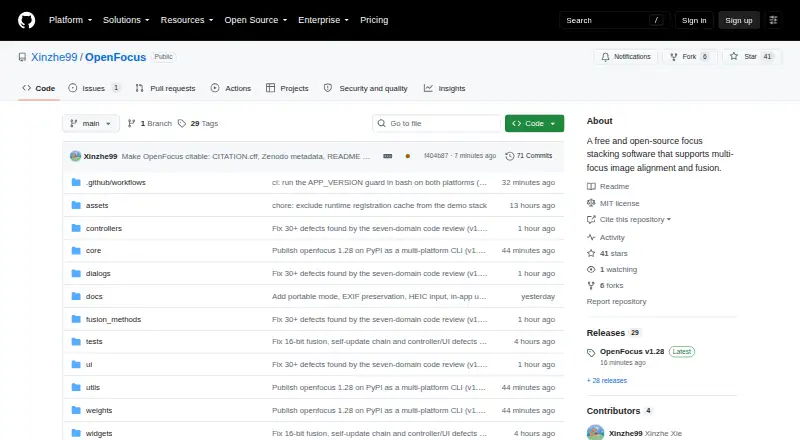
OpenFocus is a free, open-source desktop workstation for combining images captured at different focus depths. It is aimed at photographers and other technical users who want control over registration and fusion rather than a single automated stacking method. Workflows can handle alignment only, fusion only, or both stages together, while batch processing across multiple folders supports larger sets of images. Common output formats include JPG, PNG, BMP, and TIFF, with annotation overlays and GIF export adding useful presentation options.
Its main strength is algorithmic breadth. OpenFocus provides Homography and ECC methods for registration, then offers several fusion approaches, including guided filter, DCT, DTCWT, GFG-FGF, and StackMFF V4. ROI fusion workflows allow processing around selected image areas, and StackMFF V4 can use optional GPU acceleration. The software also includes an AI-oriented deep-learning model through StackMFF V4, giving users a choice between multiple classical methods and a model-based approach. That combination makes it a good fit for comparing techniques or adapting processing to different focus-bracketed sets.
Platform setup is the main practical consideration. A pre-built Windows package is available, while macOS and Linux use requires running the software from source. That distinction favors users comfortable with technical installation and configuration, especially when working across platforms. Choose OpenFocus if free access, open-source availability, batch folders, ROI processing, and algorithm choice matter more than a simplified workflow. Users seeking a ready-to-run experience on every supported desktop platform or a narrowly guided stacking process may prefer a less technical alternative.
Your product? Our editors can test OpenFocus in depth and publish a review, labelled as paid · from $149/mo →
OpenFocus pricing
OpenFocus fact sheet
| Free plan | Yes |
|---|---|
| Paid from | Free |
| RAW file support | Not verified |
| Automatic alignment | Yes |
| Batch processing | Yes |
| Manual retouching | Not verified |
| Supported platforms | Windows |
| Output formats | JPG, PNG, BMP, TIFF |
| Deployment | Self-hosted, Desktop |
| Platforms | Windows, macOS, Linux |
| Support | Community |
| Built for | Solo, Small business (editorial estimate) |
| Pricing | Free plan |
| Website | github.com |
| Facts checked | 20 Sep 2026 |
Alternatives to OpenFocus
- PlaneFuseA flexible local stacker for advanced photographers working across RAW and developed images.9.4
- ForgePixA free, open-source workstation for focus stacking, astrophotography, and related image workflows.9.3
- Shine StackerA capable free stacker with desktop controls, RAW support, and automation options.9.1

See all OpenFocus alternatives →
Used OpenFocus? Be the first to review it
The editor score above is our own research. What this page doesn't have yet is a reader's view — what you used OpenFocus for, what worked and what didn't. No stars are seeded and no review is paid for; an editor reads every one before it appears.
Write a reviewTwo minutes · verified accounts only · read by an editor before it appears
Featured on iTechGuides

OpenFocus is listed in our Focus Stacking Software directory. Add the badge to your site — it links back to this page.
<a href="https://www.itechguides.com/products/openfocus/"><img src="https://www.itechguides.com/best/badge/openfocus.svg" alt="Featured on iTechGuides" width="230" height="46"></a>
Reviewed by iTechGuides Editors · Editorial team · Updated Oct 2026
Advertiser disclosure: iTechGuides is reader-supported. Vendors can pay for top positions in our rankings and for a place on other products' pages, and we may earn a commission when you click some links. Bought places stand at the number bought; this page and our disclosure say so. Paying vendors may get a fuller, more detailed review from our editors, and that review can change their score. How we rank.
Last updated · How we research and update