
OpenBuildings Designer
OpenBuildings Designer: A broad Windows BIM suite for coordinated architectural and engineering projects. Ranked #5 of 29 in Architectural Design Software by our editors (8.8/10); pricing: Paid; best for large multidisciplinary building-design projects.
At a glance
- Editor score8.8 / 10
- PricingPaid
- Best forLarge multidisciplinary building-design projects
- Free planNo
- Paid from$3,844/yr
- Founded1984 · Exton, Pennsylvania, United States
- Facts checked20 Sep 2026
Where it wins
- Models architectural, structural, mechanical, and electrical disciplines
- Includes clash detection, energy analysis, and quantity reporting
- Exchanges IFC, COBie, DWG, RFA, and SketchUp data
Where it doesn't
- Annual licensing is $3,844 per license
- Runs on Windows rather than across multiple platforms
- Its broad feature set may exceed focused design workflows
Our verdict on OpenBuildings Designer
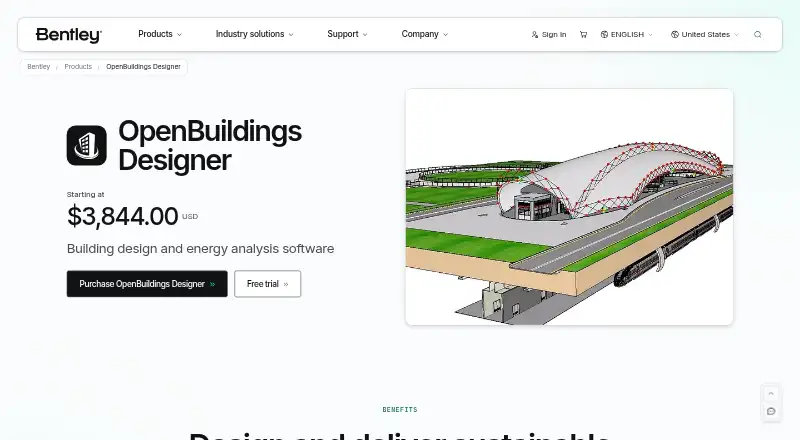
OpenBuildings Designer is multidisciplinary BIM software for architects, structural engineers, mechanical and electrical designers, and construction teams. It combines 3D building modeling with coordinated drawings, schedules, documentation, visualization, simulation, clash detection, quantity reports, and analysis across building disciplines. The Windows application also connects project information with Bentley’s iTwin and ProjectWise environments, making it suited to large building projects that require coordination across several technical teams.
The published plan is OpenBuildings Designer at $3,844 per license for 12 months, billed annually. The plan includes building design, visualization, documentation, simulation, building energy simulation and performance analysis, generative design, IFC, RFA, and DWG data exchange, plus OpenBuildings Speedikon. The subscription is described as a 12-month Virtuoso subscription including one license and two service/training Keys. There is no free plan, so organizations should evaluate the annual commitment against their need for multidisciplinary modeling and analysis.
Its strongest fit is a coordinated workflow spanning design, engineering, performance, and documentation. Energy analysis uses EnergyPlus and Radiance, while visual programming supports generative and computational design. iTwin Platform, ProjectWise, Excel, NBS Chorus, Components Center, Relux, GIS data services, and other listed connections extend the project ecosystem. Teams needing IFC and COBie exchange, in-product clash detection, quantity and volume analysis, or shared project information will find broad coverage here. Smaller teams seeking a narrowly focused or lower-cost design tool should look elsewhere.
Your product? Our editors can test OpenBuildings Designer in depth and publish a review, labelled as paid · from $149/mo →
OpenBuildings Designer pricing
All 1 OpenBuildings Designer plans and prices →
OpenBuildings Designer fact sheet
| Free plan | No |
|---|---|
| Paid from | $3,844/yr |
| Platform | Not verified |
| BIM authoring | Not verified |
| Parametric modeling | Not verified |
| Construction documents | Not verified |
| Rendering tools | Not verified |
| IFC support | Yes |
| Project limit | Not verified |
| Deployment | Cloud, Desktop |
| Platforms | Windows |
| Support | Phone, Tickets, Community, Docs · 24/7 |
| Built for | Small business, Mid-market, Enterprise (editorial estimate) |
| Integrations | 10 integrations: iTwin Platform, ProjectWise, iTwin Analytical Synchronizer, Microsoft Excel, NBS Chorus, Components Center … |
| Pricing | Paid (source) |
| Website | bentley.com |
| Facts checked | 20 Sep 2026 |
OpenBuildings Designer integrations
OpenBuildings Designer lists 10 integrations on its own site.
- iTwin Platform
- ProjectWise
- iTwin Analytical Synchronizer
- Microsoft Excel
- NBS Chorus
- Components Center
- Relux
- EnergyPlus
- Radiance
- GIS data services
Alternatives to OpenBuildings Designer
- Autodesk RevitA multidiscipline BIM platform with strong Autodesk coordination and automation support.9.4
- ArchicadA mature OpenBIM platform for architectural teams that need modeling, documentation, and teamwork.9.3
- AllplanA broad BIM suite for firms coordinating architecture, engineering, construction and cost workflows.9.1



See all OpenBuildings Designer alternatives →
OpenBuildings Designer vs the competition
- OpenBuildings Designer vs Autodesk Revit
- OpenBuildings Designer vs Archicad
- OpenBuildings Designer vs Allplan
- OpenBuildings Designer vs Vectorworks Architect
- OpenBuildings Designer vs BricsCAD BIM
- OpenBuildings Designer vs Snaptrude


Compare OpenBuildings Designer with any tool side by side →
Also Ranked In
OpenBuildings Designer is ranked in 7 of our directories.
Used OpenBuildings Designer? Be the first to review it
The editor score above is our own research. What this page doesn't have yet is a reader's view — what you used OpenBuildings Designer for, what worked and what didn't. No stars are seeded and no review is paid for; an editor reads every one before it appears.
Write a reviewTwo minutes · verified accounts only · read by an editor before it appears
Featured on iTechGuides

OpenBuildings Designer is listed in our Architectural Design Software directory. Add the badge to your site — it links back to this page.
<a href="https://www.itechguides.com/products/openbuildings-designer/"><img src="https://www.itechguides.com/best/badge/openbuildings-designer.svg" alt="Featured on iTechGuides" width="230" height="46"></a>
Reviewed by iTechGuides Editors · Editorial team · Updated Oct 2026
Advertiser disclosure: iTechGuides is reader-supported. Vendors can pay for top positions in our rankings and for a place on other products' pages, and we may earn a commission when you click some links. Bought places stand at the number bought; this page and our disclosure say so. Paying vendors may get a fuller, more detailed review from our editors, and that review can change their score. How we rank.
Last updated · How we research and update