
OMNi DAW
OMNi DAW: A compact free DAW with multitrack, MIDI, plug-ins, and AI stem separation. Ranked #52 of 128 in Audio Editing Software by our editors (4.2/10); pricing: Free plan; best for free users wanting a compact modern DAW.
At a glance
- Editor score4.2 / 10
- PricingFree plan
- Best forFree users wanting a compact modern DAW
- Free planYes
- Paid fromFree
- Third-party pluginsYes
- Facts checked20 Sep 2026
Where it wins
- Free one-time download with no account required
- Combines session view, timeline arrangement, MIDI, and audio editing
- Hosts VST3, CLAP, LV2, and VST2 plug-ins
Where it doesn't
- Available only for Windows and Linux
- No video editing or collaboration features
- Proprietary freeware rather than open-source software
Our verdict on OMNi DAW
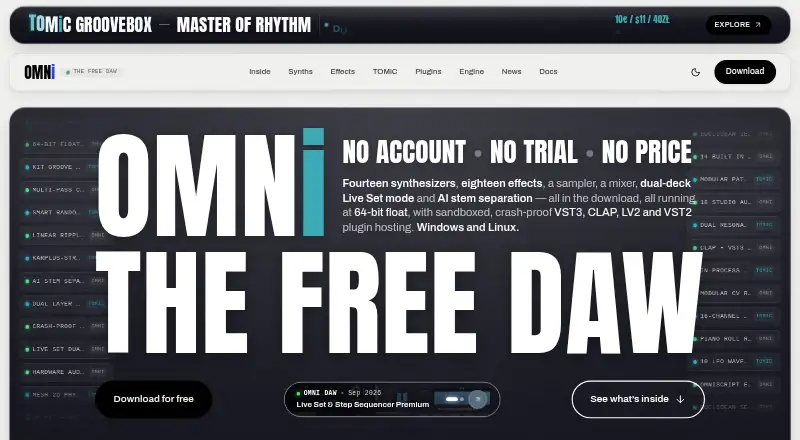
OMNi DAW is a free digital audio workstation for music production on Windows and Linux. It brings session-based clip and scene launching together with timeline arrangement, audio and MIDI clips, piano-roll editing, note-expression lanes, built-in synthesizers, a sampler, a mixer, and audio effects. Its audience is musicians and producers who want a compact desktop environment without an account, subscription, or trial workflow.
The pricing is straightforward: the Free plan costs €0 as a one-time price. It includes fourteen synthesizers, eighteen effects, a sampler and mixer, AI stem separation, and external plug-in hosting. The broader feature set adds automation, fades, bounce, track freezing, and audio warping, while MIDI users get sequencing and note-expression editing. AI stem separation can divide material into vocals, drums, bass, and other, giving the free package a notable editing capability without introducing a paid tier.
OMNi DAW’s main strength is its focused production workflow across session and timeline views, with support for VST3, CLAP, LV2, and VST2 plug-ins. That makes it suitable for users who want arrangement, sound design, and multitrack editing in one desktop application. Its fit is narrower for people who need video work, collaboration, or broader platform coverage: the published platform list is limited to Windows and Linux, and no video or collaboration features are described. Choose OMNi DAW for free music production with built-in instruments, effects, MIDI, and stem separation; consider an alternative if those omitted workflows are central to your projects.
Your product? Our editors can test OMNi DAW in depth and publish a review, labelled as paid · from $149/mo →
OMNi DAW pricing
All 1 OMNi DAW plans and prices →
OMNi DAW fact sheet
| Free plan | Yes |
|---|---|
| Paid from | Free |
| Supported platforms | Windows, Linux |
| Multitrack editing | Yes |
| MIDI sequencing | Yes |
| Third-party plugins | Yes |
| Noise reduction | Not verified |
| Video synchronization | Not verified |
| Cloud collaboration | Not verified |
| Deployment | Desktop |
| Platforms | Windows, Linux |
| Support | Community, Docs |
| Built for | Solo, Small business (editorial estimate) |
| Pricing | Free plan (source) |
| Website | omnidaw.com |
| Facts checked | 20 Sep 2026 |
Alternatives to OMNi DAW
- Pro ToolsA broad workstation for studios spanning music production, audio post, and immersive mixing.9.4
- REAPERA flexible desktop DAW with broad audio and MIDI tools and a one-time license from $60.9.3
- Logic ProA broad audio and MIDI workstation for Apple-based producers and video composers.9.2


See all OMNi DAW alternatives →
Used OMNi DAW? Be the first to review it
The editor score above is our own research. What this page doesn't have yet is a reader's view — what you used OMNi DAW for, what worked and what didn't. No stars are seeded and no review is paid for; an editor reads every one before it appears.
Write a reviewTwo minutes · verified accounts only · read by an editor before it appears
Featured on iTechGuides

OMNi DAW is listed in our Audio Editing Software directory. Add the badge to your site — it links back to this page.
<a href="https://www.itechguides.com/products/omni-daw/"><img src="https://www.itechguides.com/best/badge/omni-daw.svg" alt="Featured on iTechGuides" width="230" height="46"></a>
Reviewed by iTechGuides Editors · Editorial team · Updated Oct 2026
Advertiser disclosure: iTechGuides is reader-supported. Vendors can pay for top positions in our rankings and for a place on other products' pages, and we may earn a commission when you click some links. Bought places stand at the number bought; this page and our disclosure say so. Paying vendors may get a fuller, more detailed review from our editors, and that review can change their score. How we rank.
Last updated · How we research and update