
NoteTab
NoteTab: A capable text-processing editor with a useful free edition and one-time Pro pricing. Ranked #55 of 82 in Text Editors by our editors (3.8/10); pricing: Free plan · 30-day trial; best for windows users focused on text processing.
At a glance
- Editor score3.8 / 10
- PricingFree plan · 30-day trial
- Best forWindows users focused on text processing
- Free planYes
- Paid from$39.95 one-time
- Founded1996 · Charmey, Switzerland
- Facts checked21 Sep 2026
Where it wins
- Cross-document and file search with wildcard and regex support
- Snippets, Clip Libraries, macros, and built-in scripting
- HTML/CSS tools, outliner, word statistics, and text conversion
Where it doesn't
- Linux support runs through Wine rather than a native Linux edition
- Paid features require a one-time $39.95 purchase
- Its desktop focus does not include macOS, iOS, Android, or browser extensions
Our verdict on NoteTab
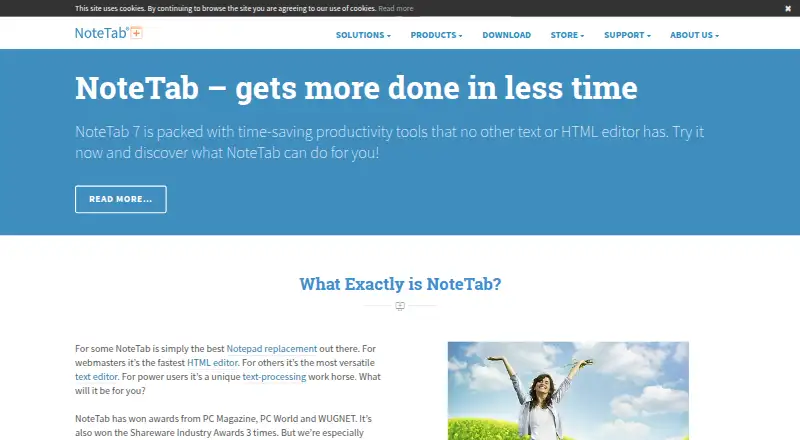
NoteTab is a desktop text and HTML editor aimed at Windows users who work with documents, web content, notes, and repetitive text-processing tasks. Its feature set covers tabbed editing, search and replace across selections, documents, open documents, and unopened files, plus wildcard and regular-expression searching. Writers, webmasters, and power users also get reusable snippets, Clip Libraries, macros, an integrated two-pane outliner, real-time word statistics, and text-to-HTML or HTML-to-text conversion. Linux use is supported through Wine.
Pricing is straightforward. NoteTab Light is free for private or professional use and includes tabbed text editing, text macros and snippets, file search, and HTML tag stripping. The published paid bundle, NoteTab Pro + NoteTab Standard, costs $39.95 one time. It adds text and HTML editing, search and replace, regular expressions, scripting, HTML5 and CSS3 support, and syntax highlighting. The vendor also lists a 30-day free trial. This structure makes Light a practical starting point for text processing, while the paid bundle fits users who need broader web-authoring and automation capabilities without a recurring subscription.
NoteTab’s standout strength is the depth of its text-processing toolkit. Search can span multiple scopes, snippets and macros can reduce repetitive work, and the built-in scripting language supports custom text-processing tools. The outliner adds a way to organize notes and documents alongside editing, while HTML and CSS highlighting and conversion tools extend the workflow toward web content. Choose NoteTab if Windows-based text processing, automation, and HTML work matter more than a broad cross-device ecosystem. Users seeking native support beyond Windows, or a browser-based editor, should look elsewhere.
Your product? Our editors can test NoteTab in depth and publish a review, labelled as paid · from $149/mo →
NoteTab pricing
All 2 NoteTab plans and prices →
NoteTab fact sheet
| Free plan | Yes |
|---|---|
| Paid from | $39.95 one-time |
| Supported platforms | Windows; Linux through Wine |
| Multi-cursor editing | Not verified |
| Macro recording | Not verified |
| Column editing | Not verified |
| Large-file handling | Not verified |
| Extension support | Yes |
| Free trial | 30 days · no card needed |
| Money-back guarantee | 90 days |
| Deployment | Desktop |
| Platforms | Windows, Linux |
| Support | Community, Docs |
| Built for | Solo, Small business (editorial estimate) |
| Pricing | Free plan · 30-day trial (source) |
| Website | notetab.com |
| Facts checked | 21 Sep 2026 |
Alternatives to NoteTab
- Visual Studio CodeA free, open-source editor with broad development features across desktop and web.9.4
- NeovimA free, open-source editor for keyboard-driven workflows and deep customization.9.3
- GNU EmacsA mature, highly customizable editor for users who value breadth and control.9.2


See all NoteTab alternatives →
Used NoteTab? Be the first to review it
The editor score above is our own research. What this page doesn't have yet is a reader's view — what you used NoteTab for, what worked and what didn't. No stars are seeded and no review is paid for; an editor reads every one before it appears.
Write a reviewTwo minutes · verified accounts only · read by an editor before it appears
Featured on iTechGuides

NoteTab is listed in our Text Editors directory. Add the badge to your site — it links back to this page.
<a href="https://www.itechguides.com/products/notetab/"><img src="https://www.itechguides.com/best/badge/notetab.svg" alt="Featured on iTechGuides" width="230" height="46"></a>
Reviewed by iTechGuides Editors · Editorial team · Updated Oct 2026
Advertiser disclosure: iTechGuides is reader-supported. Vendors can pay for top positions in our rankings and for a place on other products' pages, and we may earn a commission when you click some links. Bought places stand at the number bought; this page and our disclosure say so. Paying vendors may get a fuller, more detailed review from our editors, and that review can change their score. How we rank.
Last updated · How we research and update