Nextpad++
Nextpad++: A Notepad++-style desktop editor with macros, plugins, and broad syntax highlighting. Ranked #47 of 82 in Text Editors by our editors (4.6/10); pricing: Free plan; best for mac and Linux users wanting a free editor with macros.
At a glance
- Editor score4.6 / 10
- PricingFree plan
- Best forMac and Linux users wanting a free editor with macros
- Free planYes
- Paid fromFree
- Founded2026
- Facts checked24 Sep 2026
Where it wins
- Syntax highlighting for 80+ programming languages
- Record and replay macros, with column-mode text selection
- Plugin Admin supports browsing, installing, updating, and removing plugins
Where it doesn't
- No Windows support; available for macOS and Linux only
- It is an independent community port, not the official Windows Notepad++ product
- Its desktop focus may not suit users seeking a browser-based editor
Our verdict on Nextpad++
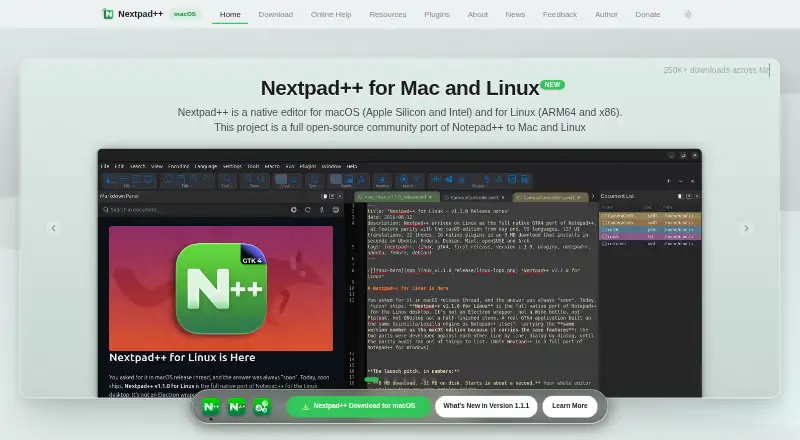
Nextpad++ is a free, open-source text and code editor for macOS and Linux, aimed at developers and other users who want a Notepad++-style workflow on those platforms. It is a desktop application built as an independent port, using the Scintilla editing engine. Syntax highlighting covers 80+ programming languages, and core editing tools include search and replace, find in files, column selection, and recordable macros. The macOS edition supports Apple Silicon and Intel Macs; Linux editions are available for ARM64 and x86 architectures.
Its breadth is a notable fit for a free editor: tabbed editing and session management help organize work, while encoding and line-ending conversion controls support text files with differing formats. The Plugin Admin lets users browse, install, update, and remove plugins, including ported plugins. That gives the editor room to adapt beyond its built-in editing features, though users should check whether the plugins they need are available for this independent port. The product is explicitly separate from the official Windows Notepad++ product, so familiarity with that editor's general approach does not make this the same application.
Pricing is straightforward: the project is free and open source, with no paid upgrades. That makes it suitable for solo users and small teams who want macros and plugin support without a subscription. The trade-off is platform coverage: Nextpad++ supports macOS and Linux, not Windows, and its desktop deployment does not address browser-based editing. Documentation and community are the listed support channels. Choose it if you want a free native editor on a supported platform; look elsewhere if Windows support or a web editor is essential.
Your product? Our editors can test Nextpad++ in depth and publish a review, labelled as paid · from $149/mo →
Nextpad++ pricing
Nextpad++ fact sheet
| Free plan | Yes |
|---|---|
| Paid from | Free |
| Supported platforms | macOS, Linux |
| Multi-cursor editing | Not verified |
| Macro recording | Yes |
| Column editing | Yes |
| Large-file handling | Not verified |
| Extension support | Yes |
| Deployment | Desktop |
| Platforms | macOS, Linux |
| Support | Docs, Community |
| Built for | Solo, Small business (editorial estimate) |
| Pricing | Free plan |
| Website | nextpad.org |
| Facts checked | 24 Sep 2026 |
Alternatives to Nextpad++
- Visual Studio CodeA free, open-source editor with broad development features across desktop and web.9.4
- NeovimA free, open-source editor for keyboard-driven workflows and deep customization.9.3
- GNU EmacsA mature, highly customizable editor for users who value breadth and control.9.2


See all Nextpad++ alternatives →
Used Nextpad++? Be the first to review it
The editor score above is our own research. What this page doesn't have yet is a reader's view — what you used Nextpad++ for, what worked and what didn't. No stars are seeded and no review is paid for; an editor reads every one before it appears.
Write a reviewTwo minutes · verified accounts only · read by an editor before it appears
Featured on iTechGuides

Nextpad++ is listed in our Text Editors directory. Add the badge to your site — it links back to this page.
<a href="https://www.itechguides.com/products/nextpad/"><img src="https://www.itechguides.com/best/badge/nextpad.svg" alt="Featured on iTechGuides" width="230" height="46"></a>
Reviewed by iTechGuides Editors · Editorial team · Updated Sep 2026
Advertiser disclosure: iTechGuides is reader-supported. Vendors can pay for top positions in our rankings and for a place on other products' pages, and we may earn a commission when you click some links. Bought places stand at the number bought; this page and our disclosure say so. Paying vendors may get a fuller, more detailed review from our editors, and that review can change their score. How we rank.
Last updated · How we research and update