
Nero AI Motion Tracker
Nero AI Motion Tracker: A focused Windows tracker with useful anonymization and moving-subject effects. Ranked #13 of 40 in Motion Tracking Software by our editors (7.3/10); pricing: Paid; best for simple Windows object and face tracking.
At a glance
- Editor score7.3 / 10
- PricingPaid
- Best forSimple Windows object and face tracking
- Free planNo
- Paid from$49.99 one-time
- Founded1995 · Karlsruhe, Germany
- Facts checked20 Sep 2026
Where it wins
- Tracks people and objects, including occluded or changing subjects
- Applies blur, mosaic, text, graphics, and effects to moving subjects
- Exports MP4 video without loss of original video quality
Where it doesn't
- Runs on Windows 10 64-bit and Windows 11 64-bit only
- Offers a narrow video-tracking workflow rather than a broader platform
- CUDA acceleration is specified for zone tracking, limiting its stated scope
Our verdict on Nero AI Motion Tracker
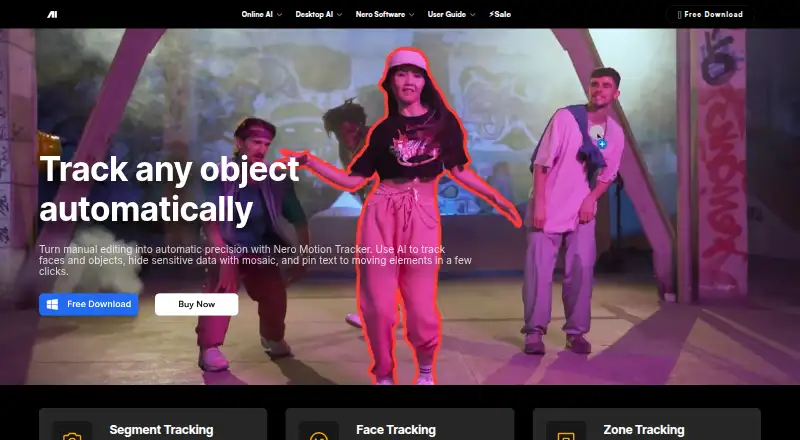
Nero AI Motion Tracker is Windows desktop software for automatically following faces, people, and objects through video. It is aimed at video editors, content creators, and anyone who needs to conceal sensitive visual information or keep visual elements attached to moving subjects. Its tracking options cover segments for pixel-level object work, faces for anonymization, and predefined zones for area-based tracking. The workflow also includes previewing results before exporting the tracked video.
The standout feature is the combination of tracking and visual treatment. Users can apply blur or mosaic effects to faces and sensitive areas, then attach text, clip art, graphics, or other effects to a moving subject. Segment tracking is designed for people and objects, including subjects that become occluded or change over time. Automatic face tracking supports privacy-focused editing, while NVIDIA CUDA GPU acceleration is specified for zone tracking. MP4 export is listed without loss of original video quality, making the product particularly relevant to editors who want focused tracking tools without a broader production suite.
The published plan shows Nero Motion Tracker PRO at a one-time price of $49.99. It includes segment tracking, face tracking, zone tracking, blur and mosaic effects, and attached text, graphics, and effects. The product is available for Windows 10 64-bit and Windows 11 64-bit. That focused, single-product pricing can suit individual editors and creators who need straightforward tracking and anonymization on a Windows computer. It is less suitable for teams seeking cross-platform software, a wider ecosystem, or a broader collaboration-oriented video platform.
Questions about Nero AI Motion Tracker
What does Nero AI Motion Tracker run on? Windows. It runs as a desktop app.
Does Nero AI Motion Tracker offer a money-back guarantee? Yes: 30 days.
Who is Nero AI Motion Tracker built for? Solo users, small businesses and mid-market companies (our editorial estimate).
Your product? Our editors can test Nero AI Motion Tracker in depth and publish a review, labelled as paid · from $149/mo →
Nero AI Motion Tracker pricing
All 1 Nero AI Motion Tracker plans and prices →
Nero AI Motion Tracker fact sheet
| Free plan | No |
|---|---|
| Paid from | $49.99 one-time |
| Point tracking | Not verified |
| Planar tracking | Not verified |
| Object tracking | Yes |
| 3D camera tracking | Not verified |
| Mask tracking | Not verified |
| Keyframe editing | Not verified |
| Supported platforms | Windows 10 64-bit and Windows 11 64-bit |
| Money-back guarantee | 30 days |
| Deployment | Desktop |
| Platforms | Windows |
| Support | Docs |
| Built for | Solo, Small business, Mid-market (editorial estimate) |
| Pricing | Paid (source) |
| Website | pcai.nero.com |
| Facts checked | 20 Sep 2026 |
Alternatives to Nero AI Motion Tracker
- Mocha ProA broad professional tracking suite for compositors, editors, and VFX teams.9.3
- Autodesk Flow StudioA broad browser-based toolkit for turning live-action footage into editable 3D scenes.9.1
- Vizrt Object TrackerA capable broadcast tracker with strong detection and metadata output, but contact-sales pricing.8.8


See all Nero AI Motion Tracker alternatives →
Used Nero AI Motion Tracker? Be the first to review it
The editor score above is our own research. What this page doesn't have yet is a reader's view — what you used Nero AI Motion Tracker for, what worked and what didn't. No stars are seeded and no review is paid for; an editor reads every one before it appears.
Write a reviewTwo minutes · verified accounts only · read by an editor before it appears
Featured on iTechGuides

Nero AI Motion Tracker is listed in our Motion Tracking Software directory. Add the badge to your site — it links back to this page.
<a href="https://www.itechguides.com/products/nero-ai-motion-tracker/"><img src="https://www.itechguides.com/best/badge/nero-ai-motion-tracker.svg" alt="Featured on iTechGuides" width="230" height="46"></a>
Reviewed by iTechGuides Editors · Editorial team · Updated Nov 2026
Advertiser disclosure: iTechGuides is reader-supported. Vendors can pay for top positions in our rankings and for a place on other products' pages, and we may earn a commission when you click some links. Bought places stand at the number bought; this page and our disclosure say so. Paying vendors may get a fuller, more detailed review from our editors, and that review can change their score. How we rank.
Last updated · How we research and update