Neon Wizard
Neon Wizard: A focused Windows tool for neon layouts, tube planning, supports, and production exports. Ranked #22 of 25 in Sign Design Software by our editors (7.0/10); pricing: Paid; best for specialist neon sign designers.
At a glance
- Editor score7.0 / 10
- PricingPaid
- Best forSpecialist neon sign designers
- Free planNo
- Paid from$350 one-time
- Vinyl cuttingYes
- Facts checked21 Sep 2026
Where it wins
- Full-scale neon patterns with tube measurements and spacing controls
- Tube supports, raceways, support holes, and automatic alignment
- Layered exports and channel-letter return plots in Plus and Pro
Where it doesn't
- Windows-only software for Windows 7, 8, 10, and 11
- Paid product with one-time licenses starting at $350
- Its feature set focuses on neon and related sign-production workflows
Our verdict on Neon Wizard
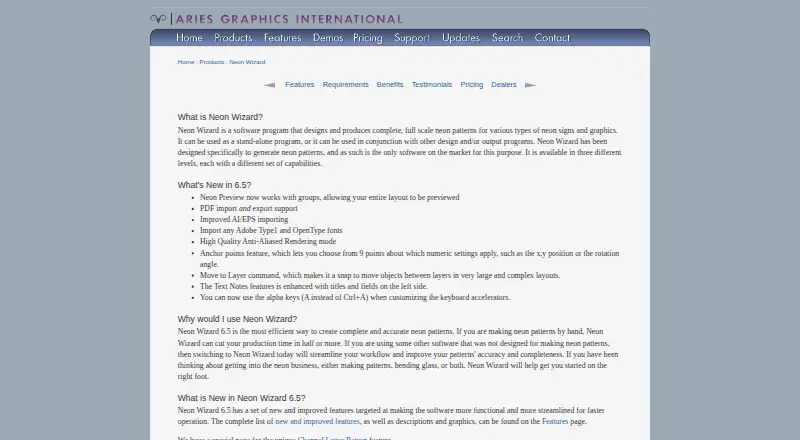
Neon Wizard is desktop software for designing and producing full-scale neon sign patterns and related production layouts. It is intended for sign businesses working with neon signs, channel letters, and production patterns. Core tools include neon-specific lettering, interactive letter and line spacing, Auto Tube Layout for channel letters, tube diameter and length displays, tube supports, support-hole generation, raceways, and tube-opening alignment. The software also supports plotting and output through related design or production programs, making it a specialist option rather than a general sign-design package.
Pricing is organized around one-time license editions. Neon Wizard Std 6.5 costs $995 and provides standard neon design and pattern-making features. Plus 6.5 costs $1,195 and adds scanning and vectorizing, advanced neon layout tools, layered export, and Channel Letter Returns. Pro 6.5 costs $1,495 for the professional neon design and production edition. Designer licenses range from $350 for Std Designer 6.5 to $600 for Pro Designer 6.5, while multisite options include Neon Wizard 6.5 Multisite at $696.50 and Neon Wizard Plus 6.5 Multisite at $836.50. There is no free plan, although a demonstration version is offered with output restrictions.
The strongest fit is a specialist neon sign designer who needs production-oriented control over tube layouts, supports, raceways, mounting holes, housings, and return plots. Plus and Pro editions are the relevant choices when scanning, vectorizing, advanced layout, or layered export matter. VMware Fusion and Parallels are listed alongside Windows support, while the published platform specifications identify Windows 7, 8, 10, and 11. Choose Neon Wizard for dedicated neon and channel-letter workflows; choose another category tool if the priority is broader sign design beyond its focused production scope.
Your product? Our editors can test Neon Wizard in depth and publish a review, labelled as paid · from $149/mo →
Neon Wizard pricing
All 9 Neon Wizard plans and prices →
Neon Wizard fact sheet
| Free plan | No |
|---|---|
| Paid from | $350 one-time |
| Vinyl cutting | Yes |
| Vehicle graphics | No |
| Lettering tools | Yes |
| Production output | Cut |
| Supported platforms | Windows 7, 8, 10, and 11 |
| Plotter support | Yes |
| Deployment | Desktop |
| Platforms | Windows |
| Support | Email, Phone, Tickets, Docs |
| Built for | Small business, Mid-market, Enterprise (editorial estimate) |
| Integrations | 2 integrations: VMware Fusion, Parallels |
| Pricing | Paid (source) |
| Website | aries-graphics.com |
| Facts checked | 21 Sep 2026 |
Neon Wizard integrations
Neon Wizard lists 2 integrations on its own site.
- VMware Fusion
- Parallels
Alternatives to Neon Wizard
- SAi FlexiA full production suite for sign businesses that design, print and cut in-house.9.3
- VinylMasterA Windows-focused sign-production suite with affordable entry pricing and broad output support.9.1
- SignMasterA Windows-focused sign production suite with broad device support and low upgrade prices.9.0


See all Neon Wizard alternatives →
Used Neon Wizard? Be the first to review it
The editor score above is our own research. What this page doesn't have yet is a reader's view — what you used Neon Wizard for, what worked and what didn't. No stars are seeded and no review is paid for; an editor reads every one before it appears.
Write a reviewTwo minutes · verified accounts only · read by an editor before it appears
Featured on iTechGuides

Neon Wizard is listed in our Sign Design Software directory. Add the badge to your site — it links back to this page.
<a href="https://www.itechguides.com/products/neon-wizard/"><img src="https://www.itechguides.com/best/badge/neon-wizard.svg" alt="Featured on iTechGuides" width="230" height="46"></a>
Reviewed by iTechGuides Editors · Editorial team · Updated Oct 2026
Advertiser disclosure: iTechGuides is reader-supported. Vendors can pay for top positions in our rankings and for a place on other products' pages, and we may earn a commission when you click some links. Bought places stand at the number bought; this page and our disclosure say so. Paying vendors may get a fuller, more detailed review from our editors, and that review can change their score. How we rank.
Last updated · How we research and update