
NdotCAD
NdotCAD: A beginner-friendly 3D tool with practical exports, templates, and collaboration. Ranked #125 of 147 in 3D Modeling Software by our editors (3.0/10); pricing: Free plan · 7-day trial; best for simple shared 3D and metaverse projects.
At a glance
- Editor score3.0 / 10
- PricingFree plan · 7-day trial
- Best forSimple shared 3D and metaverse projects
- Free planYes
- Platform accessBoth
- Facts checked22 Sep 2026
Where it wins
- Free browser and desktop access with a 7-day free trial
- Exports FBX, OBJ, GLB, glTF, and STL files
- Supports sharing, templates, textures, and 3D-printing workflows
Where it doesn't
- No sculpting, animation, or rendering features
- Web version is still in beta
- Basic plan limits some features
Our verdict on NdotCAD
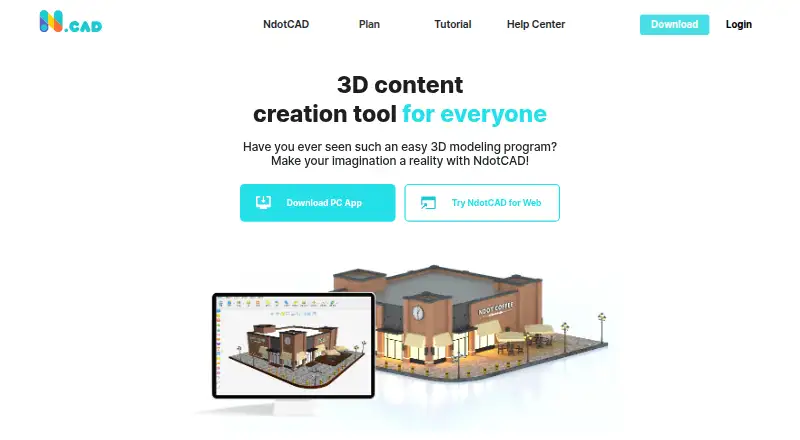
NdotCAD is desktop and web 3D modeling software for beginners, individual creators, educators, and organizations. Its feature set covers 3D shape combination, 2D sketch tracing, SVG import, texture mapping, templates, project sharing, and collaboration. The Windows application supports importing SVG and STL files, while the web version provides browser-based design, community templates, and free beta storage up to 500 MB. The product is particularly suited to simple shared 3D projects, metaverse content, and practical 3D-printing workflows.
NdotCAD uses a freemium model with a free plan and a 7-day free trial. The Basic plan is described as a starter plan with some feature limitations. The Standard plan includes all NdotCAD features, unlimited 3D templates, no ads, and registration for up to 2 PCs per account. The published plans do not display numeric prices. Platform access spans web and Windows, giving users a choice between browser-based work and desktop modeling. Its integration set is practical for destination-based workflows, including Unity, Unreal Engine, Roblox, ZEPETO, Minecraft, Cura, and Simplify3D.
The strongest case for NdotCAD is its focused workflow: create shapes, trace or import 2D assets, apply textures, use templates, collaborate in a browser, and export to common 3D and printing formats. STL import, editing, and export support adds a clear route to 3D printing, while FBX, OBJ, GLB, and glTF exports support games and metaverse destinations. Users who need sculpting, animation, or rendering should choose a more specialized 3D modeling application instead. NdotCAD fits creators who value approachable modeling and sharing over advanced content-production depth.
Your product? Our editors can test NdotCAD in depth and publish a review, labelled as paid · from $149/mo →
NdotCAD pricing
All 2 NdotCAD plans and prices →
NdotCAD fact sheet
| Free plan | Yes |
|---|---|
| Paid from | Not verified |
| Platform access | Both |
| Sculpting tools | Not verified |
| Animation tools | Not verified |
| Parametric modeling | Not verified |
| Render engine | Not verified |
| 3D print export | Yes |
| Free trial | 7 days |
| Money-back guarantee | 20 days |
| Deployment | Cloud, Desktop |
| Platforms | Web, Windows |
| Support | |
| Built for | Solo, Small business, Mid-market, Enterprise (editorial estimate) |
| Integrations | 7 integrations: Unity, Unreal Engine, Roblox, ZEPETO, Minecraft, Cura … |
| Pricing | Free plan · 7-day trial (source) |
| Website | ndotcad.com |
| Facts checked | 22 Sep 2026 |
NdotCAD integrations
NdotCAD lists 7 integrations on its own site.
- Unity
- Unreal Engine
- Roblox
- ZEPETO
- Minecraft
- Cura
- Simplify3D
Alternatives to NdotCAD
- BlenderA broad free 3D suite covering modeling, animation, rendering, scripting, and print export.9.3
- HoudiniA deep procedural 3D suite for VFX, animation, games, and technical art.9.1
- Autodesk MayaA mature desktop suite for studios handling modeling, animation, VFX, and rendering.9.0



See all NdotCAD alternatives →
Used NdotCAD? Be the first to review it
The editor score above is our own research. What this page doesn't have yet is a reader's view — what you used NdotCAD for, what worked and what didn't. No stars are seeded and no review is paid for; an editor reads every one before it appears.
Write a reviewTwo minutes · verified accounts only · read by an editor before it appears
Featured on iTechGuides

NdotCAD is listed in our 3D Modeling Software directory. Add the badge to your site — it links back to this page.
<a href="https://www.itechguides.com/products/ndotcad/"><img src="https://www.itechguides.com/best/badge/ndotcad.svg" alt="Featured on iTechGuides" width="230" height="46"></a>
Reviewed by iTechGuides Editors · Editorial team · Updated Oct 2026
Advertiser disclosure: iTechGuides is reader-supported. Vendors can pay for top positions in our rankings and for a place on other products' pages, and we may earn a commission when you click some links. Bought places stand at the number bought; this page and our disclosure say so. Paying vendors may get a fuller, more detailed review from our editors, and that review can change their score. How we rank.
Last updated · How we research and update