
Music Tag
Music Tag: A focused music-library cleanup tool, not a full audio editor. Ranked #123 of 128 in Audio Editing Software by our editors (3.0/10); pricing: Paid; best for automatic music tagging and library cleanup.
At a glance
- Editor score3.0 / 10
- PricingPaid
- Best forAutomatic music tagging and library cleanup
- Free planNo
- Facts checked22 Sep 2026
Where it wins
- Fingerprint-based identification fills in missing music metadata.
- Batch downloads metadata and album artwork for library cleanup.
- Supports MP3, MP4/AAC, WMA, and FLAC files.
Where it doesn't
- Does not provide the category’s core audio-editing functions.
- Paid software with no permanent free plan.
- Desktop support is limited to Windows and macOS.
Our verdict on Music Tag
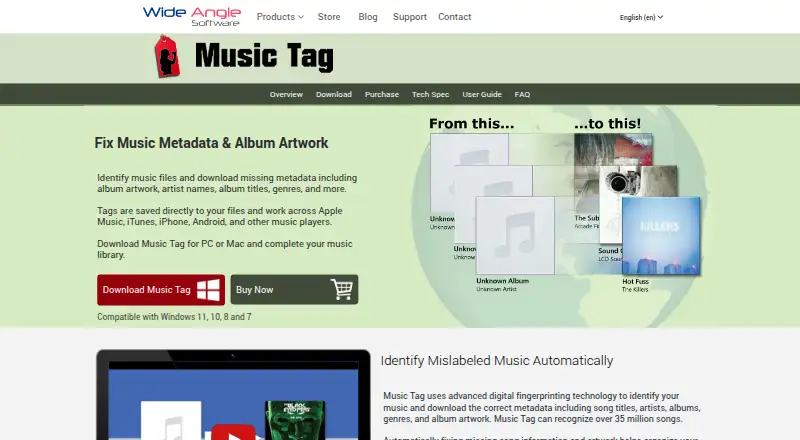
Music Tag is desktop software for Windows and macOS that identifies music files and updates their embedded metadata. It is aimed at people organizing personal music libraries, correcting inaccurate track information, and filling gaps in titles, artists, albums, genres, and cover artwork. Automatic identification uses digital fingerprinting, while manual controls allow tags to be added, edited, or removed. Drag-and-drop importing supports MP3, MP4/AAC, WMA, and FLAC files, giving the product a focused role in music-library maintenance rather than general audio production.
The strongest fit is batch cleanup. Music Tag can download missing track data and album artwork, then embed that information in supported files. Its connections with iTunes, Apple Music, and Windows Media Player also suit libraries associated with those platforms. These features make it practical for correcting incomplete collections at scale, while manual editing provides control when automatically identified information needs adjustment. The product’s value is concentrated in identification, metadata, artwork, and organization rather than recording, mixing, trimming, or other editing workflows.
Pricing is paid, with the official purchase information describing a lifetime, one-time license. There is no permanent free plan, and the trial has functional limitations. Choose Music Tag if your priority is automatic music identification and library cleanup across Windows or macOS. Choose another product if you need software centered on editing audio content itself, or if your workflow requires broader platform coverage. Music Tag is a specialized metadata utility within an audio-editing category, not a replacement for a full audio editor.
Your product? Our editors can test Music Tag in depth and publish a review, labelled as paid · from $99/mo →
Music Tag pricing
Music Tag fact sheet
| Free plan | No |
|---|---|
| Paid from | Not verified |
| Supported platforms | Windows, macOS |
| Multitrack editing | Not verified |
| MIDI sequencing | Not verified |
| Third-party plugins | Not verified |
| Noise reduction | Not verified |
| Video synchronization | Not verified |
| Cloud collaboration | Not verified |
| Money-back guarantee | 30 days |
| Deployment | Desktop |
| Platforms | Windows, macOS |
| Support | Docs, Email |
| Built for | Solo, Small business (editorial estimate) |
| Integrations | 3 integrations: iTunes, Apple Music, Windows Media Player |
| Pricing | Paid (source) |
| Website | wideanglesoftware.com |
| Facts checked | 22 Sep 2026 |
Music Tag integrations
Music Tag lists 3 integrations on its own site.
- iTunes
- Apple Music
- Windows Media Player
Alternatives to Music Tag
- Pro ToolsA broad workstation for studios spanning music production, audio post, and immersive mixing.9.4
- REAPERA flexible desktop DAW with broad audio and MIDI tools and a one-time license from $60.9.3
- Logic ProA broad audio and MIDI workstation for Apple-based producers and video composers.9.2


See all Music Tag alternatives →
Also Ranked In
Music Tag is ranked in 2 of our directories.
Used Music Tag? Be the first to review it
The editor score above is our own research. What this page doesn't have yet is a reader's view — what you used Music Tag for, what worked and what didn't. No stars are seeded and no review is paid for; an editor reads every one before it appears.
Write a reviewTwo minutes · verified accounts only · read by an editor before it appears
Featured on iTechGuides

Music Tag is listed in our Audio Editing Software directory. Add the badge to your site — it links back to this page.
<a href="https://www.itechguides.com/products/music-tag/"><img src="https://www.itechguides.com/best/badge/music-tag.svg" alt="Featured on iTechGuides" width="230" height="46"></a>
Guides on audio editing software
- 10 Best Audio Editing Apps and DAWs for Android in 2026Aug 2026
- 7 Best Audio Editing Apps for macOSAug 2026
- Top 10 Audio Editing Software for Ubuntu 24.04Aug 2026
Reviewed by iTechGuides Editors · Editorial team · Updated Oct 2026
Advertiser disclosure: iTechGuides is reader-supported. Vendors can pay for top positions in our rankings and for a place on other products' pages, and we may earn a commission when you click some links. How we rank.
Last updated · How we research and update