MultiTrack DAW
MultiTrack DAW: A focused iOS DAW for straightforward multitrack recording, editing, and export. Ranked #91 of 128 in Audio Editing Software by our editors (3.0/10); pricing: Paid; best for iOS users needing straightforward multitrack recording.
At a glance
- Editor score3.0 / 10
- PricingPaid
- Best foriOS users needing straightforward multitrack recording
- Free planNo
- Third-party pluginsYes
- Founded2001
- Facts checked20 Sep 2026
Where it wins
- Supports up to 32 stereo or mono tracks
- Records up to 16 tracks simultaneously with compatible USB hardware
- Includes non-destructive editing, core effects, and stem export
Where it doesn't
- Available only on iPhone and iPad
- Does not include MIDI, video, or collaboration features
- Does not include audio restoration tools
Our verdict on MultiTrack DAW
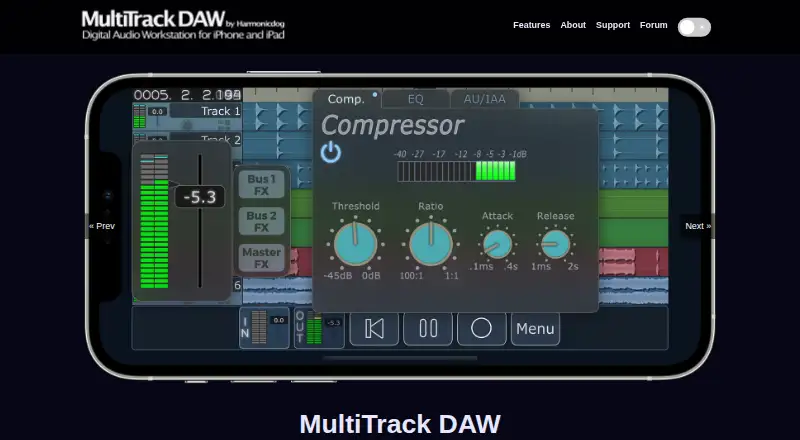
MultiTrack DAW is a mobile digital audio workstation for recording, editing, mixing, and exporting audio on iPhone and iPad. It is aimed at musicians, producers, and mobile recording users who want multitrack tools in an iOS-focused workflow. The app supports up to 32 stereo or mono tracks and can record up to 16 tracks simultaneously with compatible USB hardware. Loop recording, punch in/out, track freeze, and stem export extend its usefulness from basic capture to complete mobile sessions.
The paid plan structure starts with the MultiTrack DAW app, which includes two stereo tracks and enables all features. Add 8 Stereo Tracks expands the project by eight stereo tracks, while Add 16 Stereo Tracks expands it by sixteen stereo tracks. This gives users a focused way to increase track capacity as their sessions require it. Editing is non-linear and non-destructive, and the built-in EQ, compressor, reverb, and delay cover core mixing needs. AudioUnits AUv3, Inter-App Audio, and Audiobus 3 support add options for compatible iOS audio workflows.
MultiTrack DAW’s main strength is its focused scope: it brings multitrack recording and editing to iPhone and iPad without presenting a broader desktop-style production environment. That makes it a suitable choice for iOS users recording bands, instruments, voice, or layered arrangements with compatible hardware. Users who need MIDI sequencing, audio restoration, video production, or collaboration should choose a broader alternative instead. Its iOS-only design also makes platform fit the central buying consideration.
Your product? Our editors can test MultiTrack DAW in depth and publish a review, labelled as paid · from $149/mo →
MultiTrack DAW pricing
All 3 MultiTrack DAW plans and prices →
MultiTrack DAW fact sheet
| Free plan | No |
|---|---|
| Paid from | Not verified |
| Supported platforms | iOS: iPhone and iPad |
| Multitrack editing | Yes |
| MIDI sequencing | Not verified |
| Third-party plugins | Yes |
| Noise reduction | Not verified |
| Video synchronization | Not verified |
| Cloud collaboration | Not verified |
| Deployment | Mobile |
| Platforms | iOS |
| Support | Community |
| Built for | Solo, Small business (editorial estimate) |
| Integrations | 3 integrations: AudioUnits (AUv3), Inter-App Audio (IAA), Audiobus 3 |
| Pricing | Paid (source) |
| Website | harmonicdog.com |
| Facts checked | 20 Sep 2026 |
MultiTrack DAW integrations
MultiTrack DAW lists 3 integrations on its own site.
- AudioUnits (AUv3)
- Inter-App Audio (IAA)
- Audiobus 3
Alternatives to MultiTrack DAW
- Pro ToolsA broad workstation for studios spanning music production, audio post, and immersive mixing.9.4
- REAPERA flexible desktop DAW with broad audio and MIDI tools and a one-time license from $60.9.3
- Logic ProA broad audio and MIDI workstation for Apple-based producers and video composers.9.2


See all MultiTrack DAW alternatives →
Also Ranked In
MultiTrack DAW is ranked in 2 of our directories.
Used MultiTrack DAW? Be the first to review it
The editor score above is our own research. What this page doesn't have yet is a reader's view — what you used MultiTrack DAW for, what worked and what didn't. No stars are seeded and no review is paid for; an editor reads every one before it appears.
Write a reviewTwo minutes · verified accounts only · read by an editor before it appears
Featured on iTechGuides

MultiTrack DAW is listed in our Audio Editing Software directory. Add the badge to your site — it links back to this page.
<a href="https://www.itechguides.com/products/multitrack-daw/"><img src="https://www.itechguides.com/best/badge/multitrack-daw.svg" alt="Featured on iTechGuides" width="230" height="46"></a>
Reviewed by iTechGuides Editors · Editorial team · Updated Oct 2026
Advertiser disclosure: iTechGuides is reader-supported. Vendors can pay for top positions in our rankings and for a place on other products' pages, and we may earn a commission when you click some links. Bought places stand at the number bought; this page and our disclosure say so. Paying vendors may get a fuller, more detailed review from our editors, and that review can change their score. How we rank.
Last updated · How we research and update