
MotionVFX
MotionVFX: A broad plugin-based library for editors working across five major applications. Ranked #6 of 21 in Motion Graphics Template Libraries by our editors (8.3/10); pricing: Free plan · 14-day trial; best for editors needing advanced plugin-based graphics.
At a glance
- Editor score8.3 / 10
- PricingFree plan · 14-day trial
- Best forEditors needing advanced plugin-based graphics
- Free planYes
- Included appsFinal Cut Pro, Apple Motion, DaVinci Resolve, Adobe Premiere Pro, Adobe After Effects
- Facts checked20 Sep 2026
Where it wins
- Supports five major video editing and motion graphics applications
- Combines templates, effects, tracking, compositing, LUTs, and AI tools
- Free Elements collection adds a no-cost starting point
Where it doesn't
- The $39 monthly starting price may be high for occasional users
- Plugin-based workflows add an installation and licensing dependency
- Its value is tied to supported editing applications
Our verdict on MotionVFX
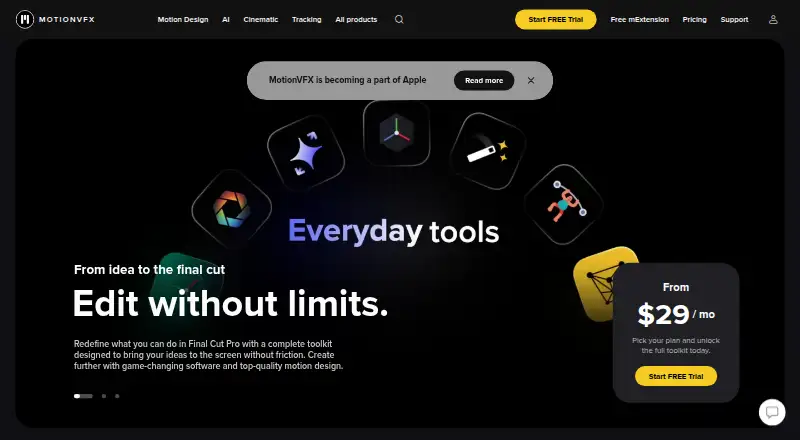
MotionVFX provides motion graphics templates, effects, transitions, titles, lower thirds, generators, overlays, typography, compositing packs, LUTs, timelines, and AI-assisted video tools. It is aimed at editors and motion designers working in Final Cut Pro, Apple Motion, DaVinci Resolve, Adobe Premiere Pro, or Adobe After Effects. The library runs on Windows and macOS, while mExtension provides in-application browsing and downloading for Final Cut Pro. A free Elements collection gives users a way to access selected assets without starting with a paid subscription.
The published plans divide the product into design-focused, cinematic, and combined options. DesignStudio includes 8,000+ motion design elements, 100+ template collections, mCaptionsAI with 86 caption styles, 1,000+ trackable elements, and access to FreezeFrames. CineStudio focuses on tools such as mUpscalerAI, mRotoAI with 7 expansions, mTracker Surface, mFlare2, mPuppet, and mFilmLook with Motion Blur AI and 2 expansions. Ultimate combines the main DesignStudio and CineStudio capabilities, including mTracker 3D with 13 expansions. The homepage states pricing from $39 per month, and a 14-day free trial is available.
Its strongest fit is for editors who want more than a basic template catalog and need effects, tracking, compositing, and AI-assisted tools inside established applications. mInstaller handles product installation and license management across supported editing applications, which helps organize a plugin-based collection but also makes the workflow dependent on MotionVFX’s software layer. Editors should choose MotionVFX when its supported applications and advanced tool categories match their production needs. Those seeking standalone assets without plugins, or a lower-cost monthly starting point, may find its model less suitable.
Your product? Our editors can test MotionVFX in depth and publish a review, labelled as paid · from $149/mo →
MotionVFX pricing
All 3 MotionVFX plans and prices →
MotionVFX fact sheet
| Free plan | Yes |
|---|---|
| Paid from | Not verified |
| Included apps | Final Cut Pro, Apple Motion, DaVinci Resolve, Adobe Premiere Pro, Adobe After Effects |
| Template types | motion graphics, titles, lower thirds, generators, effects, transitions, overlays, typography, add-ons, compositing packs, LUTs, timelines |
| Commercial license | Not verified |
| Editable source files | Not verified |
| Download policy | Not verified |
| Plugin required | Yes |
| Available resolution | Not verified |
| Free trial | 14 days |
| Deployment | Desktop |
| Platforms | Windows, macOS |
| Support | Email, Docs |
| Built for | Solo, Small business, Mid-market, Enterprise (editorial estimate) |
| Integrations | 5 integrations: Final Cut Pro, Apple Motion, DaVinci Resolve, Adobe Premiere Pro, Adobe After Effects |
| Pricing | Free plan · 14-day trial (source) |
| Website | motionvfx.com |
| Facts checked | 20 Sep 2026 |
MotionVFX integrations
MotionVFX lists 5 integrations on its own site.
- Final Cut Pro
- Apple Motion
- DaVinci Resolve
- Adobe Premiere Pro
- Adobe After Effects
Alternatives to MotionVFX
- VideoboltA broad browser-based template library for fast, branded video production.9.4
- Motion ArrayA broad asset subscription for creators who need templates, stock media, and editing tools.9.1
- Artlist TemplatesA broad, editable template library for teams working across four major video editors.8.9

See all MotionVFX alternatives →
MotionVFX vs the competition
- MotionVFX vs Videobolt
- MotionVFX vs Motion Array
- MotionVFX vs Artlist Templates
- MotionVFX vs Motion Library
- MotionVFX vs Jitter
- MotionVFX vs ProductionCrate



Compare MotionVFX with any tool side by side →
Used MotionVFX? Be the first to review it
The editor score above is our own research. What this page doesn't have yet is a reader's view — what you used MotionVFX for, what worked and what didn't. No stars are seeded and no review is paid for; an editor reads every one before it appears.
Write a reviewTwo minutes · verified accounts only · read by an editor before it appears
Featured on iTechGuides

MotionVFX is listed in our Motion Graphics Template Libraries directory. Add the badge to your site — it links back to this page.
<a href="https://www.itechguides.com/products/motionvfx/"><img src="https://www.itechguides.com/best/badge/motionvfx.svg" alt="Featured on iTechGuides" width="230" height="46"></a>
Reviewed by iTechGuides Editors · Editorial team · Updated Oct 2026
Advertiser disclosure: iTechGuides is reader-supported. Vendors can pay for top positions in our rankings and for a place on other products' pages, and we may earn a commission when you click some links. Bought places stand at the number bought; this page and our disclosure say so. Paying vendors may get a fuller, more detailed review from our editors, and that review can change their score. How we rank.
Last updated · How we research and update