
MiniMeters
MiniMeters: A compact desktop meter suite covering analysis, routing, recording, and clipping tools. Ranked #37 of 43 in Audio Analysis Software by our editors (4.7/10); pricing: Paid; best for compact all-purpose metering.
At a glance
- Editor score4.7 / 10
- PricingPaid
- Best forCompact all-purpose metering
- Free planNo
- Paid from$20 one-time
- Real-time analysisYes
- Facts checked20 Sep 2026
Where it wins
- Combines VU, waveform, spectrogram, spectrum, stereo, loudness, and oscilloscope views
- Supports VST3, Audio Unit, and CLAP plug-ins across three desktop platforms
- Adds DAW routing, recording, and clips from the previous 10 or 60 seconds
Where it doesn't
- Paid product with a $20 one-time purchase and no free plan
- Supports stereo input or output with a two-channel capacity
- Focused on desktop use across Windows, macOS, and Linux
Our verdict on MiniMeters
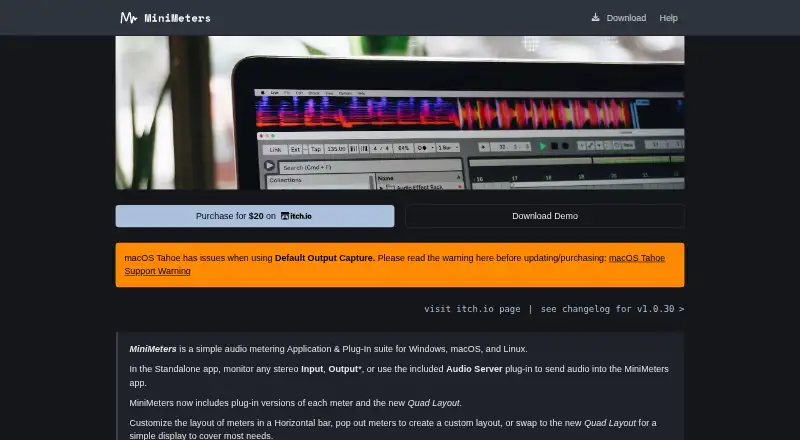
MiniMeters is a desktop audio metering application and plug-in suite for audio professionals who need several real-time analysis views in one compact tool. It monitors stereo input or output audio and can also receive audio from a DAW through its Audio Server plug-in. The feature set covers VU metering, waveform display, spectrogram, spectrum analysis, stereo width, balance, correlation, loudness, and an oscilloscope with pitch-following mode. Recording and short audio-clipping tools extend it beyond basic visual metering.
Its strongest fit is breadth within a stereo monitoring workflow. The spectrogram supports configurable FFT sizes and scales, while spectrum analysis includes target-curve overlays. Loudness measurement offers LUFS and RMS modes, and the Pop-out and Quad layouts provide alternate ways to arrange the views. The Audio Server plug-in handles DAW routing, while VST3, Audio Unit, and CLAP support gives the suite several plug-in formats for compatible workflows. Buyers who want multiple analysis perspectives without assembling separate meters should find the feature mix relevant.
The published plan structure is simple: MiniMeters costs $20 as a one-time purchase and includes the standalone application, Audio Server plug-in, and meter plug-ins. A separate demo download is available, and the purchase link points to itch.io, where regional tax or payment differences may apply. MiniMeters suits audio professionals seeking compact stereo metering on Windows, macOS, or Linux. It is less suitable for buyers who need a free plan, more than two channels, or analysis beyond its desktop and stereo-focused scope.
Your product? Our editors can test MiniMeters in depth and publish a review, labelled as paid · from $149/mo →
MiniMeters pricing
All 1 MiniMeters plans and prices →
MiniMeters fact sheet
| Free plan | No |
|---|---|
| Paid from | $20 one-time |
| Real-time analysis | Yes |
| Offline file analysis | Yes |
| Loudness standards | Not verified |
| Maximum channels | 2 channels |
| Plugin support | Vst |
| Analysis views | VU, waveform, spectrogram, spectrum, stereometer, loudness, oscilloscope |
| Deployment | Desktop |
| Platforms | Windows, macOS, Linux |
| Support | Email, Community, Docs |
| Built for | Solo, Small business (editorial estimate) |
| Integrations | 3 integrations: VST3, Audio Unit, CLAP |
| Pricing | Paid (source) |
| Website | minimeters.app |
| Facts checked | 20 Sep 2026 |
MiniMeters integrations
MiniMeters lists 3 integrations on its own site.
- VST3
- Audio Unit
- CLAP
Alternatives to MiniMeters
- Insight 2A focused metering plug-in for loudness compliance and multichannel audio analysis.9.1
- WLM Plus Loudness MeterA standards-focused loudness plugin for production across major DAWs.9.0
- SmaartA broad measurement suite for live sound, acoustics, and SPL monitoring.8.9

See all MiniMeters alternatives →
Used MiniMeters? Be the first to review it
The editor score above is our own research. What this page doesn't have yet is a reader's view — what you used MiniMeters for, what worked and what didn't. No stars are seeded and no review is paid for; an editor reads every one before it appears.
Write a reviewTwo minutes · verified accounts only · read by an editor before it appears
Featured on iTechGuides

MiniMeters is listed in our Audio Analysis Software directory. Add the badge to your site — it links back to this page.
<a href="https://www.itechguides.com/products/minimeters/"><img src="https://www.itechguides.com/best/badge/minimeters.svg" alt="Featured on iTechGuides" width="230" height="46"></a>
Reviewed by iTechGuides Editors · Editorial team · Updated Oct 2026
Advertiser disclosure: iTechGuides is reader-supported. Vendors can pay for top positions in our rankings and for a place on other products' pages, and we may earn a commission when you click some links. Bought places stand at the number bought; this page and our disclosure say so. Paying vendors may get a fuller, more detailed review from our editors, and that review can change their score. How we rank.
Last updated · How we research and update