
Mimi
Mimi: A focused iPhone meme maker with AI text placement, effects, and HD export. Ranked #25 of 27 in Meme Makers by our editors (6.6/10); pricing: Free plan; best for styled iPhone memes with AI text placement.
At a glance
- Editor score6.6 / 10
- PricingFree plan
- Best forStyled iPhone memes with AI text placement
- Free planYes
- AI generationYes
- Facts checked20 Sep 2026
Where it wins
- AI-powered text placement with fonts, effects, masks, and shadows
- Trending templates plus gallery imports and organized collections
- HD export with one-tap sharing to Instagram, TikTok, and Twitter
Where it doesn't
- Available only for iPhone and iPad
- Focused on static image memes rather than broader media creation
- Paid options list the same broad feature unlock across plans
Our verdict on Mimi
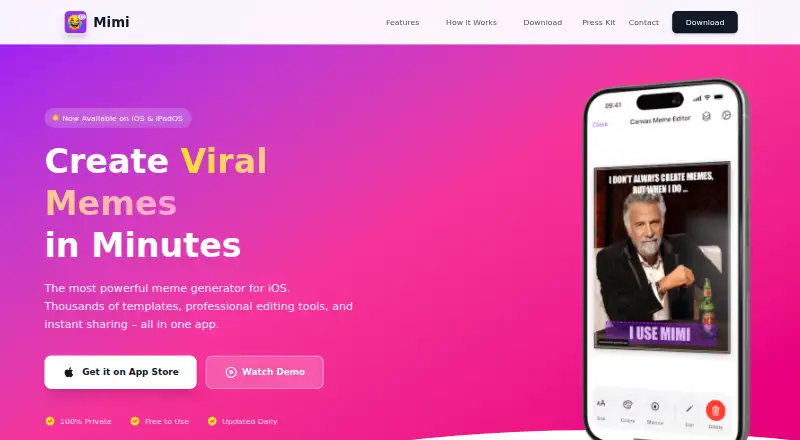
Mimi is a free iPhone and iPad app for creating image memes from trending templates or photos in the device gallery. It is aimed at people who want more control than a basic caption tool, with custom fonts, text styling, AI-powered text placement, effects, masks, balloons, shadows, and custom watermarks. Collections help organize finished memes, while HD image export and one-tap sharing support social publishing. Its fit is clearest for iOS users who make static image memes and want styled layouts without moving into a broader design platform.
The pricing model is freemium, with a free plan and optional Mimi+ access. The listed options are Mimi+ Weekly, Mimi+ Monthly, Mimi+ Yearly, and Lifetime Unlock; the paid options unlock all Mimi features, while the lifetime option unlocks them permanently. The published plan descriptions do not separate different feature bundles, so the main purchase decision is between recurring access and a permanent unlock. Users who only need basic meme creation can start with the free plan, while frequent creators may prefer access to the full set of fonts, layouts, and collection features.
Mimi keeps its scope narrow: static image meme creation on iOS. That focus brings together templates, smart text placement, visual effects, organization, HD export, and social sharing in one mobile workflow. Instagram, TikTok, and Twitter are listed as sharing destinations, but the product is not positioned as a video or GIF maker. Choose Mimi if you create image memes on an iPhone or iPad and value styling controls and template-driven editing. Choose an alternative if you need Android support, video-based meme creation, or a wider media-production toolkit.
Your product? Our editors can test Mimi in depth and publish a review, labelled as paid · from $149/mo →
Mimi pricing
Mimi fact sheet
| Free plan | Yes |
|---|---|
| Paid from | Not verified |
| GIF creation | Not verified |
| Video meme creation | Not verified |
| AI generation | Yes |
| Watermark-free export | Not verified |
| Maximum video length | Not verified |
| Maximum upload size | Not verified |
| Mobile apps | Ios |
| Deployment | Mobile |
| Platforms | iOS |
| Integrations | 3 integrations: Instagram, TikTok, Twitter |
| Pricing | Free plan (source) |
| Website | getmimi.app |
| Facts checked | 20 Sep 2026 |
Mimi integrations
Mimi lists 3 integrations on its own site.
- TikTok
Alternatives to Mimi
- Meme CreatorA broad, free meme editor with templates, timelines, uploads, and social workflows.9.4
- Imgflip Meme GeneratorA broad browser-based meme maker with templates, GIFs, AI tools, and privacy options.9.2
- Piñata FarmsA flexible meme maker for template remixes, original edits, and AI-generated images.9.0



Used Mimi? Be the first to review it
The editor score above is our own research. What this page doesn't have yet is a reader's view — what you used Mimi for, what worked and what didn't. No stars are seeded and no review is paid for; an editor reads every one before it appears.
Write a reviewTwo minutes · verified accounts only · read by an editor before it appears
Featured on iTechGuides

Mimi is listed in our Meme Makers directory. Add the badge to your site — it links back to this page.
<a href="https://www.itechguides.com/products/mimi/"><img src="https://www.itechguides.com/best/badge/mimi.svg" alt="Featured on iTechGuides" width="230" height="46"></a>
Reviewed by iTechGuides Editors · Editorial team · Updated Oct 2026
Advertiser disclosure: iTechGuides is reader-supported. Vendors can pay for top positions in our rankings and for a place on other products' pages, and we may earn a commission when you click some links. Bought places stand at the number bought; this page and our disclosure say so. Paying vendors may get a fuller, more detailed review from our editors, and that review can change their score. How we rank.
Last updated · How we research and update