
Microsoft SNDS
Microsoft SNDS: A free Microsoft-focused diagnostic service for IP reputation and Outlook.com filtering signals. Ranked #26 of 31 in Email Deliverability Software by our editors (6.5/10); pricing: Free plan; best for free Outlook.com IP reputation feedback.
At a glance
- Editor score6.5 / 10
- PricingFree plan
- Best forFree Outlook.com IP reputation feedback
- Free planYes
- Paid fromFree
- Inbox placement monitoringNo
- Facts checked20 Sep 2026
Where it wins
- Free reporting for traffic, complaints, filtering, and IP status
- CSV export plus automated data access for systems
- Includes malware, virus, and open-proxy indicators
Where it doesn't
- Focused on Outlook.com-specific deliverability signals
- Does not provide inbox placement monitoring
- Requires authorization for the relevant IP range or ASN
Our verdict on Microsoft SNDS
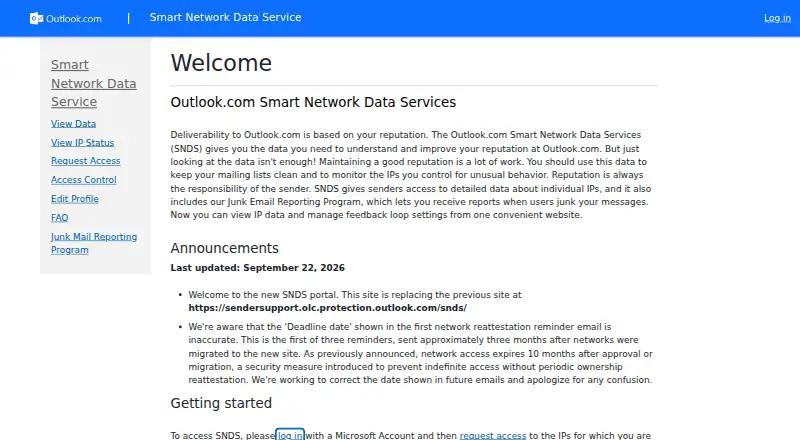
Microsoft SNDS is a free web service for email senders, internet service providers, and network administrators who control email-sending IP ranges. It focuses on Microsoft-specific diagnostics, showing IP-level email traffic and message-recipient reporting, sender complaint rates, aggregate Outlook.com spam-filter results, and status indicators for blocked, bot, or junked IPs. Access is web-based and requires Microsoft account authentication, along with authorization for the relevant IP range or ASN.
Its strongest fit is for teams that need a focused view of how Outlook.com evaluates sending infrastructure. The service also incorporates Junk Email Reporting Program feedback and displays virus, malware-hosting, and open-proxy detection indicators. CSV export supports reporting workflows, while automated data access can connect the service's information to internal systems. These capabilities make SNDS useful for diagnosing Microsoft-specific reputation concerns without a paid plan.
SNDS is narrower than a full email deliverability monitoring suite. It provides sender reputation and blocklist monitoring, but not inbox placement monitoring or spam-trap monitoring. The published service details also center the experience on Outlook.com data rather than broad mailbox-provider coverage. Choose Microsoft SNDS when free IP-level traffic, complaint, filtering, and security indicators are the priority. An alternative is more suitable when the requirement is cross-provider inbox placement analysis or broader authentication and deliverability monitoring.
Your product? Our editors can test Microsoft SNDS in depth and publish a review, labelled as paid · from $149/mo →
Microsoft SNDS pricing
Microsoft SNDS fact sheet
| Free plan | Yes |
|---|---|
| Paid from | Free |
| Inbox placement monitoring | No |
| Sender reputation monitoring | Yes |
| Authentication monitoring | Not verified |
| Blocklist monitoring | Yes |
| Spam trap monitoring | No |
| API access | Yes |
| Deployment | Cloud |
| Platforms | Web |
| Support | Email, Tickets, Docs |
| Built for | Small business, Mid-market, Enterprise (editorial estimate) |
| Pricing | Free plan |
| Website | substrate.office.com |
| Facts checked | 20 Sep 2026 |
Alternatives to Microsoft SNDS
- TrueSendTrueSend combines campaign operations with inbox placement, reputation, and authentication controls.9.4
- Validity EngageA broad enterprise suite for monitoring inbox placement, reputation, authentication, and spam-trap risk.9.2
- GlockAppsA focused toolkit for testing inbox placement, authentication, reputation, and spam risk.9.0


See all Microsoft SNDS alternatives →
Used Microsoft SNDS? Be the first to review it
The editor score above is our own research. What this page doesn't have yet is a reader's view — what you used Microsoft SNDS for, what worked and what didn't. No stars are seeded and no review is paid for; an editor reads every one before it appears.
Write a reviewTwo minutes · verified accounts only · read by an editor before it appears
Featured on iTechGuides

Microsoft SNDS is listed in our Email Deliverability Software directory. Add the badge to your site — it links back to this page.
<a href="https://www.itechguides.com/products/microsoft-snds/"><img src="https://www.itechguides.com/best/badge/microsoft-snds.svg" alt="Featured on iTechGuides" width="230" height="46"></a>
Reviewed by iTechGuides Editors · Editorial team · Updated Oct 2026
Advertiser disclosure: iTechGuides is reader-supported. Vendors can pay for top positions in our rankings and for a place on other products' pages, and we may earn a commission when you click some links. Bought places stand at the number bought; this page and our disclosure say so. Paying vendors may get a fuller, more detailed review from our editors, and that review can change their score. How we rank.
Last updated · How we research and update