Metronome Beats
Metronome Beats: A broad practice app with advanced rhythm tools and coverage across web, macOS, iOS, and Android. Ranked #1 of 26 in Metronome Apps by our editors (9.4/10); pricing: Free plan; best for broad, feature-rich practice across platforms.
At a glance
- Editor score9.4 / 10
- PricingFree plan
- Best forBroad, feature-rich practice across platforms
- Free planYes
- Tap tempoYes
- Facts checked21 Sep 2026
Where it wins
- Tempo control from 1 to 900 BPM with tap tempo
- Polyrhythm editing, custom signatures, and subdivisions up to 16 clicks
- Web, macOS, iOS, and Android availability with free functionality
Where it doesn't
- Saved presets, setlists, songs, and live mode require Pro
- Pricing varies by platform and region
- Listed integrations focus on Google and Apple account services
Our verdict on Metronome Beats
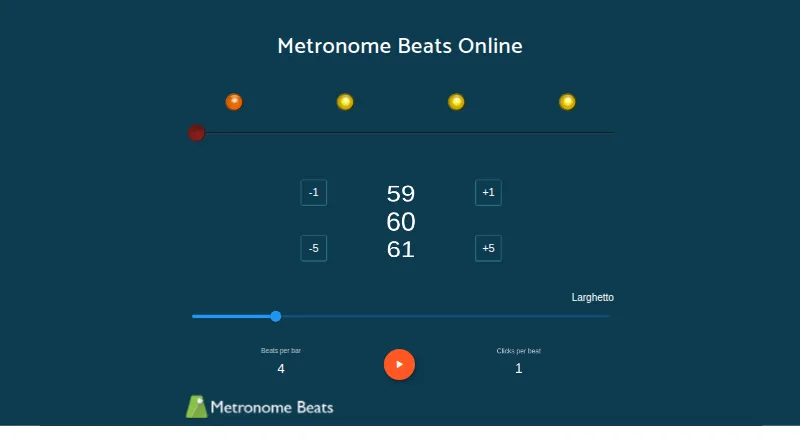
Metronome Beats is a metronome and speed-training app for musicians, music teachers, performers, and anyone practicing controlled timing. Its free plan includes a metronome, tap tempo, speed trainer, and drum machine. Across its web, macOS, iOS, and Android versions, it supports tempo settings from 1 to 900 BPM, complex and custom time signatures, visual beat indicators, timers, and bar or beat counters.
The feature set extends beyond basic click-track practice. Users can work with subdivisions of up to 16 clicks per beat, create and edit polyrhythms, program drum-machine patterns, and use gradual tempo changes for speed training. Presets, setlists, songs, and live mode support more structured practice and performance workflows, while background playback adds flexibility for sessions that do not stay inside the app. These tools make Metronome Beats a strong fit for players and teachers who need more than a simple tempo reference.
The plan structure is straightforward: the Free plan covers core timing and rhythm functions, while Metronome Beats Pro adds saved presets and setlists, songs, live mode, and no adverts. Pricing varies by platform and region. The listed ecosystem connections are Google Payments In-app Billing, Google account, and Apple account. Choose Metronome Beats if broad platform access, detailed rhythm controls, and speed training matter; choose another option if you need a narrower tool with a different integration model or want the advanced organization and performance features included without an upgrade.
Your product? Our editors can test Metronome Beats in depth and publish a review, labelled as paid · from $149/mo →
Metronome Beats pricing
All 2 Metronome Beats plans and prices →
Metronome Beats fact sheet
| Free plan | Yes |
|---|---|
| Paid from | Not verified |
| Maximum BPM | 900 BPM |
| Tap tempo | Yes |
| Subdivision control | Yes |
| Custom time signatures | Yes |
| Polyrhythm support | Yes |
| Offline mode | Not verified |
| Platform coverage | web, macos, ios, android |
| Deployment | Cloud, Mobile, Desktop |
| Platforms | Web, macOS, iOS, Android |
| Support | Email, Docs |
| Built for | Solo, Small business (editorial estimate) |
| Integrations | 3 integrations: Google Payments In-app Billing, Google account, Apple account |
| Pricing | Free plan (source) |
| Website | metronome.app |
| Facts checked | 21 Sep 2026 |
Metronome Beats integrations
Metronome Beats lists 3 integrations on its own site.
- Google Payments In-app Billing
- Google account
- Apple account
Alternatives to Metronome Beats
- YamesA focused, offline practice metronome with drills, coaching, MIDI, and backing bands.9.2
- PolyMetronomeA focused metronome for complex rhythms, tempo training and logged practice.9.1
- Pro MetronomeA flexible mobile metronome for structured practice, rhythm training, and hardware control.9.0

See all Metronome Beats alternatives →
Metronome Beats vs the competition
- Metronome Beats vs Yames
- Metronome Beats vs PolyMetronome
- Metronome Beats vs Pro Metronome
- Metronome Beats vs The Metronome by Soundbrenner
- Metronome Beats vs Metronomics
- Metronome Beats vs Bounce Metronome Pro


Compare Metronome Beats with any tool side by side →
Used Metronome Beats? Be the first to review it
The editor score above is our own research. What this page doesn't have yet is a reader's view — what you used Metronome Beats for, what worked and what didn't. No stars are seeded and no review is paid for; an editor reads every one before it appears.
Write a reviewTwo minutes · verified accounts only · read by an editor before it appears
Featured on iTechGuides

Metronome Beats is listed in our Metronome Apps directory. Add the badge to your site — it links back to this page.
<a href="https://www.itechguides.com/products/metronome-beats/"><img src="https://www.itechguides.com/best/badge/metronome-beats.svg" alt="Featured on iTechGuides" width="230" height="46"></a>
Reviewed by iTechGuides Editors · Editorial team · Updated Sep 2026
Advertiser disclosure: iTechGuides is reader-supported. Vendors can pay for top positions in our rankings and for a place on other products' pages, and we may earn a commission when you click some links. Bought places stand at the number bought; this page and our disclosure say so. Paying vendors may get a fuller, more detailed review from our editors, and that review can change their score. How we rank.
Last updated · How we research and update