mdiapp+ SE
mdiapp+ SE: A Windows comic-art tool with page management, pressure input, and programmable brushes. Ranked #28 of 29 in Comic Creation Software by our editors (5.6/10); pricing: Paid; best for windows artists focused on comic-page illustration.
At a glance
- Editor score5.6 / 10
- PricingPaid
- Best forWindows artists focused on comic-page illustration
- Free planNo
- Facts checked23 Sep 2026
Where it wins
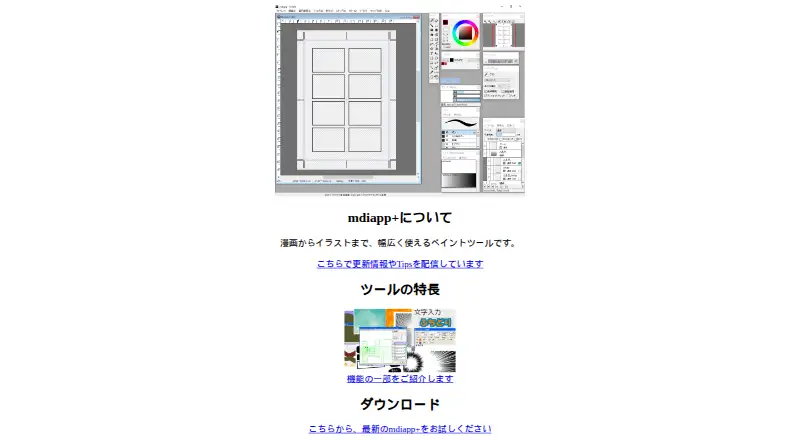
- Organizes comic pages within a project.
- Supports pen-tablet pressure and Lua-programmable script brushes.
- Includes 3D perspective drawing and several layer types.
Where it doesn't
- Runs on Windows only.
- Requires a one-time purchase; there is no free plan.
- Uses an MDP workflow for file sharing with FireAlpaca and MediBang Paint.
Our verdict on mdiapp+ SE
For Windows artists making comics and other illustrations, mdiapp+ SE combines painting tools with comic-page project management. It supports pen-tablet pressure input, standard color layers, and 1-bit and 8-bit layers. The toolset also includes Lua-programmable script brushes, 3D perspective drawing, layer free transform and mesh transform, and a concentration-lines filter. It is a desktop application for solo artists and small teams who want comic-page organization alongside illustration features.
Its layer options and drawing aids are central strengths for page-based art. The different layer types give artists options for working with monochrome and color artwork, while the perspective tool can support perspective drawing. Programmable script brushes add customization to brush behavior. The listed features focus on drawing and page organization; artists whose main requirement is verified comic lettering, panel-layout controls, or export workflows should compare alternatives based on those specific needs.
mdiapp+ SE is sold as a paid product with a one-time purchase, rather than a free plan or subscription tier. It is Windows-only, with the product information citing Steam's minimum requirement of Windows 7 or later and the official page's recommended environment of Windows Vista, 7, 8, or 10. MDP is the shared file format named for FireAlpaca and MediBang Paint, so that connection may suit artists already working with either application. Choose mdiapp+ SE if Windows compatibility, page management, and its illustration tools match your workflow; look elsewhere if you need another operating system or a free plan.
Your product? Our editors can test mdiapp+ SE in depth and publish a review, labelled as paid · from $149/mo →
mdiapp+ SE pricing
All 1 mdiapp+ SE plans and prices →
mdiapp+ SE fact sheet
| Free plan | No |
|---|---|
| Paid from | Not verified |
| Panel layouts | Not verified |
| Speech balloons | Not verified |
| Character library | Not verified |
| Illustration tools | Yes |
| Export formats | Not verified |
| Supported platforms | Windows |
| Maximum pages | Not verified |
| Deployment | Desktop |
| Platforms | Windows |
| Built for | Solo, Small business (editorial estimate) |
| Integrations | 2 integrations: FireAlpaca (MDP file format), MediBang Paint (MDP file format) |
| Pricing | Paid (source) |
| Website | nattou.org |
| Facts checked | 23 Sep 2026 |
mdiapp+ SE integrations
mdiapp+ SE lists 2 integrations on its own site.
- FireAlpaca (MDP file format)
- MediBang Paint (MDP file format)
Alternatives to mdiapp+ SE
- Clip Studio PaintA deep comic-production toolkit spanning drawing, page layout, animation, assets, and cloud workflows.9.4
- MediBang PaintA capable free comic-creation toolkit with optional cloud storage and collaboration tiers.9.1
- JUMP PAINTA focused free option for manga practice, comic pages, and cross-device creation.8.9

See all mdiapp+ SE alternatives →
Used mdiapp+ SE? Be the first to review it
The editor score above is our own research. What this page doesn't have yet is a reader's view — what you used mdiapp+ SE for, what worked and what didn't. No stars are seeded and no review is paid for; an editor reads every one before it appears.
Write a reviewTwo minutes · verified accounts only · read by an editor before it appears
Featured on iTechGuides

mdiapp+ SE is listed in our Comic Creation Software directory. Add the badge to your site — it links back to this page.
<a href="https://www.itechguides.com/products/mdiapp-se/"><img src="https://www.itechguides.com/best/badge/mdiapp-se.svg" alt="Featured on iTechGuides" width="230" height="46"></a>
Reviewed by iTechGuides Editors · Editorial team · Updated Oct 2026
Advertiser disclosure: iTechGuides is reader-supported. Vendors can pay for top positions in our rankings and for a place on other products' pages, and we may earn a commission when you click some links. Bought places stand at the number bought; this page and our disclosure say so. Paying vendors may get a fuller, more detailed review from our editors, and that review can change their score. How we rank.
Last updated · How we research and update