
Max
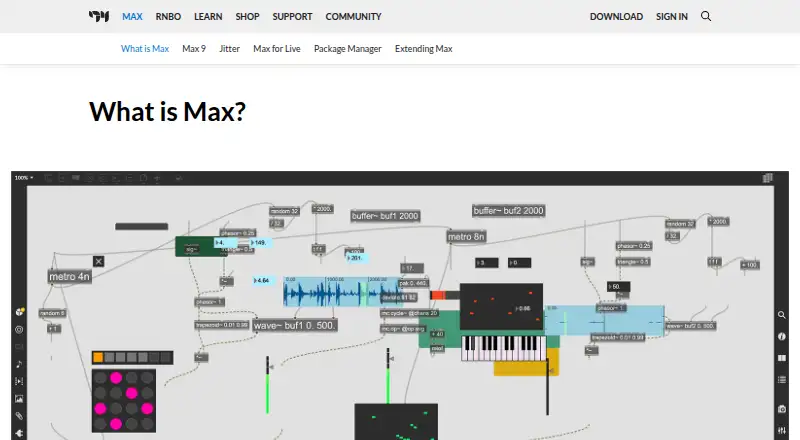
Max: A deep visual patching environment for custom sound, audiovisual, and hardware projects. Ranked #5 of 32 in Sound Design Software by our editors (8.9/10); pricing: 30-day trial; best for professional visual patching and media design.
At a glance
- Editor score8.9 / 10
- Pricing30-day trial
- Best forProfessional visual patching and media design
- Free planNo
- Paid from$133.20/yr
- Primary workflowHybrid
- Founded1997
- Facts checked20 Sep 2026
Where it wins
- Build custom synthesizers, effects, samples, and MIDI tools
- Combines multichannel audio, video, graphics, Gen, and Jitter
- Loads Audio Unit, VST, VST3, and Max for Live plug-ins
Where it doesn't
- No free plan, with annual access starting at $133.20
- Permanent license costs $442.89 and major upgrades are separate
- Available only for macOS and Windows
Our verdict on Max
Max is a visual patching environment for musicians, artists, educators, researchers, and media designers. Its connected-object workflow supports custom synthesizers, effects, sample-processing systems, MIDI tools, interactive audiovisual applications, and hardware prototypes. It runs as a standalone desktop application on macOS and Windows, with audio, video, graphics, multichannel, scripting, and code-generation capabilities. This makes it suited to projects that need a configurable visual workspace rather than a narrowly focused sound editor.
The published plans offer three payment choices. The Max 9 Permanent License costs $442.89 one time and provides perpetual access to Max 9, with incremental 9.x.x updates included; major upgrades are purchased separately. The Max Subscription costs $133.20 per year, or $14.42 per month, and includes access to Max and upgrades while the subscription remains active. Subscriptions can be cancelled, and a 30-day trial is available. The annual subscription is the lower-cost paid entry point, while the permanent license is aimed at buyers who prefer perpetual access.
Max’s strongest fit is its breadth across sound design and interactive media. Users can import and manipulate audio samples, apply timestretching and pitch shifting, patch multichannel audio with MC objects, and create real-time video and graphics with Jitter. Gen supports audio processing and code generation, while MIDI, OSC, RNBO, and hardware integration extend projects beyond the desktop. Audio Unit, VST, VST3, and Max for Live plug-in loading, plus a Package Manager with over 50 add-ons, support varied workflows. Choose Max for custom visual patching and media design; choose a simpler or free option when cost or a narrower workflow matters more.
Your product? Our editors can test Max in depth and publish a review, labelled as paid · from $149/mo →
Max pricing
Max fact sheet
| Free plan | No |
|---|---|
| Paid from | $133.20/yr |
| Primary workflow | Hybrid |
| Standalone app | Yes |
| Sample import | Yes |
| Plugin formats | Audio Unit, VST, VST3, and AMXD |
| Surround audio | Not verified |
| Supported platforms | macOS and Windows |
| Free trial | 30 days |
| Deployment | Desktop |
| Platforms | Windows, macOS |
| Support | Tickets, Community, Docs |
| Built for | Solo, Small business, Mid-market, Enterprise (editorial estimate) |
| Integrations | 7 integrations: Audio Unit, VST, VST3, Max for Live, MIDI, OSC … |
| Pricing | 30-day trial (source) |
| Website | cycling74.com |
| Facts checked | 20 Sep 2026 |
Max integrations
Max lists 7 integrations on its own site.
- Audio Unit
- VST
- VST3
- Max for Live
- MIDI
- OSC
- RNBO
Alternatives to Max
- CsoundA free, programmable sound design system with broad platform coverage and deep audio control.9.4
- SuperColliderA free, code-driven toolkit for live synthesis, processing, and experimental composition.9.3
- Bespoke SynthA flexible open-source environment for building modular instruments, effects, and live sets.9.2

Max vs the competition



Compare Max with any tool side by side →
Used Max? Be the first to review it
The editor score above is our own research. What this page doesn't have yet is a reader's view — what you used Max for, what worked and what didn't. No stars are seeded and no review is paid for; an editor reads every one before it appears.
Write a reviewTwo minutes · verified accounts only · read by an editor before it appears
Featured on iTechGuides

Max is listed in our Sound Design Software directory. Add the badge to your site — it links back to this page.
<a href="https://www.itechguides.com/products/max/"><img src="https://www.itechguides.com/best/badge/max.svg" alt="Featured on iTechGuides" width="230" height="46"></a>
Reviewed by iTechGuides Editors · Editorial team · Updated Oct 2026
Advertiser disclosure: iTechGuides is reader-supported. Vendors can pay for top positions in our rankings and for a place on other products' pages, and we may earn a commission when you click some links. Bought places stand at the number bought; this page and our disclosure say so. Paying vendors may get a fuller, more detailed review from our editors, and that review can change their score. How we rank.
Last updated · How we research and update