
Material Design Icons
Material Design Icons: A flexible, open-source icon library with strong Material ecosystem support. Ranked #15 of 46 in Icon Libraries by our editors (7.8/10); pricing: Free plan; best for developers using Material ecosystem tooling.
At a glance
- Editor score7.8 / 10
- PricingFree plan
- Best forDevelopers using Material ecosystem tooling
- Free planYes
- Paid fromFree
- Facts checked20 Sep 2026
Where it wins
- SVG, JavaScript, and four webfont formats support varied workflows
- Official Figma plugin supports icon search and insertion
- Framework guides and packages cover major web and app platforms
Where it doesn't
- No AI features are included
- Choosing between SVG, JavaScript, and webfont workflows adds implementation decisions
- Its strongest fit is teams already working with Material ecosystem tooling
Our verdict on Material Design Icons
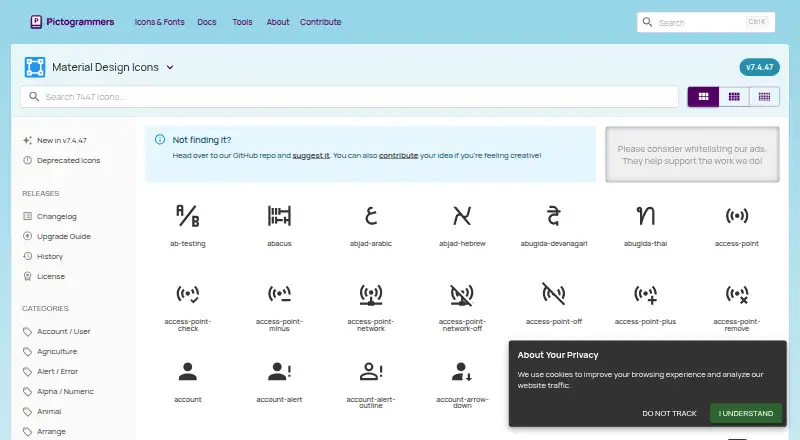
Material Design Icons is an open-source icon library maintained by Pictogrammers for designers and developers. It provides vector icons for websites, applications, and design tools, with individual and inline SVG options, JavaScript packages, and webfont distribution. The library is well suited to developers building with Material ecosystem tooling, as well as design teams that want to search for and insert icons through Figma.
The format choices are a practical strength. Icons are available as SVG, JavaScript, and EOT, TTF, WOFF, and WOFF2 webfonts, while helper classes support rotation, flipping, and animation. The project also provides NPM packages for SVG and JavaScript usage, plus framework and language integration guides. Commercial use is supported under stated open-source licenses, including Apache 2.0 for Material Design Icons assets. This makes the library adaptable across implementation styles without introducing a paid plan structure.
Its ecosystem coverage is the clearest reason to choose it. Integrations and guides span Figma, Android, Angular, AngularJS, Ember, PHP, Polymer, React, Rollup.js, Ruby on Rails, Svelte, Vue.js, Webpack, Windows, and Xamarin. The library is presented across web, Windows, and Android, and the official site displays version 7.4.47. Teams that want a searchable icon collection with multiple delivery formats and established framework guidance should consider Material Design Icons. It is less suitable for buyers specifically seeking AI-assisted icon features or a narrower workflow with no format and integration choices.
Your product? Our editors can test Material Design Icons in depth and publish a review, labelled as paid · from $149/mo →
Material Design Icons pricing
Material Design Icons fact sheet
| Free plan | Yes |
|---|---|
| Paid from | Free |
| Icons included | Not verified |
| Icon formats | SVG, JavaScript, webfont (EOT, TTF, WOFF, WOFF2) |
| Style coverage | Multiple |
| Commercial use | Yes |
| Figma plugin | Yes |
| API access | Not verified |
| Icon font | Yes |
| Deployment | Self-hosted, Desktop, Mobile, Browser extension |
| Platforms | Web, Windows, Android |
| Support | Community, Docs |
| Built for | Solo, Small business, Mid-market, Enterprise (editorial estimate) |
| Integrations | 15 integrations: Figma, Android, Angular, AngularJS, Ember, PHP … |
| Pricing | Free plan |
| Website | pictogrammers.com |
| Facts checked | 20 Sep 2026 |
Material Design Icons integrations
Material Design Icons lists 15 integrations on its own site.
- Figma
- Android
- Angular
- AngularJS
- Ember
- PHP
- Polymer
- React
- Rollup.js
- Ruby on Rails
- Svelte
- Vue.js
- Webpack
- Windows
- Xamarin
Alternatives to Material Design Icons
- The Noun ProjectA broad icon library with strong editing, integration, and API options at a low entry price.9.4
- FlaticonA broad icon library with strong format support, editing tools, and workflow integrations.9.2
- IconifyA broad, open-source icon ecosystem with APIs, generation tools, and Figma support.9.0



See all Material Design Icons alternatives →
Used Material Design Icons? Be the first to review it
The editor score above is our own research. What this page doesn't have yet is a reader's view — what you used Material Design Icons for, what worked and what didn't. No stars are seeded and no review is paid for; an editor reads every one before it appears.
Write a reviewTwo minutes · verified accounts only · read by an editor before it appears
Featured on iTechGuides

Material Design Icons is listed in our Icon Libraries directory. Add the badge to your site — it links back to this page.
<a href="https://www.itechguides.com/products/material-design-icons/"><img src="https://www.itechguides.com/best/badge/material-design-icons.svg" alt="Featured on iTechGuides" width="230" height="46"></a>
Reviewed by iTechGuides Editors · Editorial team · Updated Oct 2026
Advertiser disclosure: iTechGuides is reader-supported. Vendors can pay for top positions in our rankings and for a place on other products' pages, and we may earn a commission when you click some links. Bought places stand at the number bought; this page and our disclosure say so. Paying vendors may get a fuller, more detailed review from our editors, and that review can change their score. How we rank.
Last updated · How we research and update