
Markify
Markify: A focused annotation workspace for reviewing web pages, PDFs, and Word files. Ranked #26 of 31 in Web Annotation Tools by our editors (6.6/10); pricing: Free plan; best for simple web and document annotation.
At a glance
- Editor score6.6 / 10
- PricingFree plan
- Best forSimple web and document annotation
- Free planYes
- Paid from$15/mo
- Collaborative reviewYes
- Facts checked20 Sep 2026
Where it wins
- Anchors numbered comments to exact canvas coordinates
- Lets guests review and reply without creating accounts
- Supports websites, PDFs, Word files, and localhost sharing
Where it doesn't
- Free is limited to 2 canvases and 5 comments per canvas
- Paid plans focus on monthly canvas and comment limits
- No integrations or AI features are described
Our verdict on Markify
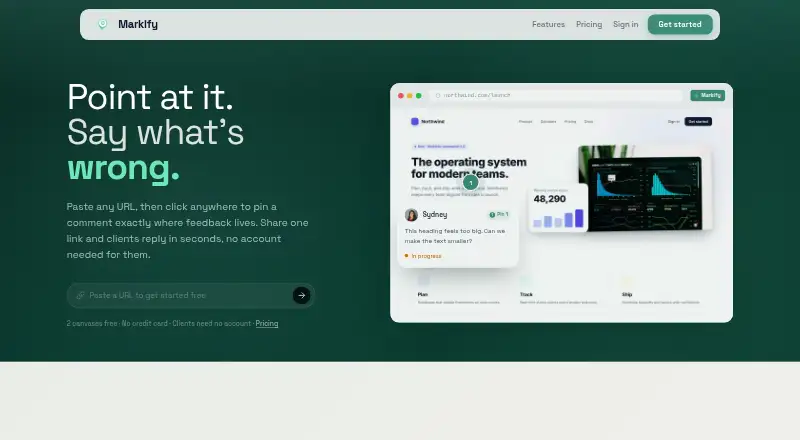
Markify is a browser-based visual feedback tool for agencies, designers, developers, marketers, and stakeholders. Users paste a public URL or upload a supported document, then place numbered comment pins on the rendered canvas. Reviewers can open shareable links, view comments, and reply without creating an account. Full-page web rendering, PDF and Word annotation, comment resolution, and localhost sharing through an npx command make it suited to focused review workflows across web and document projects.
The pricing structure is straightforward. The Free plan costs $0 forever and includes 2 canvases, up to 5 comments per canvas, shareable links without client login, resolve-and-reopen controls, and numbered comment pins. Pro costs $15 per month with 20 canvases, unlimited comments, email notifications on new comments, real-time updates, and priority support. Max costs $49 per month and adds unlimited canvases while retaining unlimited comments, notifications, real-time updates, and priority support. Annual billing is available, with an annual toggle advertising savings. The core difference between paid tiers is canvas capacity.
Markify’s standout feature is anchored visual feedback: comments stay tied to precise coordinates on a rendered web page or document, while real-time updates and resolution tracking keep review activity organized. Public links reduce friction for external stakeholders, and localhost sharing extends the workflow to local development previews. The trade-off is a narrow scope. Markify is a strong fit when the priority is simple, shareable annotation across websites and documents. Teams seeking integrations, AI-assisted review, or a broader project-management ecosystem should choose a more expansive alternative.
Your product? Our editors can test Markify in depth and publish a review, labelled as paid · from $149/mo →
Markify user reviews
- 5★1
- 4★0
- 3★0
- 2★0
- 1★0
Editor score 6.6/10 is our own research. User rating 5.0/5 is what readers say — every review is read by an editor before it appears, and none is ever paid for.
-
★★★★★
Works very well
Works very well and. Good. For the price better than most. Annotations tools out. There
Write a reviewTwo minutes · verified accounts only · read by an editor before it appears
Markify pricing
All 3 Markify plans and prices →
Markify fact sheet
| Free plan | Yes |
|---|---|
| Paid from | $15/mo |
| Annotation modes | Comments |
| Collaborative review | Yes |
| Guest access | Yes |
| Document support | Both |
| Browser capture | Yes |
| Team seats | Not verified |
| Export options | Not verified |
| Money-back guarantee | 7 days |
| Deployment | Cloud, Browser extension |
| Platforms | Web |
| Support | |
| Built for | Solo, Small business, Mid-market (editorial estimate) |
| Pricing | Free plan (source) |
| Website | usemarkify.com |
| Facts checked | 20 Sep 2026 |
Alternatives to Markify
- HypothesisA free, open-source annotation platform with strong education and collaboration features.9.3
- PinPointA free web annotation workspace combining collaborative review, PDF proofing, and AI QA.9.1
- PerusallA course-focused annotation platform combining discussion, assessment, analytics, and LMS sync.9.0



See all Markify alternatives →
Featured on iTechGuides

Markify is listed in our Web Annotation Tools directory. Add the badge to your site — it links back to this page.
<a href="https://www.itechguides.com/products/markify/"><img src="https://www.itechguides.com/best/badge/markify.svg" alt="Featured on iTechGuides" width="230" height="46"></a>
Reviewed by iTechGuides Editors · Editorial team · Updated Oct 2026
Advertiser disclosure: iTechGuides is reader-supported. Vendors can pay for top positions in our rankings and for a place on other products' pages, and we may earn a commission when you click some links. Bought places stand at the number bought; this page and our disclosure say so. Paying vendors may get a fuller, more detailed review from our editors, and that review can change their score. How we rank.
Last updated · How we research and update