MarkdownPad
MarkdownPad: A low-cost Windows Markdown editor with live preview and practical export tools. Ranked #26 of 31 in Markdown Editors by our editors (6.2/10); pricing: Free plan; best for budget Windows Markdown editing.
At a glance
- Editor score6.2 / 10
- PricingFree plan
- Best forBudget Windows Markdown editing
- Free planYes
- Paid from$14.95 one-time
- Facts checked20 Sep 2026
Where it wins
- Free tier includes live HTML preview, spell check, and HTML export
- Pro adds PDF export, auto-save, and session management for $14.95
- Supports tabs, syntax highlighting, custom CSS, and keyboard formatting
Where it doesn't
- Available only for Windows desktop workflows
- Publishing workflow is limited to local files and exports
- Published compatibility information focuses on older Windows versions
Our verdict on MarkdownPad
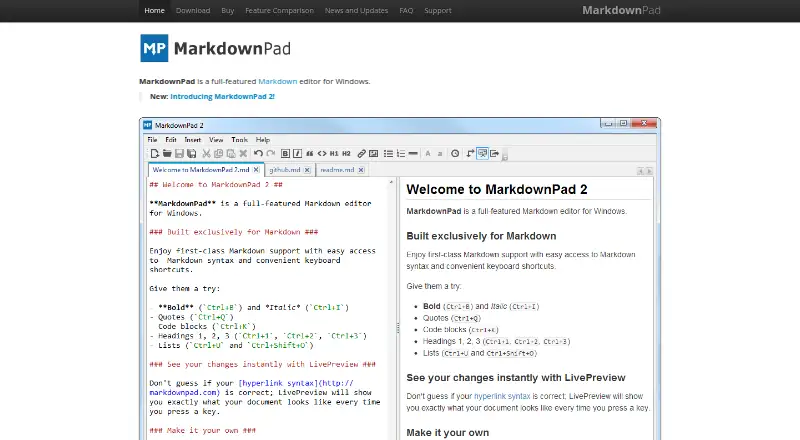
MarkdownPad is a Windows desktop Markdown editor for writers, developers, and documentation authors who want local document editing with an immediate HTML preview. Its core workflow combines Markdown syntax highlighting, keyboard shortcuts, toolbar formatting, tabbed documents, spell checking, custom CSS, and HTML export. The software is available as an installed or portable Windows application, making it a focused option for users who do not need a browser-based editor or a cross-platform workspace.
The free edition covers the essential writing workflow with Standard Markdown support, instant HTML preview, HTML export, spell checking, and custom CSS. MarkdownPad Pro costs $14.95 as a one-time purchase and adds PDF export, GitHub Flavored Markdown, Markdown Extra, auto-save, session management, and a commercial-use license. That pricing makes the upgrade straightforward for users who need more Markdown processors, document recovery features, PDF output, or business use. The Pro edition also includes image uploading, according to the product description.
MarkdownPad’s strength is its narrow, practical focus: compose locally, preview the rendered result, and export to HTML or PDF. It suits Windows users who value a traditional desktop editor and a low upfront cost, especially writers and documentation authors working with local files. It is less suitable for teams seeking a publishing workflow, broad platform coverage, or a modern multi-platform environment. Buyers should also consider the product’s dated published compatibility information, which names Windows XP, Vista, 7, and 8, alongside a latest news entry shown from 2014.
Your product? Our editors can test MarkdownPad in depth and publish a review, labelled as paid · from $149/mo →
MarkdownPad pricing
All 2 MarkdownPad plans and prices →
MarkdownPad fact sheet
| Free plan | Yes |
|---|---|
| Paid from | $14.95 one-time |
| Supported platforms | windows |
| Export formats | HTML, PDF |
| Publishing workflow | None |
| Real-time collaboration | Not verified |
| Markdown flavor | Not verified |
| Cloud sync | Not verified |
| Local file support | Yes |
| Deployment | Desktop |
| Platforms | Windows |
| Support | Email, Docs |
| Built for | Solo, Small business (editorial estimate) |
| Pricing | Free plan (source) |
| Website | markdownpad.com |
| Facts checked | 20 Sep 2026 |
Alternatives to MarkdownPad
- StackEditA broad free editor for Markdown writing, collaboration, cloud sync, and CMS publishing.9.2
- HackMDA capable collaborative Markdown workspace with strong GitHub and publishing workflows.9.1
- HedgeDocA self-hosted Markdown workspace for teams that need live collaboration and control.8.9



See all MarkdownPad alternatives →
Used MarkdownPad? Be the first to review it
The editor score above is our own research. What this page doesn't have yet is a reader's view — what you used MarkdownPad for, what worked and what didn't. No stars are seeded and no review is paid for; an editor reads every one before it appears.
Write a reviewTwo minutes · verified accounts only · read by an editor before it appears
Featured on iTechGuides

MarkdownPad is listed in our Markdown Editors directory. Add the badge to your site — it links back to this page.
<a href="https://www.itechguides.com/products/markdownpad/"><img src="https://www.itechguides.com/best/badge/markdownpad.svg" alt="Featured on iTechGuides" width="230" height="46"></a>
Reviewed by iTechGuides Editors · Editorial team · Updated Oct 2026
Advertiser disclosure: iTechGuides is reader-supported. Vendors can pay for top positions in our rankings and for a place on other products' pages, and we may earn a commission when you click some links. Bought places stand at the number bought; this page and our disclosure say so. Paying vendors may get a fuller, more detailed review from our editors, and that review can change their score. How we rank.
Last updated · How we research and update