
MailStyler
MailStyler: A Windows newsletter editor with flexible exports, reusable content, and broad email-tool integrations. Ranked #39 of 63 in Email Design Software by our editors (4.9/10); pricing: Free plan; best for windows users creating newsletters offline.
At a glance
- Editor score4.9 / 10
- PricingFree plan
- Best forWindows users creating newsletters offline
- Free planYes
- Editor typeDrag-and-drop
- Facts checked20 Sep 2026
Where it wins
- Responsive HTML generation with inline CSS
- Reusable libraries for elements and content blocks
- HTML, EML, and PDF export options
Where it doesn't
- Windows-only platform coverage
- Free Demo exports contain scrambled HTML
- Paid plan pricing and tier differences are not fully clear
Our verdict on MailStyler
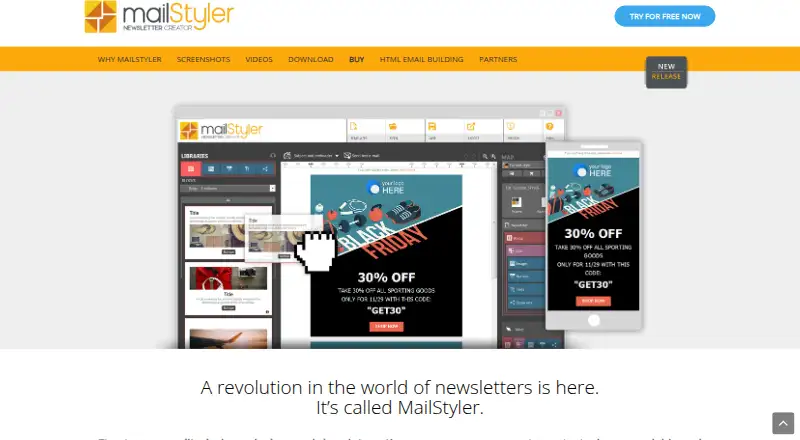
MailStyler is a Windows desktop application for designing responsive email newsletters without writing HTML. Its drag-and-drop editor supports customizable blocks and cells, preset and custom styles, social icons, image editing, and reusable personal libraries. Marketers, designers, and businesses creating newsletters offline should find its desktop workflow especially relevant, while teams working primarily on macOS or in browser-based environments may need a different fit.
The freemium structure starts with Free Demo, which includes a lifetime license, a limited template gallery, technical support, and trial exports with scrambled HTML emails. Basic adds unlimited exports, a limited image library, one installation, and one year of assistance and updates. Pro adds unlimited cloud space, an advanced image library, and the full template gallery, while Server includes the same listed capabilities. All paid tiers include a lifetime license, and the software continues operating after the first year; assistance and updates may require renewal. Pro and Server also support cloud image storage.
MailStyler covers the production steps that matter for newsletter design: image cropping, resizing, repositioning, overlays, subject and preheader fields, test emails, responsive HTML with inline CSS, and HTML, EML, or PDF export. It connects with eMailChef, SendBlaster, Gmail, Thunderbird, Outlook, Mailchimp, Dropbox, Google Drive, and OneDrive, giving users several routes into email clients, marketing tools, and storage services. Choose it if Windows desktop creation, reusable design assets, and export flexibility are priorities. Choose another option if you need native support beyond Windows or a clearer distinction between paid tiers before committing.
Your product? Our editors can test MailStyler in depth and publish a review, labelled as paid · from $149/mo →
MailStyler pricing
All 4 MailStyler plans and prices →
MailStyler fact sheet
| Free plan | Yes |
|---|---|
| Paid from | Not verified |
| Editor type | Drag-and-drop |
| Reusable content blocks | Yes |
| HTML export | Yes |
| Custom code editing | Not verified |
| Custom fonts | Not verified |
| Included editor seats | Not verified |
| Deployment | Desktop, Self-hosted |
| Platforms | Windows |
| Compliance & security | GDPR |
| Support | Phone, Docs · 24/7 |
| Built for | Solo, Small business, Mid-market (editorial estimate) |
| Integrations | 9 integrations: eMailChef, SendBlaster, Gmail, Thunderbird, Outlook, Mailchimp … |
| Pricing | Free plan (source) |
| Website | newslettercreator.com |
| Facts checked | 20 Sep 2026 |
MailStyler integrations
MailStyler lists 9 integrations on its own site.
- eMailChef
- SendBlaster
- Gmail
- Thunderbird
- Outlook
- Mailchimp
- Dropbox
- Google Drive
- OneDrive
Alternatives to MailStyler
- StripoA flexible email design workspace with broad ESP exports and collaborative editing.8.9
- Beefree (now RGE Studio)A flexible web-based design layer for email teams that need reusable workflows and HTML control.8.8
- StensulA governed email production platform for enterprise teams managing complex campaign workflows.8.7



See all MailStyler alternatives →
Used MailStyler? Be the first to review it
The editor score above is our own research. What this page doesn't have yet is a reader's view — what you used MailStyler for, what worked and what didn't. No stars are seeded and no review is paid for; an editor reads every one before it appears.
Write a reviewTwo minutes · verified accounts only · read by an editor before it appears
Featured on iTechGuides

MailStyler is listed in our Email Design Software directory. Add the badge to your site — it links back to this page.
<a href="https://www.itechguides.com/products/mailstyler/"><img src="https://www.itechguides.com/best/badge/mailstyler.svg" alt="Featured on iTechGuides" width="230" height="46"></a>
Reviewed by iTechGuides Editors · Editorial team · Updated Oct 2026
Advertiser disclosure: iTechGuides is reader-supported. Vendors can pay for top positions in our rankings and for a place on other products' pages, and we may earn a commission when you click some links. Bought places stand at the number bought; this page and our disclosure say so. Paying vendors may get a fuller, more detailed review from our editors, and that review can change their score. How we rank.
Last updated · How we research and update