
Mail Merge Toolkit
Mail Merge Toolkit: A low-cost Outlook and Word mail merge add-in with attachments, scheduling, and encryption. Ranked #7 of 27 in Mail Merge Software by our editors (7.7/10); pricing: 30-day trial; best for low-cost Outlook and Word mail merge.
At a glance
- Editor score7.7 / 10
- Pricing30-day trial
- Best forLow-cost Outlook and Word mail merge
- Free planNo
- Paid from$2.50/user/mo
- Delivery channelsBoth
- Founded2003 · Vilnius, Lithuania
- Facts checked21 Sep 2026
Where it wins
- Personalizes subjects, attachments, PDFs, and DOCX files
- Adds scheduling, delayed delivery, and batch sending
- Connects with Outlook, Word, Publisher, SharePoint, and Google Analytics
Where it doesn't
- Runs only on Windows
- No free plan is available
- Advanced features require the Professional plan
Our verdict on Mail Merge Toolkit
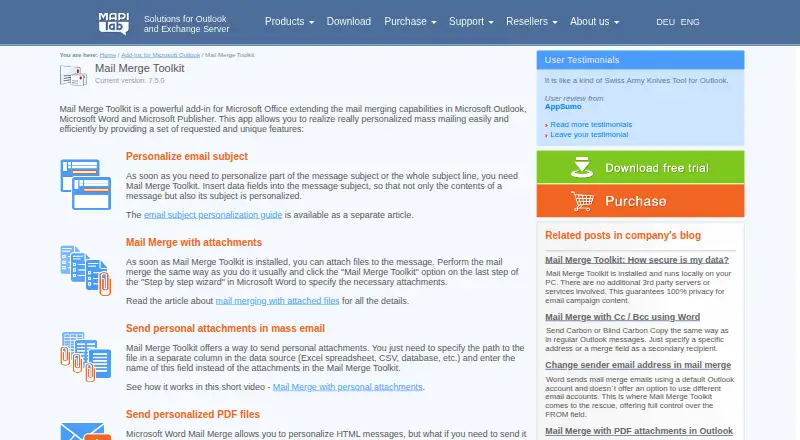
Mail Merge Toolkit is a Windows desktop add-in for Microsoft Outlook, Word, and Publisher. It is designed for individuals and organizations that need personalized email campaigns or document mail merges while staying within Microsoft Office. The software supports Outlook contacts, Excel spreadsheets, CSV files, databases, and SharePoint Lists as merge data sources. It can produce emails, PDF, DOCX, HTML, plain-text, RTF, EML, and other exported document files, with both email delivery and local file export available.
Pricing is structured around two annual per-user subscriptions. Standard costs $2.50 per user per month and includes personalized email subjects, attachment sending, personal attachments, and HTML, RTF, and plain-text messages. Professional costs $8.25 per user per month and adds personalized PDF and DOCX attachments, password-protected attachments, scheduled and batched delivery, SharePoint List data sources, digital signatures, and message encryption. A 30-day free trial is available, but there is no free plan. For teams that only need basic Outlook mail merge and attachments, Standard keeps the entry price low; Professional is the more suitable tier for controlled document delivery and security-related features.
Its main strength is the depth of Microsoft integration. Mail Merge Toolkit works with Outlook, Word, Publisher, Microsoft 365, Microsoft Exchange, SharePoint, and Google Analytics, while also supporting CC, BCC, UTM parameters, recipient-specific files, and personalized exports directly to a folder. The software has been offered since 2003 and runs locally on the user’s PC. That focus suits Windows-based Microsoft environments, but it narrows the fit for teams working on other operating systems or outside the Microsoft ecosystem. Choose it for Microsoft-centered, attachment-heavy mail merges; consider an alternative if cross-platform access is essential.
Your product? Our editors can test Mail Merge Toolkit in depth and publish a review, labelled as paid · from $149/mo →
Mail Merge Toolkit pricing
All 2 Mail Merge Toolkit plans and prices →
Mail Merge Toolkit fact sheet
| Free plan | No |
|---|---|
| Paid from | $2.50/user/mo |
| Monthly merge limit | Not verified |
| Data sources | Outlook contacts, Excel spreadsheets, CSV files, databases, and SharePoint Lists |
| Output types | Emails, PDF, DOCX, HTML, plain text, RTF, EML, and other exported document files |
| Delivery channels | Both |
| Batch personalization | Yes |
| API access | Not verified |
| Free trial | 30 days |
| Deployment | Desktop |
| Platforms | Windows |
| Support | Live chat, Phone, Tickets |
| Built for | Solo, Small business, Mid-market, Enterprise (editorial estimate) |
| Integrations | 7 integrations: Microsoft Outlook, Microsoft Word, Microsoft Publisher, Microsoft 365, Microsoft Exchange, SharePoint … |
| Pricing | 30-day trial (source) |
| Website | mapilab.com |
| Facts checked | 21 Sep 2026 |
Mail Merge Toolkit integrations
Mail Merge Toolkit lists 7 integrations on its own site.
- Microsoft Outlook
- Microsoft Word
- Microsoft Publisher
- Microsoft 365
- Microsoft Exchange
- SharePoint
- Google Analytics
Alternatives to Mail Merge Toolkit
- MailmeteorAn affordable mail merge tool with tracking, automation, and CRM connections.8.8
- GMassA feature-rich Gmail outreach tool for personalized campaigns and automated follow-ups.8.6
- DocuSign GenA focused Salesforce tool for generating data-driven Word, PDF, and DocuSign documents.7.8



See all Mail Merge Toolkit alternatives →
Mail Merge Toolkit vs the competition
- Mail Merge Toolkit vs Mailmeteor
- Mail Merge Toolkit vs GMass
- Mail Merge Toolkit vs DocuSign Gen
- Mail Merge Toolkit vs Adobe Document Generation API
- Mail Merge Toolkit vs Formstack Documents
- Mail Merge Toolkit vs YAMM



Compare Mail Merge Toolkit with any tool side by side →
Used Mail Merge Toolkit? Be the first to review it
The editor score above is our own research. What this page doesn't have yet is a reader's view — what you used Mail Merge Toolkit for, what worked and what didn't. No stars are seeded and no review is paid for; an editor reads every one before it appears.
Write a reviewTwo minutes · verified accounts only · read by an editor before it appears
Featured on iTechGuides

Mail Merge Toolkit is listed in our Mail Merge Software directory. Add the badge to your site — it links back to this page.
<a href="https://www.itechguides.com/products/mail-merge-toolkit/"><img src="https://www.itechguides.com/best/badge/mail-merge-toolkit.svg" alt="Featured on iTechGuides" width="230" height="46"></a>
Reviewed by iTechGuides Editors · Editorial team · Updated Oct 2026
Advertiser disclosure: iTechGuides is reader-supported. Vendors can pay for top positions in our rankings and for a place on other products' pages, and we may earn a commission when you click some links. Bought places stand at the number bought; this page and our disclosure say so. Paying vendors may get a fuller, more detailed review from our editors, and that review can change their score. How we rank.
Last updated · How we research and update